Repository navigation
Cybersecurity OPSEC Guide
Last reviewed: 2026-11-17 (documentation and architecture review; no lab containment or anonymity testing performed).
Proxy risk companion: Proxy types, leak checks and Froxy research. Public proxies are untrusted intermediaries; prefer explicit, approved network routing and Tor/Whonix where appropriate for the threat model.
Practical OPSEC guide for cybersecurity professionals - covering the specific virtualized environment setup, identity management, and operational discipline needed for pentesting, malware research, and privacy-sensitive security work.
Documents planning considerations for a virtualized security research setup: supported hosts and hypervisors, VM compartmentalization, network boundaries, identity separation, storage, and communications. VPN/Tor combinations are treated as task-specific exceptions, not a default chain.
Plan a repeatable research environment with explicit host, network, identity, and evidence boundaries for authorized work. These controls reduce some accidental cross-use; they cannot guarantee anonymity or prevent attribution.
- Initial setup of a new security research workstation
- Auditing your current OPSEC posture for gaps
- Preparing for an engagement requiring high-confidentiality operational security
- Training yourself or a team on professional OPSEC practices
- Executive Overview
- Host OS Setup
- Host and Hypervisor Selection
- Network Architecture
- VM Architecture
- OPSEC Rules
- High-Security Configurations
- Field Edition (Portable OPSEC)
- Home Lab Edition (Persistent Setup)
- Recommended Tools
- Appendix: VM Folder Structure
This guide outlines workload separation for a cybersecurity environment. Suitability depends on the host, hypervisor, routing, and handling procedures; VM labels alone do not enforce separation. This is a planning reference, not a validated host configuration. Workloads include:
- Pentesting
- OSINT & reconnaissance
- Malware analysis
- Defensive research (IDS, SIEM, packet capture)
- Privacy and anonymity
- Secure red-team/blue-team workflows
Two modes are provided:
- Field Use Mode → portable, encrypted storage with an explicit evidence-retention plan
- Home Lab Mode → fully virtualized infrastructure with VLANs, IDS/IPS, SIEM
Your host operating system and hypervisor are part of the trusted control plane. A compromised host can undermine every guest; higher-risk malware work may require a separate physical machine.
The host OS, firmware, hypervisor, and management network are part of the trusted control plane. A guest compromise may affect shared services, devices, or data; a host or hypervisor compromise can undermine every guest. For malware work with consequential risk, consider a dedicated physical analysis host and specialist review.
| Decision | Review before choosing |
|---|---|
| Host operating system | Is it supported and patched? Can disk encryption, endpoint protection, secure boot, and recovery be managed under policy? |
| Hypervisor | Does the current release support the host and guest architectures? What are the update channel, licensing terms, device-sharing defaults, and network controls? |
| Hardware | Does firmware expose required virtualization and IOMMU features? Are the relevant guest OS releases supported? |
| Management | Can administration be restricted to a trusted network and account? Are backups and recovery paths protected? |
Examples include desktop hypervisors on supported Windows or Linux hosts and server-oriented platforms such as Proxmox VE. These are choices, not security guarantees; verify current upstream compatibility and licensing rather than relying on a fixed product/version recipe.
On Windows, keep supported security features enabled where hardware, policy, and hypervisor compatibility allow. Microsoft's memory integrity guidance explains that Memory Integrity uses virtualization-based security. Do not disable the Windows hypervisor while expecting VBS protections that depend on it to remain active.
For multi-VM platforms, protect the management plane separately from guest and analysis networks. Storage options such as ZFS can help with integrity and snapshots when configured and maintained correctly; they are not required for every deployment and do not replace backups or access controls.
Research VM → virtual NAT → host routing/firewall → optional VPN → destination
- A host VPN is optional and task-dependent; verify that the guest's actual IPv4, IPv6, DNS, and failure paths follow the intended policy
- NAT permits outbound communication and may expose host or LAN services; it does not establish malware containment
- Malware execution starts on an isolated virtual segment or with its network adapter disconnected; block host, management, LAN, and uncontrolled Internet access
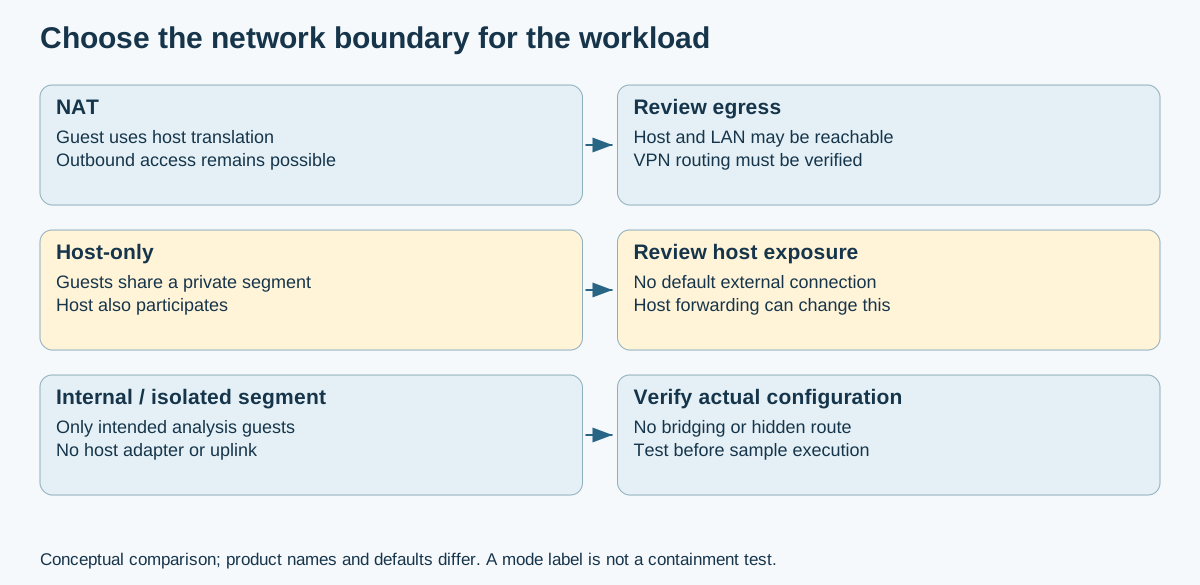
Networking comparison: VMware's network definitions explain why NAT and host-only are not synonyms for an isolated malware network. Other hypervisors have different names and defaults; inspect actual adapters, forwarding, and firewall rules.
| Category | VM | Purpose |
|---|---|---|
| Offensive | Kali / Parrot | Pentesting + exploitation |
| Defensive | ELK / Wazuh | SIEM + threat detection |
| Network | Zeek / Suricata | Packet analysis IDS/IPS |
| Research | Debian/Ubuntu OSINT | Recon, OSINT, documentation |
| Malware | Supported Windows guest + REMnux | Scoped malware analysis in a controlled lab |
| Tor-routed workload | Whonix Gateway + Workstation | Tor-routed applications with explicit limits; see upstream threat model |
| Utility | Windows Admin VM | Windows-only tools |
- Clipboard sharing: OFF
- Drag-and-drop: OFF
- Shared folders: OFF
- USB passthrough: Avoid for malware VMs
- Known-clean snapshots and separate backups, with sensitive snapshot files protected
- Choose networking per workload; NAT, host-only, and internal networks have different trust boundaries
- Bridged mode only for explicitly scoped LAN work; no bridging of the malware segment
Whonix exception: Workstation must use only the supplied private network to Gateway; do not apply the generic NAT/bridged advice to it. Use the Whonix + Kicksecure guide for the VirtualBox baseline and the separate KVM/libvirt installation route.
Choose a network route from written scope and the task's threat model. A host VPN is optional and can change the source address, resolver path, and client allowlist behavior. See the VPN guide for trust-boundary limits.
For Whonix, keep the Workstation attached only to the supported private network to its Gateway and follow the Whonix tunnel guidance before adding any other tunnel. Do not treat VPN/Tor stacking as a default privacy improvement.
Compartmentalization can reduce accidental cross-use. Personal logins, browser behavior, shared files, endpoint telemetry, timing, and provider records can still link activity. Neither Tor nor a VPN guarantees anonymity.
- Define the identities and data that must be separated before choosing controls.
- Use distinct accounts, browser profiles, devices, or VMs only where the workflow requires them; sharing a host does not create independent identities.
- Do not log into personal accounts in a work profile when identity separation matters.
- Document the required network route and evidence handling. A different VPN exit IP alone does not prevent correlation.
- Review reused usernames, recovery addresses, cookies, device identifiers, time patterns, and uploaded documents for cross-links.
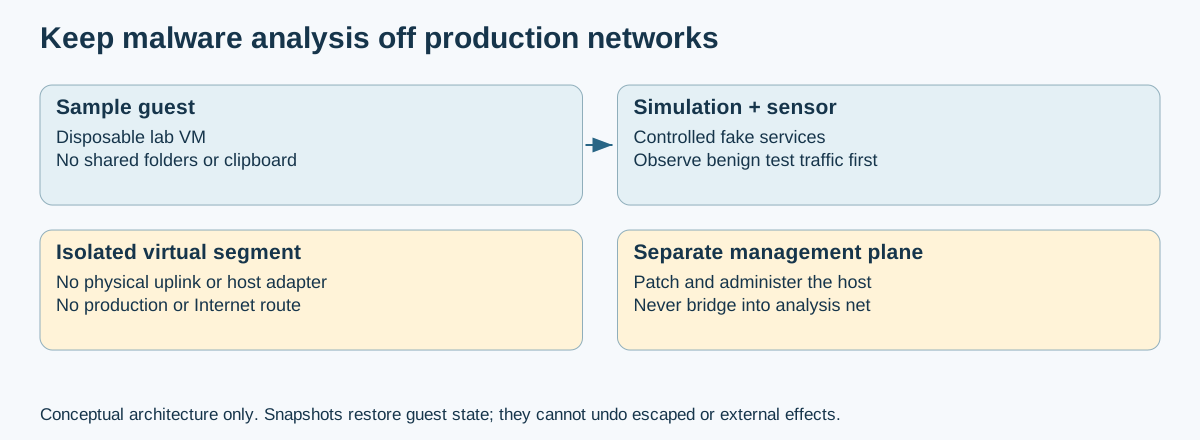
Containment design: simulated services can support observation without real Internet access. This is a conceptual target architecture, not a verified Proxmox configuration. An IDS in monitor mode observes traffic; it does not block it.
Rules:
- Keep the sample-analysis segment off physical uplinks and management/LAN bridges; verify that no default route reaches production or the public internet.
- Use controlled simulation services when network behavior must be observed. Treat any gateway or second adapter as a high-risk exception with explicit egress rules and monitoring.
- Permit any external access only through a separately designed, logged, destination-restricted gateway under the lab owner's policy.
- Disable unnecessary shared folders, clipboard, USB and PCI passthrough. Virtual drivers and RAM settings are compatibility/resource decisions, not proof of isolation.
- Test boundaries with benign traffic before introducing a sample; snapshots restore guest state but cannot undo host compromise or external communication.
This mode is for authorized work on the go, at client sites, or during travel. Encryption and an ephemeral guest do not guarantee deniability or removal of host, provider, or service records.
- Store sensitive working data in an encrypted volume; keep separately protected recovery material and backups
- Use a patched laptop and a supported, installed hypervisor; an external VM image does not make the hypervisor portable
- Use disposable guests where appropriate, while preserving required engagement records outside the guest
- Use approved research identities without mixing personal accounts or credentials
- Restrict LAN access explicitly; a VPN may retain local routes or bypass paths
- A currently supported operating system with policy-approved storage encryption and recovery procedures.
- Verify the selected hypervisor and VPN against current host security features and policy.
- Restrict management access and document which local networks are reachable.
- 1 × OSINT VM (Debian minimal)
- 1 × Kali/Parrot
- 1 × Whonix-Gateway and 1 × Whonix-Workstation (LXQt build flavors:
whonix-gateway-lxqtandwhonix-workstation-lxqt); see installation and naming. - (Optional) 1 × Windows Malware VM
An encrypted container protects stored contents while locked, within its threat model. Mounted data, RAM, swap, hibernation, host logs, and backups may remain exposed. Follow VeraCrypt's security requirements; container use alone does not establish deniability.
- External SSD with VeraCrypt container
- Minimize unnecessary personal data; retain the logs and evidence required by the engagement
- Preserve necessary results, then restore a known-clean guest state; rollback does not erase external records
- Execute malware on a shared field laptop; use a dedicated lab and verify containment before any execution
- Mix personal accounts, shared browser synchronization, or personal credentials into research guests
- Use bridged networking
This mode is for full home lab deployments, learning, testing networks, SOC practice, and running a personal cyber range.
- Confirm current Proxmox VE hardware and firmware requirements from upstream documentation.
- Size CPU, memory, and storage for the selected guest count, packet-capture volume, and analysis tools; leave capacity for the host.
- Select a supported storage layout and keep separate protected backups; ZFS is one option, not a universal requirement.
/proxmox
 ├── offensive/
 ├── defensive/
 ├── anonymity/
 ├── research/
 ├── malware/
 └── shared-images/
These are roles, not security properties of bridge names. A Linux bridge behaves like a virtual switch; review physical ports, host addresses, VLAN tags, guest adapters, and forwarding rules. See the Proxmox network documentation source.
- Example role: management/LAN bridge, restricted to trusted administrative access
- Example role: isolated malware segment with no physical uplink or unapproved routing
- Example role: blue-team test segment with deliberately configured routing and monitoring
- Zeek sensor
- Suricata IDS (inline or monitor mode)
- Wazuh Manager
- Elastic Stack (SIEM)
- pfSense router/firewall
- Kali, Parrot, CommandoVM
- Sliver / Cobalt Strike lab
- AD attack lab with Windows DC + clients
- A VPN service only when required by policy or threat model; compare current provider claims and trust boundaries in the VPN guide.
- VeraCrypt
- KeepassXC
- USB data-blocking adapters (check the exact connector and power/data behavior; these do not secure the endpoint)
- Wireshark — capture only at approved interfaces and account for host traffic visibility.
- REMnux
- Flare-VM
- Ghidra
- Cuckoo Sandbox documentation (legacy/version-specific reference; validate current maintenance and platform support before choosing a sandbox)
/VMs
 ├── offensive/
 │    ├── kali/
 │    └── parrot/
 ├── defensive/
 │    ├── elastic/
 │    ├── suricata/
 │    ├── zeek/
 │    └── wazuh/
 ├── anonymity/
 │    ├── whonix-gw/
 │    └── whonix-ws/
 ├── malware/
 │    ├── windows-analysis-guest/
 │    └── remnux/
 ├── research/
 │    ├── ubuntu-osint/
 │    └── windows-analysis/
 └── shared/
      └── qcow2-base-images/
- Microsoft: memory integrity and VBS
- Broadcom: hosted VM networking types
- Proxmox: network configuration source
- REMnux documentation — verify current analysis environment and network-isolation guidance for the selected workflow.
- Whonix: supported VirtualBox baseline
- VeraCrypt: security requirements and precautions
This revision checks documentation and explains trust boundaries. It does not certify a host, prove anonymity, or validate a running malware lab.
- README.md - OPSEC section index
- ../Documentation/VPN.md - VPN trust boundaries and task-dependent routing
- ../Documentation/TOR.md - Tor Browser, explicit app routing, and anonymity limits
- ../Documentation/virtualmachines.md - VM compartmentalization setup
- press-freedom/README.md - journalists, confidential-source protection, device seizure and duress planning
- ../Cryptography/encrypted-storage.md - portable drive encryption and recovery
- ../Cryptography/security-keys-passkeys.md - FIDO2/passkey account safeguards
- ../Mobile/README.md - Mobile security section (mobile OPSEC, device hardening)
- ../Mobile/mobile_pentest_sop.md - Mobile pentest SOP (MAC randomization, covert operation procedures)
📄 Source: OPSEC/OPSEC_guide.md | ✏️ Suggest an edit | ⬅️ Back to Operations Security (OPSEC)