Repository navigation
Hardware Testing
Diagnostic, benchmarking, and reliability stress testing guides and scripts for PC test benches
Part of the ULTIMATE CYBERSECURITY MASTER GUIDE


Index for hardware testing, diagnostics, and benchmarking tools on Manjaro Linux - covering stress testing, reliability validation, and performance benchmarking for dedicated test bench systems.
Indexes the HardwareTesting section: the dedicated Intel test bench setup guide (Manjaro), Python orchestration scripts for automated diagnostic runs, and hardware-specific testing procedures for CPU, memory, storage, and GPU.
Provide a complete reference for hardware qualification testing on Linux, enabling repeatable diagnostics and benchmarks for system validation before production deployment.
- Qualifying hardware for a dedicated security lab or test bench system
- Running reliability stress tests on a new Linux system
- Diagnosing intermittent hardware failures with structured testing
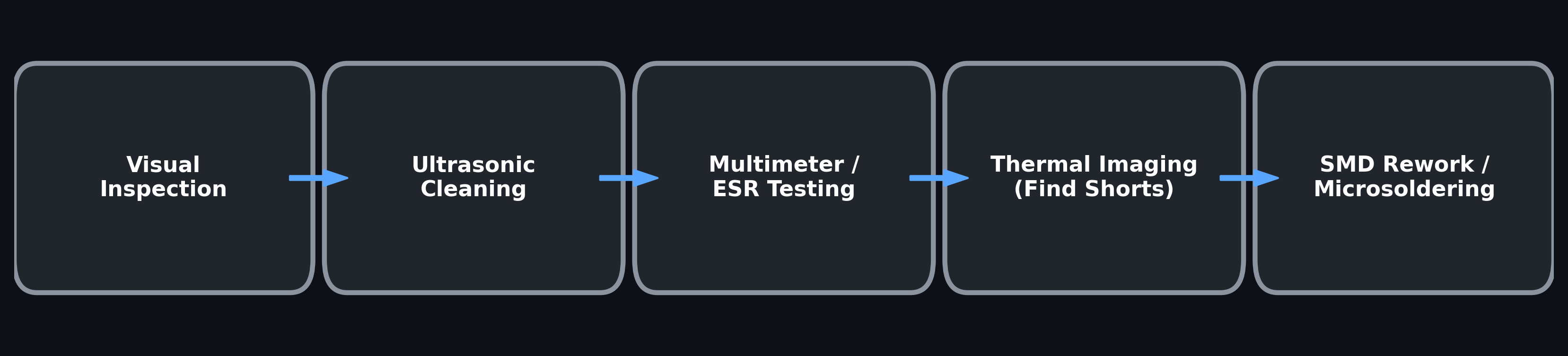
Reference fault-isolation sequence for hardware repair and test benches. Perform only measurements and rework within your training, equipment and electrical-safety limits; this is not a required step sequence for every device.
This section contains platform-specific cheat sheets and Python automation scripts for hardware diagnostics, benchmarking, stress testing, and reliability validation on dedicated PC test benches.
While hardware testing is often treated as a general repair or homelab task, it directly applies to cybersecurity work in several important ways. Security labs, forensic workstations, password-cracking rigs, virtualization hosts, local AI systems, network monitoring boxes, and incident-response machines all depend on stable, trusted, and properly matched hardware. A system that is unstable, overheating, misconfigured, underpowered, or using unreliable used parts can create false positives, failed workloads, corrupted data, inaccurate benchmarks, or wasted investigation time.
This process is especially useful for verifying functionality and performance of used, refurbished, repurposed, or donated hardware before trusting it in a work environment, home lab, cybersecurity lab, or production-adjacent role. It helps answer questions such as:
- Is this CPU, RAM, GPU, SSD, NIC, or motherboard actually stable under load?
- Is the hardware performing as expected for its generation and specifications?
- Are there signs of overheating, throttling, failing storage, memory instability, PCIe issues, driver problems, or firmware-related problems?
- Is this machine appropriate for general operations, virtualization, password hashing, packet capture, local AI, malware analysis, security monitoring, or backup/recovery tasks?
- Is the hardware worth using, reselling, repairing, upgrading, or retiring?
For cybersecurity specifically, choosing the right hardware for the task matters. A password-cracking system may prioritize GPU performance and cooling. A Security Onion, Zeek, Suricata, or packet-capture box may depend heavily on NIC compatibility, storage throughput, and sustained uptime. A virtualization or malware-analysis host needs stable RAM, CPU virtualization support, disk I/O, and safe isolation. A local AI or log-analysis workstation may need GPU VRAM, system memory, and fast NVMe storage. A forensic workstation needs reliability, data integrity, and predictable behavior more than raw benchmark numbers.
These tests also help establish a baseline of trust before hardware is used for sensitive work. Used systems can have failing drives, unstable memory, outdated firmware, unsupported chipsets, poor thermal performance, or unknown configuration problems. Testing does not magically make hardware “secure,” but it does reduce uncertainty and helps confirm that the equipment is reliable enough for the role it is being assigned.
Each platform combination, such as Manjaro + Intel or Debian + AMD, gets its own reference document for package management, driver setup, kernel notes, firmware considerations, GPU tooling, sensor support, stress-testing tools, and hardware-specific behavior.
The Python scripts in py/ are Linux-focused and designed to be portable where possible. The orchestration logic is shared across systems, but install commands, driver packages, kernel behavior, GPU tooling, sensor detection, and package availability can vary by distribution and hardware platform. The cheat sheets document those platform-specific differences so the same general testing workflow can be adapted across multiple Linux environments.
The overall goal of this section is to make hardware validation repeatable, practical, and useful for real-world repair work, homelab builds, cybersecurity labs, infrastructure planning, and choosing the best hardware for a specific technical role.
| Platform | Cheat Sheet | Scripts |
|---|---|---|
| Manjaro Linux - Intel CPU Platform (Z790 / 13th–14th Gen i9) | Manjaro_Intel_TestBench.md | py/ |
| Platform | Status |
|---|---|
| Manjaro Linux - AMD CPU Platform (X670 / Ryzen 7000) | Planned |
| Debian - Intel CPU Platform (Z790 / 13th–14th Gen i9) | Planned |
| Debian - AMD CPU Platform (X670 / Ryzen 7000) | Planned |
Reference: Manjaro_Intel_TestBench.md
Covers Z790 motherboards with 13th/14th Gen Core i9 processors running Manjaro Linux. The guide is written for an Intel CPU test bench, but the GPU testing workflow also supports AMD Radeon and NVIDIA GPUs when the correct GPU tools are installed.
Includes:
-
pacman,pamac, and AUR package management for diagnostic tools. - Hardware diagnostics and system info with
inxi,dmidecode,lscpu,lspci,lsusb,lshw, andhwinfo. - Thermal monitoring with
lm_sensors/sensors. - Intel-focused monitoring notes for tools such as
intel-gpu-tools,turbostat, ands-tuiwhere applicable. - CPU and system stress testing with
stress-ng,sysbench, and optional Prime95 /mprime. - Memory and storage diagnostics with
memtester,nvme-cli,smartmontools,fio, and optionalkdiskmark. - Fresh install provisioning one-liners for the test-bench tool stack.
- Optional Phoronix Test Suite workflows for standardized benchmark runs.
- Modern GPU testing paths using
memtest_vulkan,vkmark,glmark2, vendor telemetry, and kernel PCIe/GPU fault scanning. - Python automation scripts that generate client-facing Markdown reports.
Python Scripts - Py/
Modular Python scripts that orchestrate CLI tools, stream output live, and compile results into clean Markdown reports.
| Script | What it does | Sudo |
|---|---|---|
full_hw_suite.py |
Full sequential diagnostic - system info, CPU, RAM, storage, GPU | ✅ |
standalone_gpu_tester.py |
Universal GPU first-pass benchmark - Vulkan/OpenGL validation, VRAM testing, kernel fault scanning | ❌ |
amd_gpu_tester.py |
Dedicated AMD Radeon GPU diagnostic with amdgpu telemetry and rigorous load testing | ❌ |
nvidia_gpu_tester.py |
Dedicated NVIDIA GPU diagnostic with nvidia-smi telemetry and rigorous load testing |
❌ |
standalone_ram_tester.py |
RAM bandwidth and multi-pass stability testing | ✅ |
stress_soak.py |
Reliability burn-in - simultaneous CPU/RAM/storage/GPU load with continuous thermal logging | ✅ |
See py/README.md for full installation instructions, usage, and per-script documentation.
If the vendor-specific GPU scripts are renamed in the repo, keep the table and examples aligned with the actual filenames in
py/.
Run this on every Manjaro / Arch-based test bench:
sudo pacman -Syu --needed

sudo pacman -S --needed \
  base-devel git make gcc cmake ninja pkgconf rust cargo \
  python python-pip curl unzip jq \
  inxi dmidecode pciutils usbutils lshw hwinfo \
  lm_sensors smartmontools nvme-cli \
  sysbench memtester stress-ng fio \
  vulkan-tools mesa-utils \
  vkmark glmark2 \
intel-gpu-tools nvtopRun once after installing the base tools:
sudo sensors-detect --auto
sensors
Without sensor detection, thermal reporting may be incomplete or empty.
Install the GPU block that matches the hardware being tested.
sudo pacman -S --needed \
  mesa vulkan-radeon \
  amdsmi amdgpu_top radeontop
Useful AMD validation commands:
inxi -G -c0
lspci -nnk | grep -A4 -E "VGA|3D|Display"
vulkaninfo --summary
glxinfo -B
amd-smi list
amd-smi static --gpu 0
amd-smi metric --gpu 0
amdgpu_top --dumpsudo pacman -S --needed \
nvidia-utils cuda opencl-nvidiaUseful NVIDIA validation commands:
nvidia-smi
nvidia-smi -q
nvcc --version
vulkaninfo --summary
glxinfo -BThese are useful for manual benchmarking, client demonstrations, or deeper comparative testing. Availability can vary by Manjaro repository/AUR status, so verify with pamac search if any package fails.
pamac build mprime-bin kdiskmark unigine-superposition phoronix-test-suiteIf phoronix-test-suite is available from your configured Manjaro repositories, it may also be installed with:
pamac install phoronix-test-suitememtest_vulkan is used by the GPU scripts for VRAM stability testing. It is useful for AMD, NVIDIA, and Intel GPUs as long as the system exposes a working Vulkan device.
mkdir -p ~/src
cd ~/src

if [ ! -d memtest_vulkan ]; then
  git clone https://github.com/GpuZelenograd/memtest_vulkan.git
fi

cd memtest_vulkan
git pull
cargo build --release
sudo install -m 755 target/release/memtest_vulkan /usr/local/bin/memtest_vulkan
Verify:
command -v memtest_vulkan
memtest_vulkan
Stop the test with Ctrl+C after confirming it starts and detects the correct GPU.
gpu-burn is NVIDIA/CUDA-specific. It is only needed for NVIDIA diagnostic runs that use the --gpu-burn option.
mkdir -p ~/src
cd ~/src

if command -v nvcc >/dev/null 2>&1; then
  if [ ! -d gpu-burn ]; then
    git clone https://github.com/wilicc/gpu-burn.git
  fi

  cd gpu-burn
  git pull
  make

  sudo install -m 755 gpu_burn /usr/local/bin/gpu-burn
  sudo ln -sf /usr/local/bin/gpu-burn /usr/local/bin/gpu_burn
else
  echo "nvcc was not found. Skipping gpu-burn build."
  echo "Install/repair CUDA first if this bench needs NVIDIA gpu-burn testing."
fi
Verify:
gpu-burn -l
gpu-burn 60Run this after installing the base tools, GPU tools, optional benchmark tools, memtest_vulkan, and gpu-burn.
echo "== Core script tools =="
for bin in \
  python git make gcc cmake ninja cargo rustc \
  inxi dmidecode lspci lsusb lshw hwinfo \
  sysbench memtester fio stress-ng \
  smartctl nvme sensors \
  glmark2 vkmark vulkaninfo glxinfo \
  intel_gpu_top nvtop; do
  printf "%-22s %s\n" "$bin" "$(command -v "$bin" || echo '❌ NOT FOUND')"
done

echo
echo "== AMD tools =="
for bin in amd-smi amdgpu_top radeontop; do
  printf "%-22s %s\n" "$bin" "$(command -v "$bin" || echo 'optional / not installed')"
done

echo
echo "== NVIDIA tools =="
for bin in nvidia-smi nvcc gpu-burn gpu_burn; do
  printf "%-22s %s\n" "$bin" "$(command -v "$bin" || echo 'optional / not installed')"
done

echo
echo "== GPU VRAM test =="
for bin in memtest_vulkan; do
  printf "%-22s %s\n" "$bin" "$(command -v "$bin" || echo '❌ NOT FOUND')"
donepython3 py/standalone_gpu_tester.py --client "Client Name"python3 py/amd_gpu_tester.py --client "Client Name"python3 py/nvidia_gpu_tester.py --client "Client Name"Optional NVIDIA CUDA stress path:
python3 py/nvidia_gpu_tester.py --client "Client Name" --gpu-burnsudo python3 py/full_hw_suite.py --client "Client Name"sudo python3 py/standalone_ram_tester.py --client "Client Name" --memtester-size 4G --passes 3sudo python3 py/stress_soak.py --mode standard --client "Client Name"Quick smoke-test soak:
sudo python3 py/stress_soak.py --mode quick --client "Client Name"Status: Planned
Will cover X670/X670E motherboards with Ryzen 7000 series processors. Key differences from the Intel guide will include:
- AMD CPU platform monitoring and validation.
-
amd_pstatevsintel_pstateCPU frequency scaling. -
k10temp/ optionalzenpowertemperature and voltage reporting. - Optional Ryzen tuning tools such as
ryzenadj, where appropriate. - EXPO vs XMP memory profile validation.
- AMD chipset, IOMMU, and kernel parameter notes.
- AMD integrated/discrete graphics considerations where relevant.
Status: Planned
Will cover Z790/i9 hardware running Debian stable. Key differences from the Manjaro guide will include:
-
aptpackage management. - Backports or manual installation for newer kernels, Mesa, Vulkan, and hardware diagnostics.
- Mesa/OpenGL stack differences affecting
glmark2,vkmark, and Vulkan behavior. -
systemdservice configuration for persistent sensor monitoring. - Kernel version availability and hardware support timelines.
Status: Planned
Will cover X670/Ryzen 7000 hardware on Debian stable. It will combine the AMD-specific platform notes and Debian packaging differences from the planned guides above.
If adding a new platform guide, follow the naming convention:
Hardware Testing/
├── {Distro}_{CPUPlatform}_TestBench.md    # cheat sheet
└── py/                                    # shared Python scripts
Where {Distro} is Manjaro, Debian, etc. and {CPUPlatform} is Intel, AMD, or another hardware platform label.
Examples:
Manjaro_Intel_TestBench.md
Manjaro_AMD_TestBench.md
Debian_Intel_TestBench.md
Debian_AMD_TestBench.md
These hardware testing guides and scripts are provided for:
✅ AUTHORIZED USES:
   • Qualifying hardware you own or have explicit permission to test
   • Reliability testing for security labs, forensic workstations, and pentest rigs
   • Benchmarking and stress testing in controlled environments
   • Supporting authorized security operations and incident response

🚫 STRICTLY PROHIBITED:
   • Running diagnostic or stress tools on hardware you do not own or control
   • Using hardware-level access techniques without authorization
   • Any activities violating applicable laws or regulations
Warranty Disclaimer: These guides are provided "AS IS" without warranty of any kind. The authors are not responsible for hardware damage, data loss, or other outcomes from running stress tests, diagnostic tools, or configuration changes on any system.
- stress-ng: https://github.com/ColinIanKing/stress-ng
- sysbench: https://github.com/akopytov/sysbench
- Phoronix Test Suite: https://www.phoronix-test-suite.com/
- memtest86+: https://www.memtest.org/
- smartmontools: https://www.smartmontools.org/
- Intel GPU Tools: https://01.org/linuxgraphics
- AMD SMI: https://github.com/ROCm/amdsmi
- NVIDIA SMI: Included with NVIDIA drivers
- Arch Wiki: https://wiki.archlinux.org/
- Manjaro Forum: https://forum.manjaro.org/
- Manjaro_Intel_TestBench.md - Dedicated Intel test bench guide
- py/README.md - Python orchestration scripts for automated testing
- ../Homelab/HomeLab_Setup.md - Homelab context for test bench
Pacific Northwest Computers · pnwcomputers.com · Vancouver, WA Last updated: 06-11-2026
📖 Use These Guides Responsibly: Test Only Hardware You Own or Control
Hardware diagnostics and stress testing - use them ethically and with proper authorization.
Repository: ULTIMATE CYBERSECURITY MASTER GUIDE
Maintained by: Pacific Northwest Computers
⭐ Star this repo if you find it useful! ⭐
📂 Folder: HardwareTesting | ✏️ Suggest an edit | 🗺️ Browse by Topic