Repository navigation
Operations Security OPSEC
Comprehensive operational security practices for cybersecurity professionals and security researchers
Part of the ULTIMATE CYBERSECURITY MASTER GUIDE


Document operational security practices for cybersecurity professionals, including identity separation, network privacy, virtualization, portable operating systems, communications security, and device hygiene.
Organize controls across five layers: identity, network, endpoint, operational procedures, and communications. Provide a starting point for the general OPSEC guide and the dedicated Whonix + Kicksecure and Tails OS USB setup guides.
Help practitioners protect client information, separate professional and personal activities, and reduce exposure from operational mistakes. Select controls according to the information being protected and the capabilities of the expected adversary.
- Preparing an authorized engagement requiring client confidentiality and operational separation.
- Building an isolated research environment or reviewing an existing lab.
- Choosing a portable privacy environment for temporary or persistent work.
- Learning OPSEC concepts for training, research, or personal privacy.
Important
No operating system guarantees anonymity. Encryption, Tor routing, VM isolation, and temporary sessions address different risks. Accounts, documents, behavior, compromised hardware, and traffic analysis can still expose identity. [^tails-warnings]
- Overview
- What is OPSEC?
- Current Documentation
- Press Freedom, Source Protection and Duress Planning
- Whonix vs. Tails: How They Work
- Feature Comparison
- Pros and Cons
- Which Setup Should You Choose?
- VPN Recommendations by Environment
- Core OPSEC Principles
- OPSEC Guidelines by Activity
- Verification Checklist
- Security & Legal Considerations
- Incident Response
- Contributing
- Resources and Related Files
- Tradecraft
This directory covers operational security for authorized security work and privacy-focused computing.
What You'll Find Here:
- 🛡️ Threat modeling and OPSEC fundamentals.
- 🎭 Identity and account separation.
- 🌐 Network privacy, Tor, and segmentation.
- 🖥️ Virtualization and compartmentalization.
- 💾 Portable USB operating systems.
- 🔐 Encryption, selective persistence, and backups.
- 📋 Verification, maintenance, and incident response.
Start with the threat model: What must remain confidential? Who might obtain it? What access do they have? What would failure cost? The answers determine whether you need an ordinary client VM, a persistent Whonix workstation, a temporary Tails session, or a separate malware lab.
Operational Security (OPSEC) is a process for identifying sensitive information, understanding how it could be exposed, and applying proportionate safeguards.
| Step | Question | Example |
|---|---|---|
| 1. Identify critical information | What needs protection? | Client data, account ownership, research notes, engagement timelines. |
| 2. Analyze threats | Who could obtain or misuse it? | Malicious websites, a compromised endpoint, an unauthorized insider. |
| 3. Analyze vulnerabilities | How could exposure happen? | Shared accounts, document metadata, unrestricted VM networking. |
| 4. Assess risk | How likely and damaging is exposure? | Prioritize a stolen unlocked laptop over a low-impact tracking cookie. |
| 5. Apply and review controls | What reduces the risk, and how will it be checked? | Encryption, separation, network restrictions, and recovery exercises. |
| Goal | What it addresses | What it does not establish |
|---|---|---|
| Confidentiality | Who can read sensitive information. | Whether an activity can be linked to you. |
| Anonymity | Whether activity can be linked to an identity. | Whether the endpoint is free of malware. |
| Compartmentalization | How far a mistake or compromise can spread. | Perfect separation when accounts or files reconnect compartments. |
| Amnesia | How much session state remains locally. | Erasure of remote records or files deliberately saved elsewhere. |
| Encryption at rest | Protection of locked stored data. | Protection of data while unlocked and accessible. |
| File | Description | Primary Coverage |
|---|---|---|
| OPSEC_guide.md | General OPSEC and virtualized security environment guide. | Field and home-lab workflows, host security, VM architecture, network segmentation, and research practices. |
| whonix-kicksecure-usb-guide.md | Install Kicksecure on an encrypted external drive and run Whonix-Gateway and Whonix-Workstation in VirtualBox. | Trusted downloads, installation, encryption checks, VM routing, persistent/live modes, updates, and recovery. |
| tails-usb-setup-guide.md | Create a bootable Tails USB with optional encrypted Persistent Storage. | Installation from Windows/Linux/macOS, Tor connection, session reset, selective persistence, backups, and recovery. |
| Encrypted USB Drives and Removable Storage | Choose vetted encrypted storage, back up and validate recovery. | BitLocker, LUKS, VeraCrypt, hardware drives, PhantomDrive research limits, and client evidence handling. |
| Hardware Security Keys and Passkeys | Protect accounts used in portable field workflows. | FIDO2, SoloKeys, device-bound/synced passkeys, token custody and recovery. |
| press-freedom/README.md | Protect journalists, newsrooms and confidential sources. | Computers/phones/networks, retention/disposal, and duress/seizure response. |
| anonymity-layering.md | Layer non-attribution on top of a baseline VPN for OSINT and active engagements. | Threat-model-driven layering, self-owned VPS exits, paid residential proxy workflows, proxychains-ng leak prevention. |
| Proxy types and Froxy research | Understand HTTP/HTTPS/SOCKS, DNS leaks and free-list discovery risks. | Lab-only Froxy library review; why untrusted proxies are inappropriate for client evidence and source protection. |
For journalists, newsroom security and confidential sources, use the dedicated Press Freedom & Source Protection hub. It covers desktop, laptop, cellphone and network security, lawful data minimization, retention, media sanitization and legal holds, and personal safety, coercion, detention and device-seizure response. Pair these with encrypted storage and FIDO2 passkeys/security keys.
Important
Establish retention and backup policies before an incident. Do not use emergency deletion to defeat legal preservation duties; seek local counsel for compelled access questions.
- Read the principles and comparison below.
- Review the general guide for broader lab and engagement context.
- Follow the dedicated setup guide for your chosen operating system.
- Complete that guide's acceptance checks before sensitive use.
- Recheck upstream documentation when versions or hardware change.
Repository recommendation: Keep a trusted, properly configured VPN connected whenever practical, including on ordinary operating systems and the Kicksecure host used for Whonix. Apply the environment-specific guidance below. NAT is not malware containment, and Tor Browser should not receive arbitrary fingerprinting modifications.
Tails emphasizes temporary live sessions. Whonix separates applications from the Tor gateway and supports an ongoing workspace. Both use Tor, but their operating models differ.
Comparison scope: The Whonix column below describes this repository's Kicksecure host on an encrypted external USB drive with VirtualBox. The Tails column describes Tails booted directly from USB. Whonix also supports other deployments; these are not universal claims about every Whonix platform.
- Kicksecure is the physical computer's host operating system in this setup. It runs VirtualBox and manages physical networking and storage.
- Whonix-Gateway runs Tor and provides the Workstation's network path.
- Whonix-Workstation runs applications on an isolated virtual network connected to the Gateway. Its supplied configuration prevents ordinary direct Internet access. [^whonix-design]
The host is installed onto the external drive; this is a full installation with VM disk images, rather than simply flashing a Whonix USB image. Host disk encryption must be selected and verified during installation. [^whonix-usb]
Important boundary: Installing Whonix does not automatically send Kicksecure host applications through Tor. Perform the intended anonymous activity inside Whonix-Workstation.
Installer and naming: The LXQt build flavors are whonix-gateway-lxqt and whonix-workstation-lxqt; the shared installer uses --guest=whonix --interface=lxqt. Its inspected VirtualBox branch imports both VMs, while KVM import remains a placeholder. See guest names, VirtualBox versus KVM/libvirt, and invalid guest version diagnostics for dated source evidence and the manual KVM route.
The separate Gateway helps contain direct IP leaks from Workstation applications. This assumes the isolation remains intact: host, hypervisor, or Gateway compromise can undermine it. Malware can still steal documents or account credentials through the permitted Tor connection.
Tails starts directly on compatible hardware, independently of the installed everyday operating system. It does not need a separate desktop host and hypervisor for this setup.
Ordinary session changes are temporary. Persistent Storage is an optional encrypted partition for selected files and supported settings; users can leave it locked at startup. It is neither hidden storage nor encryption of the whole bootable USB. [^tails-persistence]
Tails uses Tor for normal Internet application activity. The Unsafe Browser is an explicit exception: it connects without Tor and exposes the connection's public IP address to websites. Use it only for its documented captive-portal or trusted local-network purpose, then close it. [^unsafe-browser]
Whonix normally retains changes. Optional live modes exist at the guest and host layers; guest-only live mode does not establish that the host leaves no artifacts. The Gateway requires an initial persistent boot for Tor entry-guard setup. Updates and baseline maintenance must also survive restart. [^whonix-live]
Tails starts from a temporary-session model, with selected persistence added when needed. Restarting does not delete its Persistent Storage, documents saved to other media, or records kept by websites and network operators.
| Category | Whonix + Kicksecure USB | Tails USB |
|---|---|---|
| Operating model | Kicksecure host plus Gateway and Workstation VMs. | A live OS booted directly on the computer. |
| Main design emphasis | Separate application execution from Tor routing. | Temporary sessions with optional selected persistence. |
| Default retention | Installed host and VM disks retain changes. | Ordinary session changes are discarded; enabled persistence is retained. |
| Optional live use | Host and guest live modes require deliberate setup and verification. | Live operation is the normal workflow. |
| Encryption | Configure host storage encryption and verify VM disks, snapshots, and backups are covered. | Optional Persistent Storage is encrypted; bootable system files are not covered by that partition. |
| Network boundary | Workstation reaches the Internet through Gateway; host traffic is a separate concern. | OS-level Tor routing restrictions, with documented exceptions such as Unsafe Browser. |
| Application compromise | Separate Gateway limits direct network exposure if isolation holds; files and credentials remain at risk. | No separate Gateway VM boundary; an OS compromise can undermine routing protections. |
| Hardware burden | Runs a host and two VMs; needs virtualization support and sufficient RAM/storage. | Avoids two-VM overhead; still requires supported processor, graphics, and networking hardware. |
| USB workflow | Full external-drive installation; an external SSD is a practical choice for VM workloads. | Image a USB stick, boot it, and optionally create Persistent Storage. |
| Customization | More suited to maintaining a persistent set of research applications. | Bundled tools and supported Additional Software; extensive customization needs caution. |
| Maintenance | Maintain host, hypervisor, Gateway, and Workstation. | Follow the Tails upgrade process and maintain persistence backups. |
| Local network identifier | Physical MAC-address policy belongs on the host; changing a guest MAC does not change it. | MAC address anonymization is enabled by default, subject to hardware support. |
| Identity separation | Separate Workstations can help organize contexts; shared accounts, host, and Gateway still matter. | Restart between contexts; separate USBs may be appropriate where persistent data must stay apart. |
| VPN recommendation | Keep a host-level VPN connected before starting Whonix; verify its routing and disconnect behavior. | Do not install a conventional VPN client inside Tails. An upstream VPN router is an optional, separately managed configuration; see below. |
| Tor performance | Subject to Tor latency, service blocking, and protocol limitations. | Subject to the same Tor tradeoffs. |
| Likely best fit | An ongoing research workspace with retained tools and controlled VM separation. | Portable browsing or document work with limited retained state. |
Architecture and retention details: Whonix design, USB installation, live mode, and Tails persistence. Hardware, MAC policy, software, and maintenance references are listed under Resources. “Best fit” judgments are practical recommendations for the setups in this repository.
| Setup | ✅ Pros | |
|---|---|---|
| Whonix + Kicksecure USB | Separate Tor gateway; persistent tools and workspace; VM compartments and snapshots; encrypted external storage when configured; optional live modes. | More components to configure and update; greater resource and storage demands; host remains a trusted component; retained disks and snapshots need protection; live-mode behavior requires careful checks. |
| Tails USB | Direct live boot; fewer setup layers; temporary sessions by default; selective encrypted persistence; portable workflow with bundled privacy tools. | Hardware compatibility varies; unsaved work is lost on shutdown; customization is more constrained; persistent data still creates retained records; no separate Gateway VM boundary. |
Shared limits: Neither fixes identity reuse, a malicious document, an unlocked stolen device, compromised firmware, or a sufficiently capable traffic-correlation adversary. Neither is a dedicated malware-detonation sandbox. A USB drive provides portability, not trust in the computer it boots on.
| Your Main Requirement | Starting Point | Reason |
|---|---|---|
| Temporary browsing with little local retention | Tails | Temporary sessions are its normal operating model. |
| A few saved documents or settings alongside live sessions | Tails with selected persistence | Retain only the features you need. |
| Ongoing research with installed tools and saved project state | Whonix + Kicksecure | Persistent Workstations fit a maintained workspace. |
| Separate application execution from Tor routing | Whonix | Gateway and Workstation are different VMs. |
| Portable use with fewer installation steps | Tails, after compatibility checks | Avoids installing a host, hypervisor, and two guests. |
| Client testing requiring a VPN, direct protocols, or agreed source IPs | Dedicated engagement VM | Follow the client's approved network design; anonymity systems may not fit. |
| Executing unknown malware | A dedicated isolated analysis lab | Requires containment and monitoring beyond Tor routing. |
| Suspected firmware or hardware compromise | Replace or remediate the hardware first | Neither USB setup makes compromised hardware trustworthy. |
Practical recommendation: Choose the simplest setup that meets your threat model and that you can reliably maintain. “More layers” alone is not evidence of better protection.
Keep a trusted VPN connected at all times when practical and compatible with the task. This is the repository's operational preference for ordinary operating systems, research workstations, and the Kicksecure host in this guide. It is not a claim that Whonix or Tails requires a VPN or that adding one guarantees stronger anonymity.
A correctly configured full-tunnel VPN encrypts traffic between the device and the VPN endpoint and reduces direct exposure to the local network and ISP. The provider becomes another party you must trust. Continue using HTTPS, supported updates, endpoint protections, and identity separation.
| Environment | Recommended Approach | Important Qualification |
|---|---|---|
| Windows, macOS, and general-purpose Linux | Keep a trusted VPN active whenever practical, including at home and on public networks. Enable automatic connection and a kill switch where supported. | Verify DNS, IPv6, and application routing. A VPN does not disable OS telemetry or prevent account-based tracking. |
| Ordinary research VMs | Prefer a host VPN covering the intended VM egress, or an explicitly configured VPN gateway. | Verify actual traffic: bridged networking, split tunneling, and VPN exclusions can bypass the intended path. |
| Whonix on Kicksecure | Connect the host VPN before launching Whonix and keep it connected during use. Preserve the supplied Gateway/Workstation isolation. | Treat this as VPN-before-Tor; do not add a direct Workstation adapter or an arbitrary Workstation VPN. |
| Tails booted directly from USB | Keep Tails' standard Tor configuration. If a VPN layer is desired and feasible, manage it on an upstream router. | Tails does not support a conventional VPN client inside the OS. Router VPN operation is separate from Tails and must be verified independently. |
| Client and business environments | Use the organization's approved VPN and routing policy. | A commercial privacy VPN must not conflict with required access, monitoring, or approved testing source IPs. |
| Malware labs | Consider an approved VPN only at controlled egress when Internet access is authorized. | Keep samples isolated from the host, LAN, and business VPN; containment takes priority over tunnel availability. |
The intended external connection order is your computer → VPN server → Tor network → destination. Configure the VPN on Kicksecure, outside the VMs. Host applications use the VPN; Whonix application traffic still uses Tor. Follow the Whonix VPN-before-Tor documentation, which is community-supported guidance.
The ISP sees the VPN connection; the VPN provider can associate your source connection with Tor use. Websites reached through Tor still see a Tor exit, not the VPN server. If the VPN fails without effective blocking, Tor may reconnect directly through the ISP. That is a failure of the intended VPN layer even if Workstation traffic still uses Tor. Review the tunnel tradeoffs.
Tails' VPN FAQ says it does not work with VPNs directly. Do not retrofit a VPN client or alter its firewall to force this recommendation. A separately configured upstream VPN router can provide the VPN-before-Tor layer, but Tails cannot verify or enforce that router's tunnel. Tor bridges are another documented option when direct Tor access is blocked.
- Check provider trust, supported clients, security maintenance, and configuration documentation. Treat logging claims as claims to evaluate, not guarantees.
- Prefer full-tunnel routing for the intended coverage. Document any split-tunnel or LAN-access exceptions.
- Test DNS and IPv6 handling as well as the visible public IP; a browser IP check alone cannot validate every application or VM.
- Test controlled VPN interruption, reconnection, network changes, and reboot using non-sensitive activity. Confirm covered Internet traffic remains blocked when the tunnel is unavailable; account for necessary tunnel/bootstrap traffic.
- For Whonix, check the host VPN and Gateway egress separately from the Workstation's Tor check. A Tor exit address alone does not prove VPN-before-Tor is working.
- When a captive portal or an authorized workflow requires an exception, pause sensitive activity, keep the exception narrow, and restore and recheck the VPN afterward.
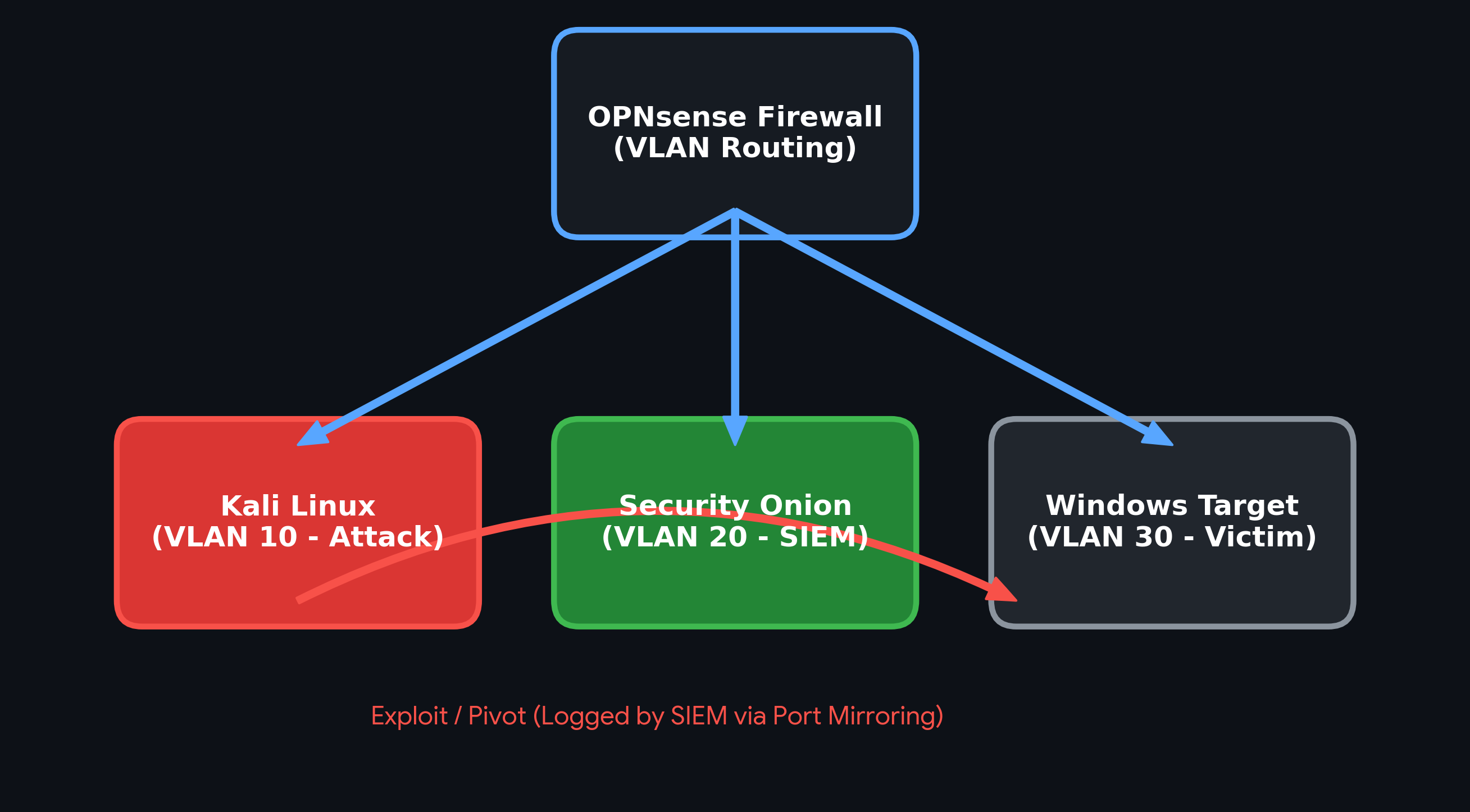
Example VM compartment boundaries. A VM does not guarantee containment or anonymity: host compromise, shared folders, USB passthrough, clipboard sharing, bridging and shared identities can connect environments.
- Separate personal, client, and research accounts and files.
- Use a dedicated workspace for each sensitive context.
- Treat clipboard sharing, shared folders, USB passthrough, and file transfers as deliberate connections between compartments.
- Remember that logging into a known personal account identifies that activity even when the connection uses Tor.
- Combine verified software, supported updates, encryption, restricted networking, and secure communications.
- Keep a trusted VPN connected whenever practical, following the environment-specific recommendations. Configure automatic connection and a tested kill switch where supported.
- A VPN shifts trust to its operator; it does not automatically improve Tor anonymity, replace HTTPS, or conceal account identity.
- Avoid ad hoc VPN/Tor/proxy chains. Review the chosen project's supported configuration and test the resulting routing.
- Keep recoverable encrypted backups and protect their keys.
- Minimize sensitive data available during a session.
- Use snapshots for recovery, while recognizing that snapshots can retain secrets and compromised state.
- Rebuild from trusted sources when compromise is suspected; rollback is not proof of eradication.
- Install only necessary software and disable unneeded integrations.
- Keep the Tor Browser configuration close to its supported defaults. Do not add arbitrary extensions, user-agent randomizers, or fingerprint-spoofing tools.
- Use supported browser security levels for script restrictions rather than accumulating custom tweaks.
- Treat NAT as a networking mode, not as proof that a VM cannot contact the host, LAN, or Internet. [^virtualbox]
- Grant access only to people who need the information.
- Keep client material out of unrelated accounts and devices.
- Review metadata and visible contents before sharing a file.
- Define retention, backup, and disposal requirements before collecting data.
Before the engagement:
- Confirm written authorization, scope, time windows, approved source infrastructure, and emergency contacts.
- Prepare a patched client-specific VM and clean recovery baseline.
- Configure the approved connection method and test network boundaries. Use the client-approved VPN where required; keep a privacy VPN active for other compatible traffic only when the engagement permits it. Do not stack tunnels or change agreed source IPs without approval.
- Establish encrypted storage, reporting channels, and evidence retention requirements.
During and after the engagement:
- Stay within scope and maintain appropriate activity records.
- Protect collected credentials, samples, and client data.
- Report critical findings using agreed procedures.
- Deliver findings securely and revoke temporary access.
- Preserve required evidence; dispose of remaining data under the agreed retention policy.
- Keep research accounts, recovery contacts, and browser state separate from personal identities.
- Select Tails, Whonix, or an ordinary isolated research VM based on the task.
- Keep a trusted VPN active on ordinary research hosts whenever practical. For Whonix, use the host VPN before Tor and verify that VM egress follows it; apply the Tails exception below.
- Use Tor Browser as supplied when Tor browsing is needed; ordinary privacy browsers do not provide an equivalent anonymity model.
- Treat account identifiers, writing patterns, uploaded documents, and behavioral overlap as potential links.
- Do not assume frequent IP changes, extra proxy hops, or a new browser identity erase earlier links.
- Review downloaded files before moving them into another compartment.
Warning
Neither NAT nor Tor is a malware-containment strategy. A VM using NAT can initiate outbound connections. Host-only networking includes the host. A VLAN requires enforced routing and firewall rules to create the intended boundary. [^virtualbox]
- Use a dedicated analysis environment separate from privacy and client workspaces.
- Begin with disconnected or tightly controlled internal networking and simulated services where appropriate.
- If Internet access is necessary, explicitly approve, restrict, and monitor egress; prevent access to management and production networks. Use an approved VPN at the controlled egress point when practical and permitted by the provider, while preserving containment and monitoring. Do not give a sample access to a corporate VPN or use a VPN as the containment boundary.
- Disable unneeded shared folders, clipboard integration, and device passthrough.
- Capture evidence and analyze it from an appropriate clean environment.
- Use clean baselines and controlled recovery; do not assume a snapshot repairs an escaped infection.
- Separate management, sensor, and analysis networks.
- Prefer an organization-approved VPN for remote administration. On analyst workstations, keep a trusted VPN active when practical and compatible with organizational policy; do not reroute sensor collection or production traffic indiscriminately.
- Protect SIEM and monitoring administration with least privilege and strong authentication.
- Encrypt sensitive telemetry and backups; define retention and access auditing.
- Monitor the monitoring infrastructure itself.
- Keep response communications and recovery credentials available through an independent trusted channel.
Wardriving records may couple wireless device identifiers with operator routes, client buildings and timestamps. Review the Wardriving collection and data-handling guide before uploading to WiGLE or disclosing GNSS-tagged observations; see the Wardriving index for individual tools. VPNs do not remove GPS coordinates deliberately embedded in uploads.
Use the detailed tests in the selected setup guide. These are acceptance checks, not certification of anonymity.
| Check | Whonix + Kicksecure | Tails |
|---|---|---|
| Trusted installation | Verify host and Whonix downloads using official methods. | Verify the Tails image using the official workflow. |
| Storage behavior | Confirm VM files, snapshots, and relevant host data are on the intended encrypted storage. | Confirm selected features persist and ordinary test files disappear after restart. |
| Boot behavior | Confirm the external installation boots independently of the internal OS. | Confirm the machine boots the intended Tails USB. |
| Network behavior | Verify supplied VM adapters and Gateway dependency; Workstation should lose Internet access when Gateway is stopped. | Complete Tor Connection and check Tor Browser; keep Unsafe Browser out of anonymous work. |
| Retention mode | Test the actual host/guest persistent or live combination being used. | Test both locked and unlocked Persistent Storage sessions. |
| Updates | Maintain all four layers: host, hypervisor, Gateway, and Workstation. | Use the supported Tails upgrade workflow. |
| VPN behavior | Confirm host and VM egress follow the intended tunnel; test disconnect, reconnect, and reboot behavior. | If an upstream VPN router is used, verify its routing and kill switch there; retain Tails Tor protections. |
| Recovery | Restore a non-sensitive test backup before relying on it. | Verify a persistence backup can recover a non-sensitive test file. |
A successful Tor check confirms the connection observed by that check. It does not prove every application is correctly configured or that identity cannot be inferred.
Use these practices for personal privacy, authorized research, education, and legitimate defensive or assessment work. Obtain appropriate authorization before testing systems belonging to others and comply with the engagement's scope and data-handling requirements.
Privacy tools do not create permission to access systems or remove accountability. Legal obligations depend on jurisdiction and circumstances; consult the repository legal notice and qualified advice where needed.
- Physical access: An unlocked system exposes data regardless of storage encryption.
- Hardware and firmware: Booting from USB does not neutralize a hardware keylogger or compromised firmware.
- Remote records: Restarting a live system does not erase service, account, or network logs.
- Traffic analysis: Tor is not a guarantee against an observer able to correlate traffic at both ends.
- Compartment links: Shared credentials, documents, or recovery methods can reconnect separated activities.
- Retention and disposal: Follow evidence-preservation requirements before deleting data. Ordinary file deletion is not a reliable sanitization method for flash media.
- Stop affected activity and avoid entering new credentials on the suspect system.
- Isolate the affected environment according to the response plan.
- Record what happened and preserve relevant evidence. Decide whether to shut down with the incident lead; rebooting or powering off may destroy volatile evidence.
- Assess exposure: accounts, documents, client information, identity links, and other connected systems.
- Notify the appropriate contacts using a trusted channel and the applicable engagement procedures.
- Rotate exposed credentials and keys from a clean device, including revoking active sessions where supported.
- Rebuild or remediate from trusted sources and verify recovery before resuming.
- Review the failure and update the controls, documentation, and acceptance checks.
Changing an IP address or rebooting into a clean session does not undo information already disclosed.
Contributions should follow the repository's documentation style and include:
- Purpose, scope, prerequisites, and a clear protection model.
- Procedures that identify the affected host, guest, drive, or account.
- Verification steps, failure conditions, and recovery guidance.
- Primary-source references for technical claims.
- Tested versions and hardware where testing occurred.
- A clear distinction between documentation review and hands-on validation.
- Working relative links and an updated documentation table when files are added or renamed.
Avoid guarantees such as “untraceable,” “zero leaks,” or “leaves no evidence.” Report security concerns without publishing credentials, client information, or sensitive operational details.
- General OPSEC Guide
- Whonix + Kicksecure USB Setup Guide
- Tails USB Setup Guide
- Anonymity Layering for OSINT & Active Engagements
- Tradecraft
- Master Index
- Whonix technical design
- Whonix USB installation
- Whonix live mode
- Whonix system requirements
- Whonix hardening checklist and host MAC policy
- Kicksecure documentation
- Installation and hardware preparation
- System requirements
- Security warnings and limitations
- Persistent Storage
- Additional Software
- MAC address anonymization
- Unsafe Browser
- Upgrading Tails
- Reticulum is a cryptography-based transport/network stack for experimenting with resilient low-bandwidth links.
- Sideband is an LXMF-compatible messaging client for supported platforms, useful for explicitly scoped off-grid communications exercises.
Neither is a substitute for Whonix/Tails identity separation, nor does encryption alone guarantee anonymity, metadata protection or uncompromised endpoints. Read the original author's documentation, licensing and device-support notices; test with non-sensitive accounts and traffic before any operational use. See the homelab for isolated lab planning.
- Tor Browser manual
- EFF Surveillance Self-Defense
- VirtualBox networking documentation
- REMnux documentation
- FLARE-VM
[^whonix-design]: Whonix: Technical Introduction. Gateway/Workstation architecture and Tor routing. [^whonix-usb]: Whonix: USB Installation. Kicksecure host installation and Whonix deployment on external storage. [^whonix-live]: Whonix: Live Mode. Host/guest distinction, default persistence, and initial Gateway setup. [^tails-persistence]: Tails: Persistent Storage. Selective encrypted storage and its visibility. [^tails-warnings]: Tails: Warnings. Identity exposure, Tor limitations, and hardware/firmware threats. [^unsafe-browser]: Tails: Unsafe Browser. Direct connectivity and intended uses. [^virtualbox]: VirtualBox: Virtual Networking. NAT, internal networking, and host-only networking boundaries.
🔒 Protect identities. Separate activities. Verify assumptions.
Maintained by: Pacific Northwest Computers
Documentation: General OPSEC, portable-workstation, privacy and press-freedom guides, plus this directory index.
Whonix/Tails comparison reviewed: 2026-09-30. Off-grid project references checked: 2026-10-26. Hardware installation and isolation tests were not performed for this README update.
⬅️ Back to Master Index | 🎯 Role Navigation | Legal Notice
- Anonymity Layering for OSINT & Active Engagements
- Cybersecurity OPSEC Guide
- Proxy Types, DNS Leaks and Froxy Research Reference
- 🔒 Tails OS: USB Operating System Setup Guide
- 🔒 Whonix + Kicksecure: Encrypted Operating System Setup Guide
- Duress, Detention, Device Seizure and Emergency Digital-Safety Plan
- Journalist Device, Mobile, Account and Network Protection
- Press and Source Data Retention, Minimization, Backups and Lawful Disposal
- Press Freedom, Journalist Safety, Source Protection & Digital Security
📂 Folder: OPSEC | ✏️ Suggest an edit | 🗺️ Browse by Topic