Repository navigation
Azure and Entra ID Security
Caution
Authorized use only. The techniques below are for authorized assessment, education, and defensive research. Test only tenants/subscriptions you own or have explicit written permission to assess, and follow the Microsoft penetration testing rules of engagement. See LEGAL.md.
M365 companion: CISA ScubaGear + SCuBA assessment covers consent, baseline deviations and retesting; Microsoft 365/Entra tenant assessments differ from Azure subscription checks.
Source and visual review: November 17, 2026. Original conceptual diagrams and documentation review only; no tenant enumeration, policy changes, or log export was performed.
Microsoft Azure and Entra ID (formerly Azure AD) security reference - the identity model, the recurring attack paths, assessment tooling, and hardening.
Covers the Entra ID / Azure RBAC split, common identity attacks (illicit consent grants, over-privileged app registrations, role abuse), enumeration tooling (ROADtools, AzureHound), and the hardening/detection baseline (Conditional Access, PIM, Defender for Cloud).
Let a reader assess an Azure/Entra environment and recommend concrete hardening mapped to Microsoft-native controls and the CIS Microsoft Azure Benchmark.
- Authorized review or penetration test of an Azure subscription / Entra tenant
- Looking up Entra ID attack paths (consent, app registrations, role abuse)
- Building an Azure/Entra hardening and monitoring baseline
- Entra ID vs Azure RBAC
- Common Identity Attacks
- Enumeration & Assessment
- Hardening & Detection
- Resources
Microsoft Entra roles govern directory administration; Azure RBAC governs Azure resource access. A principal may be powerful in one system and limited in the other. Microsoft's role comparison.
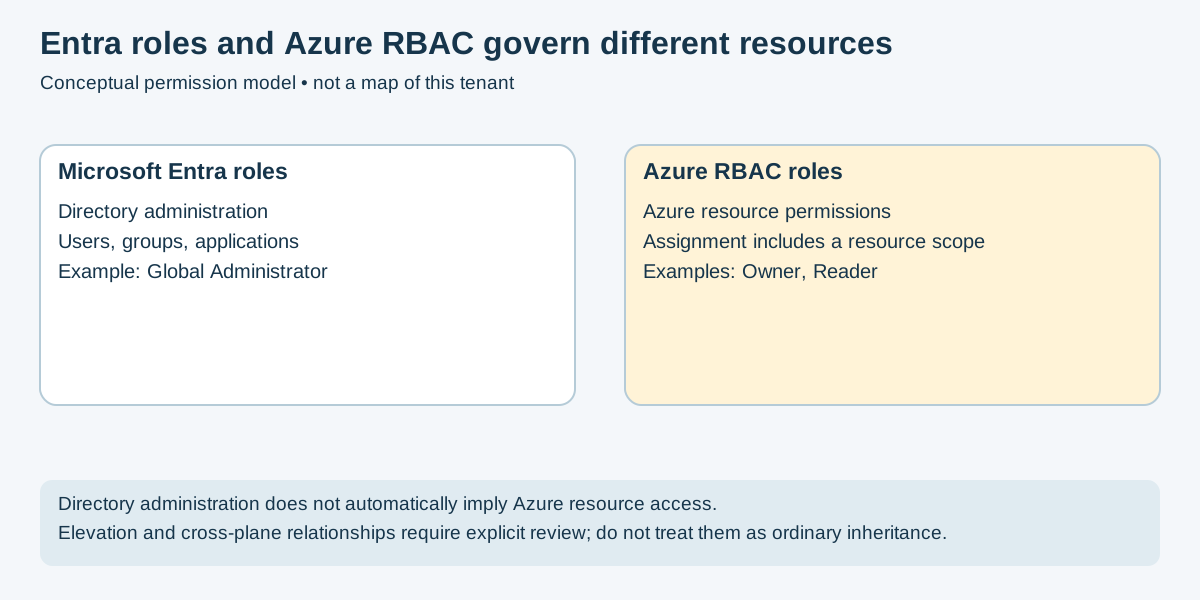
Figure 1 — Original conceptual model based on Microsoft's role comparison. It does not describe the effective permissions of an assessed tenant.
A Global Administrator does not automatically become subscription Owner. The
documented elevation mechanism assigns User Access Administrator at root scope
(/) to the elevating user. Review and remove that elevation when its task is
complete; deactivating a PIM Global Administrator assignment does not itself reset
the elevation setting. Microsoft elevation guidance.
Owner and access-administration roles can assign Azure roles within their effective scope, subject to applicable restrictions. Do not read “can grant access” as unlimited authority over unrelated tenants or scopes.
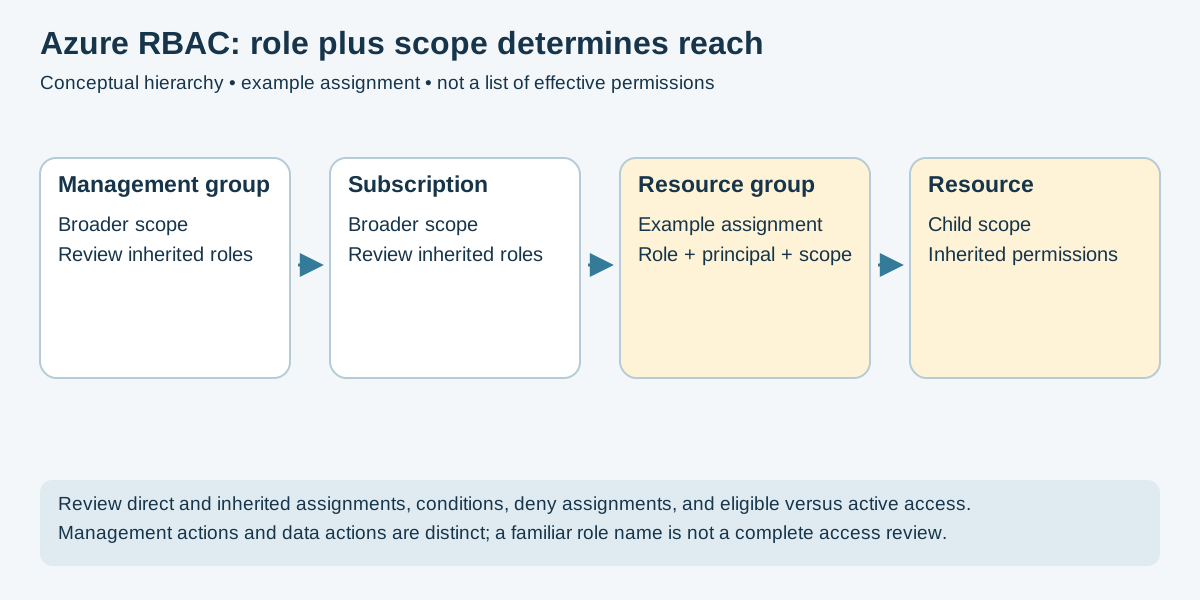
Figure 2 — Original hierarchy schematic based on Azure RBAC scope. The highlighted assignment is fictional, not a tenant finding.
Record the principal, role definition and assignment scope. Inspect inherited
assignments, conditions, deny assignments, and eligible versus currently active
access. Separate control-plane Actions from data-plane DataActions; a
management role does not directly describe every data permission or indirect
access path. Role definitions.
- Illicit consent grants: A user or administrator may approve inappropriate app permissions. Delegated and application permissions have different consent and access models; a grant does not automatically confer every user's data. Review grants and app credentials as well as user sessions. Microsoft guidance.
- Over-privileged applications: Review Microsoft Graph permissions, app-role assignments, ownership and credential lifetime. App registration presence alone does not establish exposure.
- Directory role abuse: Reduce unnecessary standing privilege and validate activation controls. PIM is a control to configure and monitor, not automatic protection.
- Legacy authentication: These clients do not support modern MFA/device signals; Conditional Access can block them. They do not universally bypass Conditional Access. Blocking legacy clients.
- Device/session compromise: Evaluate token protection, device trust and recovery separately. A PRT is device-bound; do not assume simple transferable bearer-token replay in every scenario. Microsoft PRT model.
Use the installed release's authentication and permission guidance before collection. The former bare commands omitted identity, tenant/subscription selection and prerequisites; they were not complete reproducible procedures.
| Tool | Assessment Role | Preparation and Limits |
|---|---|---|
| ROADtools / ROADrecon | Directory data collection and analysis | Verify authentication and API support in the chosen release; protect exported identity data. |
| AzureHound | Collect identity/resource relationships for BloodHound analysis | Match collector and analysis versions; collection permissions affect graph completeness. |
| Prowler | Supported Azure configuration checks | Select authorized scopes and documented read permissions; a skipped check is not a passing control. |
| ScoutSuite | Cloud configuration collection and reporting | Validate supported API/SDK versions and granted permissions before interpreting findings. |
Record tenant/subscription IDs, collector version, granted permissions, coverage, API failures and skipped checks. Keep “not assessed” distinct from “no issue found.” A configuration report is not a penetration test or proof of effective runtime enforcement.
- Identity: Prefer phishing-resistant authentication where supported. Scope and test Conditional Access before enforcing it; feature/licensing requirements vary. Review exclusions and emergency-access procedures. Conditional Access overview.
- Privilege: Use least privilege and appropriate PIM activation controls. Review both directory and resource roles; user MFA does not substitute for workload-identity credential controls.
- Applications: Review user/admin consent, app permissions, credentials and owners; revoke grants and rotate credentials through an approved response plan.
- Resources: Review Azure RBAC at the narrowest practical scope and inspect control/data permissions and inherited authority.
- Posture and threats: Defender for Cloud capabilities depend on enabled plans, resource coverage and configuration. A score is a prioritization input, not evidence that all threats are prevented.
- Benchmarking: Use the applicable CIS Azure benchmark version and record exceptions, evidence and retest criteria.
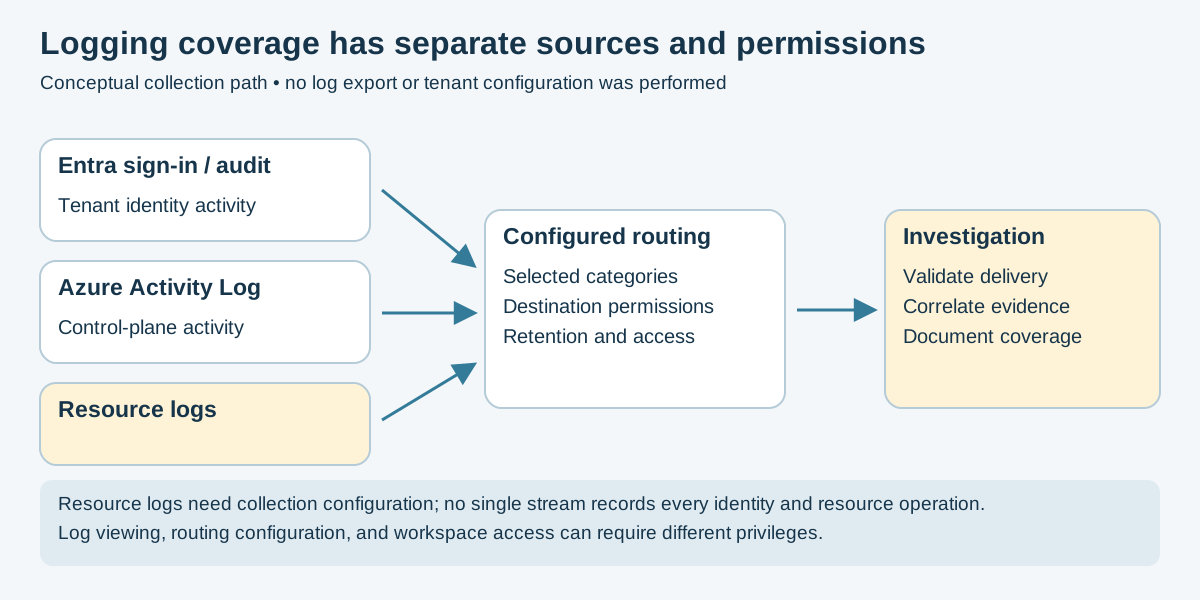
Figure 3 — Original conceptual collection model. It is not a deployed architecture or proof that events reach a SIEM.
| Source / Requirement | What To Verify |
|---|---|
| Entra sign-in and audit activity | Required categories, reader permissions, license-dependent availability and retention. |
| Azure Activity Log | Subscription control-plane coverage; it is not a record of every data operation. |
| Resource logs | Enable the required diagnostic categories; these logs are not collected by default. |
| Routing and destination | Configuration permissions, destination access, retention, delivery latency and sample-event arrival. |
| Detection | Test expected benign events, correlating identity and resource evidence; document gaps and ingestion failures. |
Use Entra diagnostic settings, Azure Activity Log and Azure Monitor diagnostic settings. Log viewing, export configuration and workspace querying can require different privileges. Never infer working collection merely from a visible dashboard.
- Microsoft Penetration Testing Rules of Engagement
- ROADtools (Entra ID) / AzureHound
- Microsoft Cloud Adoption Framework - Secure
- Entra ID security operations guide
- MITRE ATT&CK Cloud (Azure AD / Office 365)
- README.md - Cloud Security section index
- aws.md - Amazon Web Services security
- gcp.md - Google Cloud Platform security
- ../Tradecraft/active-directory.md - on-prem AD (hybrid identity context)
📄 Source: Cloud/azure.md | ✏️ Suggest an edit | ⬅️ Back to Cloud