Repository navigation
uConsole
Complete build guides for the ClockworkPi uConsole with HackerGadgets AIO v2 board - SDR, LoRa, GPS, and pentesting in your pocket
Part of the ULTIMATE CYBERSECURITY MASTER GUIDE


Important
CM5 screen rotated or desktop blank after setup? See CM5 display recovery. Earlier setup scripts can alter the desktop and mix Kali packages into Debian. The current CM5 v1.4 workflow preserves the working desktop by default; device testing is pending. CM4 legacy automation was replaced with the v2.0 read-only-by-default script and the repair utility now requires explicit --apply, and its dangerous cross-distribution/forced-overwrite behavior has been retired. See CM4 safety review. Physical CM4/CM5 hardware validation remains necessary.
Complete build and configuration guides for the ClockworkPi uConsole with HackerGadgets AIO v2 board - a pocket-sized Linux handheld optimized for SDR, LoRa, GPS, and field pentesting use.
Documents CM4 and CM5 module configurations, HackerGadgets AIO v2 + Battery/NVMe board setup, Kali Linux and Debian Trixie post-flash configuration, driver installation (WiFi, Bluetooth, audio, display), and automated setup scripts for reproducible deployments.
A fully configured, field-ready uConsole running on Kali or Trixie with all hardware working: RTL-SDR, LoRa, GPS, external WiFi adapter, NVMe storage, and the HackerGadgets power board.
- Initial uConsole build after flashing Kali or Trixie to the CM4/CM5 module
- Rebuilding a uConsole after a failed update or storage wipe
- Configuring a new HackerGadgets AIO v2 board with battery and NVMe expansion
- Reference for driver troubleshooting (WiFi chipset, audio, display brightness)
- Overview
- Setup Guides
- Hardware Stack
- CM4 vs CM5 - Quick Reference
- Kali OS Options
- ParrotOS Guide *This is a work in progress, use at your own risk!
- AIO v2 Board Capabilities
- Common Setup Sequence (The 6-Phase Approach)
- Security & Legal Disclaimer
- Resources
This directory contains complete, step-by-step build guides and automated deployment scripts for turning a ClockworkPi uConsole into a field-deployable hacking and SIGINT platform using the HackerGadgets AIO v2 extension board.
What This Covers:
- ⚙️ Automated setup scripts (
uconsole-cm4-setup.sh,uconsole-cm5-setup.sh) with image-specific prerequisites and recovery guidance - 📡 RTL-SDR setup and configuration (100 kHz – 1.74 GHz)
- 📻 LoRa / Meshtastic mesh networking (SX1262)
- 🛰️ GPS receiver configuration and PPS timing
- ⏰ Hardware RTC with battery backup (PCF85063A)
- 🔌 NVMe storage via the HackerGadgets NVMe Battery Board
- 🌐 Gigabit Ethernet via RJ45 (Upgrade Kit required)
- 📶 WiFi pentesting with external monitor-mode adapters
- 🔧 GPIO power control via
aiov2_ctl - 🐧 OS setup for both Kali Linux and Debian Trixie (Rex's images)
⚠️ Known package conflicts and automated fixes (cryptsetup, LightDM, Trixie dependency drift,libfmABI mismatch,libxcb-cursor0for Qt6 GUI,.pygpsclientvenv ownership, PolKit agent conflict on Labwc)
| Guide | Compute Module | Description |
|---|---|---|
| CM4-SETUP.md | Raspberry Pi CM4 | Safer staged CM4 setup. v2.0 setup script is read-only by default; AIO and native Kali installs are opt-in. |
| CM5-SETUP.md | Raspberry Pi CM5 | Complete CM5 setup - Features the uconsole-cm5-setup.sh automated installer, USB 3.0, and native PCIe configurations. |
| ParrotOS Guide | Raspberry Pi CM5 | Guide for installation on ParrotOS vs Kali; use at your own risk! This is a work in progress |
Which guide should I follow? If you already have your hardware, follow the guide matching your compute module. If you're buying new, see the comparison table below.
| Component | Detail |
|---|---|
| Handheld | ClockworkPi uConsole |
| Compute Module | Raspberry Pi CM4 or CM5 (with HackerGadgets adapter board) |
| Extension Board | HackerGadgets AIO v2 |
| OS | Rex's Kali Linux or Rex's Debian Trixie (6.12.y kernel), *ParrotOS work in progress |
| WiFi Adapter | External monitor-mode capable adapter (RTL8812AU recommended) |
| Component | Detail |
|---|---|
| NVMe Battery Board | HackerGadgets NVMe Battery Board (18650 or LiPo variant) |
| Upgrade Kit | HackerGadgets Upgrade Kit (required for RJ45, USB 3.0, NVMe) |
| AC1200 WiFi Card | HackerGadgets AC1200 USB-C WiFi Card (sold separately) |
| Feature | CM4 | CM5 |
|---|---|---|
| GPS Serial Port | /dev/ttyS0 |
/dev/ttyAMA0 |
| USB Speed | USB 2.0 only | USB 3.0 (with Upgrade Kit) |
| GPIO Boot State | All peripherals OFF | GPIO 7 (SDR) ON by default |
| RTC Config | dtoverlay=i2c-rtc,pcf85063a |
dtparam=rtc=off + dtoverlay=i2c-rtc,pcf85063a,i2c_csi_dsi0
|
| Serial Console | Remove console=serial0,115200 from cmdline.txt |
Remove console=serial0,115200 from cmdline.txt |
| SPI Conflict | Disable devterm-printer.service
|
Disable devterm-printer.service
|
| Onboard WiFi | No monitor mode | No monitor mode |
| Community Maturity | Most tested, most stable | Newer, improving rapidly |
| PCIe | Gen 2 (via adapter board) | Native PCIe support |
| NVMe EEPROM | Usually fine, some older units need update | Native NVMe boot support |
| Internal RTC | None (uses AIO v2's PCF85063A) | Has internal RTC (must disable for AIO v2's RTC) |
Choose CM4 if: You want the most stable, community-tested configuration with the fewest surprises. Best for first-time uConsole builders.
Choose CM5 if: You want USB 3.0 for external adapters, native PCIe for NVMe, and the newer BCM2712 SoC. Better long-term investment, but occasional rough edges.
These guides cover two distinct operating-system families, not two flavors of Kali. Avoid cross-distribution APT source mixing:
Use a native Kali image for Kali metapackages. Check the image release's actual included tools and update guidance; preserve its desktop configuration.
Use Debian 13 Trixie with the repositories intended for that image. Do not add Kali rolling to Debian. The old tool allowlist did not block all Kali system packages. Kali repository guidance
| Image | Best For |
|---|---|
| Bookworm 6.12.y | Maximum stability, daily driver |
| DragonOS | Dedicated SDR/RF analysis (GNU Radio, full RF toolkit) |
| Peripheral | Chip / Spec | GPIO Control |
|---|---|---|
| RTL-SDR | R828D + TCXO, 100 kHz – 1.74 GHz, 5V bias tee | GPIO 7 |
| LoRa | SX1262, 860–960 MHz, 22 dBm, TCXO, Meshtastic-ready | GPIO 16 |
| GPS | Multi-mode GPS/BDS/GNSS, active + passive antenna | GPIO 27 |
| RTC | PCF85063A + CR1220 battery backup | I2C (always on) |
| Internal USB | USB-C + pin header hub | GPIO 23 |
| RJ45 Ethernet | Gigabit (requires Upgrade Kit adapter board) | Always on |
| Label | Purpose | Antenna Type |
|---|---|---|
| SDR | RTL-SDR receiver | Wideband or frequency-specific |
| LoRa | SX1262 transceiver | 433 or 915 MHz (region-dependent) |
| GPS | GPS/BDS/GNSS receiver | Active or passive GPS antenna |
All peripherals are controlled via GPIO using aiov2_ctl (GitHub):
aiov2_ctl                           # Show current GPIO state
aiov2_ctl <FEATURE> <on|off>        # Toggle: GPS, LORA, SDR, USB
aiov2_ctl --status                  # Detailed status (GPIO + battery + power)
aiov2_ctl --gui                     # Launch system tray GUI
aiov2_ctl --boot-rail <FEAT> on     # Auto-enable at boot
aiov2_ctl --sync-rtc # Write system time to hardware RTCThe CM4 safety and migration review explains why the old CM4 installer was retired. For an existing CM4, start with:
bash uConsole/scripts/uconsole-cm4-setup.sh --help
bash uConsole/scripts/uconsole-cm4-setup.sh --status
These actions do not change package sources, the display manager, EEPROM, storage or radio power. When adding actual AIO hardware, follow the CM4 setup guide and confirm with the vendor's AIO v2 documentation.
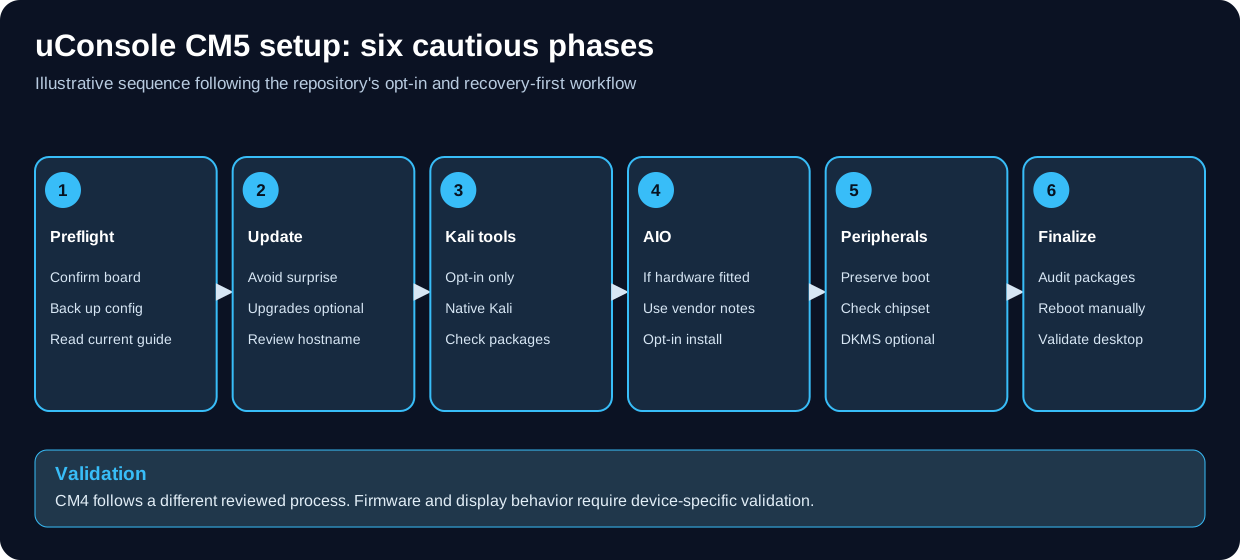
Conceptual CM5 setup summary; CM4 and different boards require their own preflight and documentation.
For CM5 v1.4, the defaults preserve the working image and optional installations require flags. See script usage and recovery instructions. The CM4 v2.0 procedure is different: read-only preflight by default with optional reviewed package installations. See the CM4 script reference.
| Phase | CM5 v1.4 behavior |
|---|---|
| Preflight | Validate OS/hardware/source configuration and back up configuration |
| Update | Skip system upgrades; optional hostname change |
| Kali tools | Opt-in, native Kali only |
| AIO | Opt-in Rex package installation for fitted hardware |
| Peripherals | Preserve boot settings; optional chipset-appropriate DKMS package |
| Finalize | Package audit; manual reboot/desktop/hardware verification |
Default setup does not install the complete AIO ecosystem. Follow the current board vendor instructions for additional hardware configuration. Software tests are not proof of a working CM5 desktop.
⚠️ LEGAL AND ETHICAL USE ONLY ⚠️

This platform includes tools and capabilities for:

✅ AUTHORIZED USES:
   • Penetration testing with explicit written authorization
   • Red team operations with organizational approval
   • Security assessments with client permission
   • RF monitoring and analysis on authorized frequencies
   • Mesh networking on licensed or unlicensed bands
   • Security research in isolated lab environments
   • Educational purposes with proper supervision
   • CTF competitions and authorized challenges

🚫 STRICTLY PROHIBITED:
   • Unauthorized penetration testing or network access
   • Intercepting communications without authorization
   • Transmitting on frequencies without proper licensing
   • WiFi deauthentication attacks on networks you don't own
   • Any use violating the Computer Fraud and Abuse Act (CFAA)
   • Any illegal or unethical activities
- LoRa / Meshtastic: Operates on ISM band (915 MHz US). No license required for low-power operation within FCC Part 15 limits.
- RTL-SDR: Receive-only device. Legal to receive in most jurisdictions, but intercepting certain communications (cellular, encrypted, private) may violate wiretapping laws.
- WiFi Pentesting: Monitor mode and packet injection are legal ONLY on networks you own or have explicit written authorization to test.
These guides are provided "AS IS" without warranty of any kind.

THE AUTHORS:
• Are not responsible for damages from guide use
• Do not warrant techniques will work in all environments
• Are not liable for legal consequences of misuse
• May update content without notice

USERS ACKNOWLEDGE:
• They use these guides at their own risk
• They are responsible for obtaining authorization
• They must comply with all applicable laws
• They are liable for their testing activities
| Resource | URL |
|---|---|
| Rex's Kali Image | https://forum.clockworkpi.com/t/kali-6-12-y-for-the-uconsole-and-devterm/14463 |
| Rex's Trixie Image | https://forum.clockworkpi.com/t/trixie-6-12-y-for-the-uconsole-and-devterm/19457 |
| Rex's Bookworm Image | https://forum.clockworkpi.com/t/bookworm-6-12-y-for-the-uconsole-and-devterm/15847 |
| AIO Board Package | https://forum.clockworkpi.com/t/hackergadgets-aio-board-package/17875 |
| Updated Images (New Screens) | https://forum.clockworkpi.com/t/updated-images-for-new-uconsole-screens/21666 |
| Resource | URL |
|---|---|
| AIO v2 Setup Guide | https://hackergadgets.com/pages/hackergadgets-uconsole-rtl-sdr-lora-gps-rtc-usb-hub-all-in-one-extension-board-setup-guide |
| aiov2_ctl GitHub | https://github.com/hackergadgets/aiov2_ctl |
| uConsole GitHub (Official) | https://github.com/clockworkpi/uConsole |
| Meshtastic Firmware Releases | https://github.com/meshtastic/firmware/releases |
| Product | URL |
|---|---|
| AIO v2 Board | https://hackergadgets.com/products/uconsole-aio-v2 |
| uConsole Upgrade Kit | https://hackergadgets.com/products/uconsole-upgrade-kit |
| NVMe Battery Board | https://hackergadgets.com/products/nvme |
- 🏠 Main Repository
- 🎯 START HERE Guide
- 💻 Cybersecurity Master Guide
- ✅ Security Checklists
- 🔍 OSINT Resources
- 📚 Documentation
- 🔒 OPSEC Guidelines
📁 Setup Guides: CM4, CM5, CM5 recovery and experimental Parrot + multiple setup/repair scripts
📖 Covers: OS setup, AIO v2 board, NVMe, WiFi, LoRa, GPS, SDR, RTC
🔄 Section reviewed: October 31, 2026 (physical deployment validation outstanding)
👥 Maintained by: Pacific Northwest Computers (PNWC)
📝 Status: Active & Growing
To contribute to the uConsole section:
- Follow the 4-header standard:
## 🎯 Purpose,## ⚙️ Function,## 🏆 Goal,## 📋 When to Useafter every H1 - Add a
## Related Filessection at the bottom with bidirectional links - Use hyphens (-) not em-dashes
- Verify all commands against the current hardware/firmware version before adding
- Include RF compliance notes for any SDR or radio transmission guidance
- Note the exact hardware revision and OS version tested against
📖 Build Responsibly: Authorization is MANDATORY for Pentesting
A pocket-sized SIGINT and pentesting platform - use it ethically and legally.
Repository: ULTIMATE CYBERSECURITY MASTER GUIDE
Maintained by: Pacific Northwest Computers
⭐ Star this repo if you find it useful! ⭐
- CM4-SETUP.md - Full setup guide for CM4 module configuration
- CM5-SETUP.md - Full setup guide for CM5 module configuration
- scripts/README.md - Automated post-flash setup scripts for CM4 and CM5
- ../SDR/sdr.md - SDR fundamentals for the RTL-SDR built into the uConsole
- ../Documentation/blackarch.md - BlackArch repo for additional pentesting tools on the uConsole
- ../CAD/README.md - CAD & 3D printing: design printed mounts, antenna brackets, port covers and carry accessories for the uConsole
- uConsole CM4/CM5 Safety, Currency and Navigation Review
- uConsole CM5 Parrot Setup
- 🖥️ uConsole CM5: Rotated Screen & Blank Desktop Recovery
- uConsole Setup Guide: CM4 Configuration
- uConsole Setup Guide: CM5 Configuration
📂 Folder: uConsole | ✏️ Suggest an edit | 🗺️ Browse by Topic