Repository navigation
Digital Forensics DFIR
Post-incident artifact extraction and timeline reconstruction — memory, disk, and live response
Part of the ULTIMATE CYBERSECURITY MASTER GUIDE · Incident Response section


Memory reference: Volatility 3 cheat sheet · cheat-sheet audit index. Keep original memory evidence immutable; confirm supported plugin names, dependencies and symbols locally.
Targeted forensic collection: Velociraptor + ForensicArtifacts triage covers consent, collection selection, UTC evidence hashes and custody; it complements existing KAPE/Autopsy and Volatility workflows.
Legacy forensic teaching material: Cypherpunk toolkit curation maps historical memory/IOC resources to modern Volatility 3 and evidence-handling practices.
Index for the Digital Forensics sub-section — guides for acquiring and analyzing evidence after an incident: memory forensics, disk forensics, and volatile live-response collection.
Links to a guide per forensic domain — memory analysis with Volatility 3, disk acquisition/analysis with Autopsy and KAPE, and live volatile-data collection — organized around the order of volatility and sound evidence handling.
Enable a responder to capture the right evidence in the right order, analyze it to establish a timeline and indicators of compromise (IoCs), and do so without destroying the evidentiary value of what they collect.
- Investigating a compromised host after detection (see Endpoint Visibility / SIEM alerts)
- Deciding what to collect first from a running system before power-down
- Extracting malware, injected code, or IoCs from a memory image
- Building an incident timeline from disk artifacts (registry, event logs, prefetch)
- Overview
- Forensic Domains
- Analysis Guides
- Order of Volatility
⚠️ Evidence Handling & Legal Warning- Contributing
- Resources
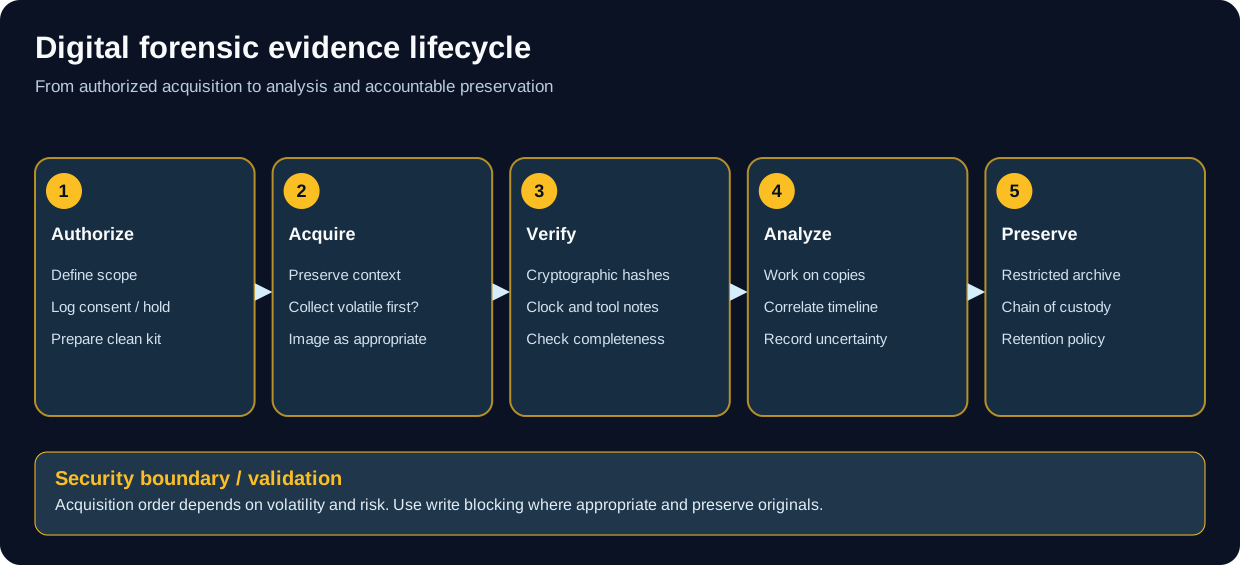
Apply case-specific legal authority and custody requirements.
Digital forensics is the disciplined recovery and analysis of evidence from computer systems. In an IR context it answers what happened, how, when, and what was affected — and, when a case may involve legal action, it does so in a way that preserves the evidence's admissibility.
This sub-section covers the three domains you will use most: memory, disk, and live volatile data. Capture is governed by the order of volatility — the most transient evidence (RAM, network state) must be collected before it is lost.
Caution
The act of investigating changes the system. Collect volatile evidence before shutting down, prefer read-only/write-blocked access to disks, and document every step. If a case may go to court, follow strict chain of custody.
| Domain | Guide | Evidence | Primary Tools |
|---|---|---|---|
| 🧠 Memory | Memory/volatility_cheatsheet.md | RAM dump (volatile) | Volatility 3 |
| 🚨 Live Response | LiveData/live_data_collection.md | Running-system state | WinPmem, DumpIt, avml |
| 🧰 Portable DFIR | Tsurugi Bento Field Guide | Live triage and verified acquisitions on running Windows endpoints | Bento, SyMenu, Sysinternals, FTK/WinPmem (if available) |
| 💽 Disk | Disks/autopsy_kape.md | Disk image (non-volatile) | Autopsy, KAPE, FTK Imager |
Build a SyMenu-based field USB, preserve evidence on a separate encrypted device, and follow worked Windows live-response procedures for process/network snapshots, persistence, EVTX, RAM, imaging, artifact triage, hashing, and reports. Bento is a Windows-first live triage toolbox, not a read-only OS or full analysis platform.
Dedicated Ubuntu-based REMnux VM and Proxmox deployment for offline malware triage, suspicious documents, PE/ELF analysis, captured network traffic, memory artifacts and evidence handling. Use this after authorized acquisition; isolate samples and never detonate malware on the analyst host.
The full analysis workflow for Windows and Linux memory dumps. Covers the Volatility 3 plugin taxonomy (windows.pslist, windows.cmdline, windows.netscan, windows.malfind, windows.dlllist), process and network-connection analysis, injected-code detection, registry-hive extraction, and artifact recovery — the fastest route to malware and IoCs that never touch disk.
Capturing volatile evidence from a running system before power-down. Covers the volatile-data priority order, memory acquisition (WinPmem, DumpIt, avml on Linux), network state (netstat/ss, active connections), process listing with hash verification, prefetch/amcache, registry-hive export, browser artifacts, and chain-of-custody documentation.
Acquiring and analyzing disk images. Covers imaging (FTK Imager, dd), the Autopsy case workflow (full forensic platform), KAPE targets/modules for rapid triage collection, timeline analysis, file carving, hash verification, and report generation.
- Linux Write Blocker — kernel patch and utilities illustrating why a read-only filesystem mount is not always sufficient to prevent writes. This is older, kernel-specific research and is not a validated replacement for a hardware write blocker.
- Digler — Go-based disk analysis and file carving with CLI/GUI interfaces. Its upstream README calls it early development; test using duplicate images and never save recovered files to the evidence device.
- FastFinder — tool for triaging suspicious files during response; record the version, search criteria and hashes for repeatability.
- Awesome Forensics — curated discovery list for forensic tools and resources; evaluate linked projects individually before relying on them for evidence.
Use these as companions to Autopsy/KAPE and live-data collection, not substitutes for authorization, write protection, forensic imaging or chain of custody.
Collect most-volatile first (adapted from RFC 3227):

1. CPU registers, cache
2. RAM (memory dump)  ........... Live Response + Memory guides
3. Network state, running processes, open connections
4. Temp files, swap/pagefile
5. Disk (image it)  ............. Disk Forensics guide
6. Remote logs / monitoring data
7. Physical config, archival media
Tip
Detection usually comes from the SIEM or endpoint telemetry; forensics is what you do after an alert to confirm, scope, and reconstruct the incident.
═══════════════════════════════════════════════════════════════
                 ⚠️  PRESERVE EVIDENTIARY VALUE  ⚠️
═══════════════════════════════════════════════════════════════

1. CHAIN OF CUSTODY
   ► If the case may involve law enforcement or litigation, follow strict
     Chain of Custody: document who, what, when, where for every item.
   ► Use write-blockers for disk imaging; verify with hashes (MD5+SHA-256).
   ► Mishandling can render evidence inadmissible.

2. MINIMIZE FOOTPRINT
   ► Investigating alters the system. Prefer trusted, statically-linked tools
     run from external media; avoid tools that overwrite volatile memory.

3. AUTHORIZATION & PRIVACY
   ► Only analyze systems you own or are explicitly authorized (in writing) to
     examine. Forensic access to others' systems can be unlawful.
   ► Images/memory contain PII/credentials — store encrypted, share sanitized.

4. MALWARE SAFETY
   ► Analyze recovered malware only in isolated, host-only environments.
   ► Do not upload targeted/proprietary samples to public sandboxes — it can
     tip off the attacker.
═══════════════════════════════════════════════════════════════
Contributions from DFIR analysts are welcome.
What we accept:
- ✅ Volatility plugin recipes and analysis walkthroughs
- ✅ KAPE targets/modules and Autopsy workflow tips
- ✅ Live-response scripts (with volatility-order rationale)
- ✅ Artifact-location references (registry persistence, browser paths)
Guidelines:
- Sanitize any sample artifacts of real PII/credentials.
- Note tool versions (e.g., Volatility 3.x).
- Describe the investigative value in your PR.
- Volatility 3: https://github.com/volatilityfoundation/volatility3
- KAPE (Kroll): https://www.kroll.com/kape
- Autopsy / The Sleuth Kit: https://www.autopsy.com/
- RFC 3227 — Evidence Collection & Archiving: https://www.rfc-editor.org/rfc/rfc3227
- The DFIR Report (real-world timelines): https://thedfirreport.com/
- SANS DFIR posters & cheat sheets: https://www.sans.org/posters/
- ⬅️ Incident Response section
- 👁️ Endpoint Visibility
- 📊 SIEM deployment guides
- 📖 Glossary (DFIR, IoC, chain of custody…)
- 🏠 Main Repository
🛡️ Collect carefully, document everything — evidence handled wrong is evidence lost.
Maintained by Pacific Northwest Computers (PNWC)
⬅️ Back to Master Index | 🎯 Role Navigation | Legal Notice
📄 Source: IncidentResponse/Digital-Forensics/README.md | ✏️ Suggest an edit | ⬅️ Back to Incident Response