Repository navigation
OpenSCAD Keyboard and Mouse Cheat Sheet
Last reviewed: 2026-11-14
Part of the OpenSCAD Design & Prototyping Guide · CAD & 3D Printing · ULTIMATE CYBERSECURITY MASTER GUIDE
Navigate: OpenSCAD Hub · Fundamentals · Project Structure · Mockups & Fit Checks · GPS Cradle Tutorial · Design for Printing · Shortcuts
The shortcuts worth memorizing, on one printable sheet. Every entry was read from OpenSCAD's own menu definitions (MainWindow.ui and the code that adds extra shortcuts) for release 2021.01 and for the development snapshot source as of 2026-11-14. Shortcuts are the same in both unless marked.
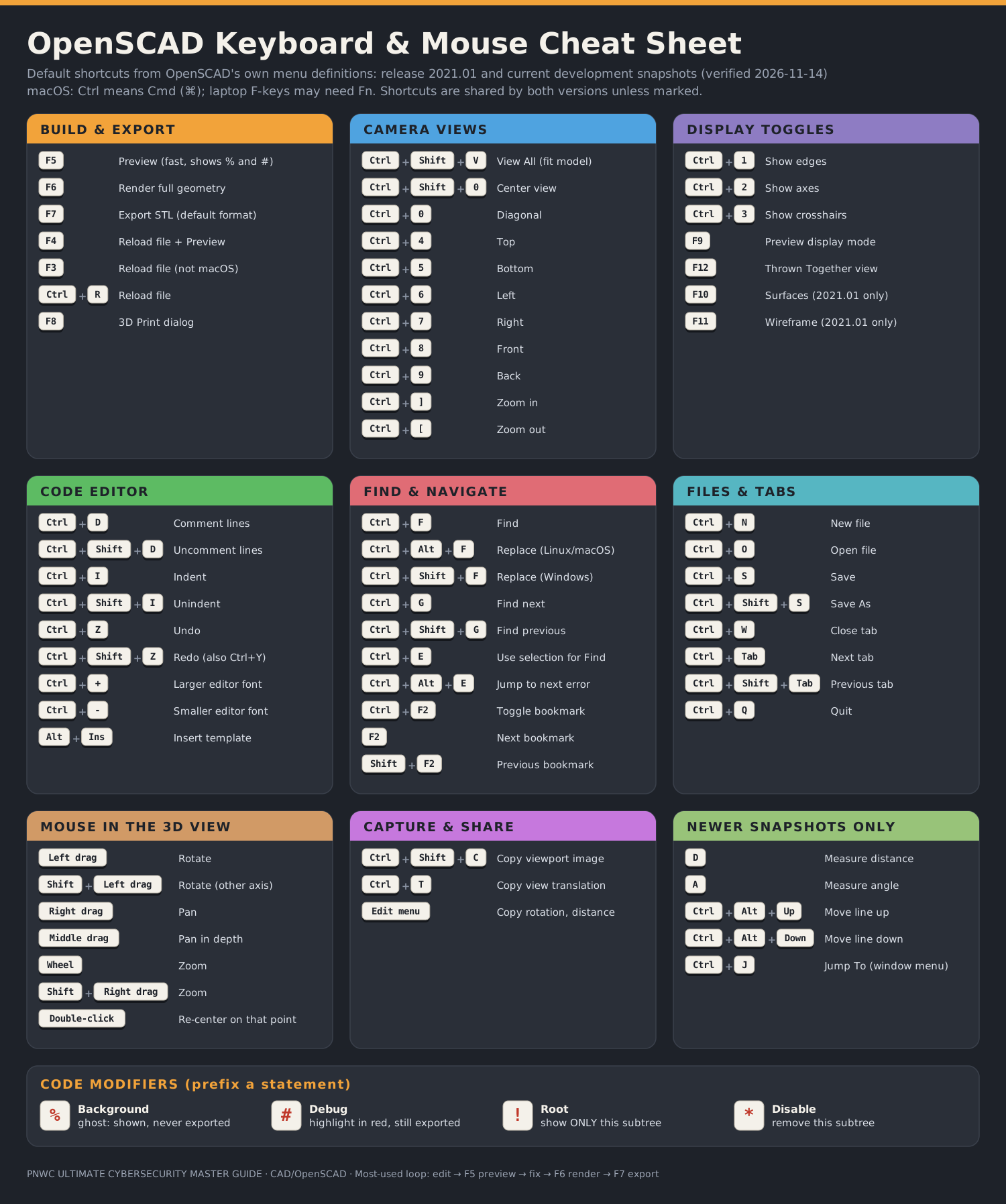
Click the image for the scalable SVG (prints sharply at any size). A PNG version is also available.
Note
macOS: Qt shows Ctrl shortcuts as ⌘ Cmd. Laptop function keys may need Fn. F3 (extra Reload key) is not added on macOS. Windows: Find & Replace is Ctrl+Shift+F instead of Ctrl+Alt+F.
| Key | Action | Why It Matters |
|---|---|---|
F5 |
Preview | Fast view with colors, % ghosts and # highlights. Press it after every edit. |
F6 |
Render | Full geometry. Reveals real errors and is required before export. |
F7 |
Export STL | Default 3D export. In snapshots this follows Preferences → Advanced → Toolbar Export 3D (STL by default). |
Ctrl+D / Ctrl+Shift+D
|
Comment / uncomment | Switch features on and off while debugging. |
Ctrl+Shift+V |
View All | Find the model again after you zoom off into space. |
| Shortcut | Action |
|---|---|
F5 |
Preview |
F6 |
Render |
F7 |
Export STL (default 3D export format) |
F4 |
Reload and Preview |
Ctrl+R or F3
|
Reload file from disk (F3 not on macOS) |
F8 |
3D Print dialog |
Tip
With an external editor, turn on Design → Automatic Reload and Preview. Saving in your editor then triggers a preview without touching OpenSCAD.
| Shortcut | View | Shortcut | View |
|---|---|---|---|
Ctrl+4 |
Top | Ctrl+5 |
Bottom |
Ctrl+6 |
Left | Ctrl+7 |
Right |
Ctrl+8 |
Front | Ctrl+9 |
Back |
Ctrl+0 |
Diagonal | Ctrl+Shift+0 |
Center |
Ctrl+] |
Zoom in | Ctrl+[ |
Zoom out |
Ctrl+Shift+V |
View All |
| Shortcut | Action | Version |
|---|---|---|
Ctrl+1 |
Show edges | Both |
Ctrl+2 |
Show axes | Both |
Ctrl+3 |
Show crosshairs | Both |
F9 |
Preview display mode | Both |
F12 |
Thrown Together display: draws all parts without CSG evaluation, handy for spotting stray or inside-out geometry | Both |
F10 |
Surfaces display mode | 2021.01 only |
F11 |
Wireframe display mode | 2021.01 only |
| Shortcut | Action |
|---|---|
Ctrl+D |
Comment selected lines |
Ctrl+Shift+D |
Uncomment selected lines |
Ctrl+I |
Indent |
Ctrl+Shift+I |
Unindent |
Ctrl+Z |
Undo |
Ctrl+Shift+Z or Ctrl+Y
|
Redo |
Ctrl++ / Ctrl+-
|
Larger / smaller editor font |
Alt+Ins |
Insert template |
Ctrl+Shift+C |
Copy viewport image to the clipboard |
Ctrl+T |
Copy viewport translation (paste into $vpt or --camera) |
| Shortcut | Action |
|---|---|
Ctrl+F |
Find |
Ctrl+Alt+F (Windows: Ctrl+Shift+F) |
Find and Replace |
Ctrl+G / Ctrl+Shift+G
|
Find next / previous |
Ctrl+E |
Use selection for Find |
Ctrl+Alt+E |
Jump to next error |
Ctrl+F2 |
Toggle bookmark |
F2 / Shift+F2
|
Next / previous bookmark |
| Shortcut | Action |
|---|---|
Ctrl+N / Ctrl+O
|
New / open file |
Ctrl+S / Ctrl+Shift+S
|
Save / Save As |
Ctrl+W |
Close tab |
Ctrl+Tab / Ctrl+Shift+Tab
|
Next / previous tab |
Ctrl+Q |
Quit |
Default mapping. It is the same in 2021.01 and in the snapshots' default OpenSCAD mouse preset; snapshots also offer OpenSCAD (Mac OS), Blender, Fusion and Custom presets in Preferences.
| Mouse | Action |
|---|---|
| Left drag | Rotate |
Shift + left drag |
Rotate around the other axis |
| Right drag | Pan |
| Middle drag | Pan in depth |
| Wheel | Zoom |
Shift + right/middle drag |
Zoom |
| Double-click on the model | Re-center the view on that point |
| Shortcut | Action |
|---|---|
D |
Measure distance |
A |
Measure angle |
Ctrl+Alt+Up / Ctrl+Alt+Down
|
Move line up / down |
Ctrl+J |
Jump To |
Not keyboard shortcuts, but you will type them constantly. Prefix any statement:
| Prefix | Name | Effect |
|---|---|---|
% |
Background | Transparent ghost; never exported |
# |
Debug | Highlighted in red; still exported |
! |
Root | Show only this subtree |
* |
Disable | Remove this subtree |
- OpenSCAD source, release tag
openscad-2021.01:src/MainWindow.ui,src/mainwin.cc,src/QGLView.cc - OpenSCAD source,
masteras of 2026-11-14:src/gui/MainWindow.ui,src/gui/MainWindow.cc,src/gui/QGLView.cc,src/core/MouseConfig.h - OpenSCAD repository · OpenSCAD Cheat Sheet (language)
⬅️ Back to Master Index | 🎯 Role Navigation | Legal Notice
📄 Source: CAD/OpenSCAD/06-keyboard-shortcuts.md | ✏️ Suggest an edit | ⬅️ Back to CAD