Repository navigation
Wardriving
Last reviewed: 2026-10-22
Caution
Authorized surveying only. Define the permitted area, types of collection, device owners, disclosure rules and any transmit-capable features before starting. Passive reception is not a blanket permission for active interference, interception or publishing location data. Read the repository legal notice.
| Resource | Description / Boundary |
|---|---|
| Additional Survey Firmware | PORKCHOP, wardriver.uk Rev3 and historical wardriver3000. |
| Biscuit Firmware Routes | Vendor browser, raw release and product-specific desktop recovery paths. |
| Resource | Role & Compatibility Boundary |
|---|---|
| C5 Wardriver | Official installer, board-specific power/wiring, Normal/Node/Core roles and SD log checks. |
| Piglet | XIAO/T-Dongle builds, standalone versus node logs and opt-in upload configuration. |
| Resource | Description |
|---|---|
| ESP32 & Related Firmware Catalog | Primary upstream projects, supported targets, use-cases & dated activity notes |
| Firmware Web Flashers | Dedicated installers plus a separate multi-device/multi-firmware reference |
Wardriving is the systematic observation and mapping of wireless infrastructure while moving (by foot, bicycle, vehicle or another safe route). A typical wireless inventory records access point identifiers, frequency/channel, received signal strength, observed security configuration, time and optional Global Navigation Satellite System (GNSS) coordinates. Bluetooth Low Energy (BLE) and cellular observations require source-specific capabilities.
This section focuses on repeatable, minimally invasive Wi-Fi/BLE inventories, GPS quality, hardware/firmware compatibility, log integrity, and authorized sharing. It does not require connecting to detected networks or attempting to access them.
Portable Cyberdeck companion: PNWC Wireless Field Device Operations maps Flipper, Marauder, Bruce/M5StickC Plus2 and WiFi Pineapple to a staged, manual client assessment and evidence workflow. It is not a universal firmware driver or a hardware-hacking bench guide.
Pocket platform companion: M5StickC Plus2 starter-pack integration for Wi-Fi/BLE observation and external-GNSS requirements. This is not an onboard-GPS logger.
- Learn field planning, safe operation and verification.
- Select a platform by its radio hardware, firmware, GPS source, controller and log location—these are not interchangeable.
- Follow exactly one platform guide.
- Validate results against your own/authorized test AP and a known location before collecting in the field.
- Read data handling, privacy and WiGLE exports before uploading or publishing.
| Guide | Controller / interface | Radio and positioning model | Primary record / transfer |
|---|---|---|---|
| SigRoam + Scout Lite | Flipper Zero app (FAP) + Scout Lite scanner | ESP32-C5, 2.4/5 GHz, Scout Lite onboard GNSS | Scout Lite microSD WiGLE CSV; optional SigRoam after-stop upload with dedicated scanner firmware |
| ESP32 Marauder · GPS/WiGLE · Flipper companion | Board screen/CLI or Flipper companion | Hardware-dependent ESP32; GPS and 5 GHz not universal | Target-dependent SD or Flipper logging; separate Marauder upload actions |
| Biscuit Ecosystem Labs | Biscuit Manager phone app | ESP32-C5 variants; phone GPS in standard workflow | App session/map/export; firmware/hardware dependent |
| AWOK Dual C5 + Biscuit | Dual-C5 board + phone app and/or Flipper | Two ESP32-C5 radios; select firmware per USB port | Biscuit Manager for Biscuit-side observations; other side independent |
| Wardrive Go | Android/iOS app | Phone scanning capabilities; optional RocketGod iosESP Wi-Fi boards | App-local sessions/exports, deliberate upload |
| Kismet | Linux host, browser UI or remote sources | Compatible capture interfaces and GPS source (often gpsd) | KismetDB / optional WiGLE CSV / PCAP-NG according to mode |
The Flipper Zero itself does not contain a Wi-Fi scanning radio. It needs suitable external wireless hardware. ESP32-C5 can scan 2.4 and 5 GHz, but a single C5 Wi-Fi radio does not observe both bands simultaneously.
Additional stationary/portable sensors: OUI-SPY Unified Blue supports specialized receive-focused Wi-Fi/BLE detection (some management modes transmit AP beacons); Bruce firmware covers board-specific radio labs; and RaspyJack is a Pi/Linux lab platform. None is a drop-in replacement for a GPS-validated wardrive logger.
Companion research platforms: Evil-M5 provides M5Stack observation exercises; LAB5 MonsterC5 / JanOS adds a separate ESP32-C5 radio and Cardputer/Tab5/Flipper controllers. JanOS's /lab/wardrives/ storage, optional auto-upload and GNSS requirements are not Marauder/Biscuit/SigRoam defaults. Use original GPS and data-handling checks before public export.
These are alternatives, not interchangeable firmware images or extra steps required by the six workflows above:
- ESP32 DualBand Wardriver guide — a dedicated ESP32-C5 wardriving project worth evaluating for a compact dual-band-capable survey build. Verify the exact board, GNSS source, logging format and release requirements; dual-band support does not imply simultaneous scanning.
- Piglet Wardriver guide — GPS-tagged Wi-Fi inventory with SD-card WiGLE-format CSV and a local web interface. A useful comparison when an ESP32 and local log review are preferable to a Flipper-driven workflow.
- OUI Master Database — optional post-collection manufacturer enrichment for MAC addresses observed in a permitted survey. OUI matches are estimates, not proof of a device maker or identity; randomized and locally administered MACs may not resolve.
Keep the field workflow and data-handling rules in force regardless of platform. Do not activate transmit, deauthentication, credential-collection or captive-portal functions during a passive survey.
This expands the existing wireless inventory and survey workflows to include the Hak5 WiFi Pineapple Mark VII for client-approved wireless security validation. It is a complementary assessment platform, not a substitute for a GPS-focused wardriving logger or continuous Kismet/nzyme WIDS. For detailed roaming surveys and data hygiene, follow the field workflow and data handling.
Hardware boundary: Hak5 lists the Mark VII with three role-based radios and native 2.4 GHz capability; 5 GHz requires a compatible external 802.11ac adapter/module. This is different from the WiFi Pineapple Enterprise and Pager. Confirm model, power, firmware, supported adapter and scan settings before deploying. Sources: Hak5 WiFi Pineapple product specifications, Mark VII firmware 2.0 notes, Mark VII features.
- Get written client permission for location, assets, SSIDs/BSSIDs, channels/bands, monitoring duration, expected impact, allowed active features, log contents, and stop contact.
- Obtain the controller's authorized AP list and deployment map. An SSID alone is not unique, and a detected BSSID is not automatically in scope.
- Record hardware revision, installed firmware, regional regulatory settings, power supply, external radio and management interface configuration.
- Use a dedicated administrative password and restrict the management UI. Backup configuration; obtain updates only through official Hak5 distribution and verify integrity as documented.
- Start with limited Recon observations. Confirm whether the specific scan action performs active probing or transmits; do not assume that every UI activity labelled Recon is passive.
- Treat PineAP, access-point impersonation, association manipulation, deauthentication, handshake capture and other active features as separate authorization gates. Do not activate on live or adjacent third-party networks without explicit legal and operational approval. Avoid collecting credentials or personal traffic.
- Power the Mark VII using the device's specified power arrangement and connect to its supported local management interface. Follow the current Mark VII initialization wizard, not Enterprise/Pager directions.
- Set a strong admin credential, confirm management isolation, select the correct regulatory country and record the firmware build.
- Verify clock/time synchronization. Choose the expected Recon radio and approved channel/band scope; an absent or unsupported 5 GHz adapter means no valid 5 GHz coverage claim.
- Before scanning, record the approved SSID/BSSID list, site map, test ID, exact UTC start time and operator.
- Run a brief baseline Recon scan using the firmware's supported workflow. Inspect observed SSID, BSSID, channel, frequency/band, advertised security and signal where available.
- Export a report or save screenshots using the firmware's supported UI. Record whether the saved result is an actual export, screenshot or manually transcribed log rather than assuming a universal API/export format.
Objective: compare detected wireless infrastructure with the controller's intended configuration.
- Select a permitted office/lab area and scan duration, with transmit features disabled unless separately authorized.
- Run a short Recon survey, capturing timestamp, SSID, BSSID, channel, band, observed encryption indicators and signal.
- Compare each BSSID to the approved controller inventory, accounting for multi-BSSID APs, mesh/repeaters and guest networks.
- Mark unmatched devices unverified until owner, controller and physical-location evidence establishes whether they are rogue.
- Confirm scope exclusions and redact neighboring networks from client-facing reports.
Deliverable: verified AP inventory, exceptions with independent evidence, and observed coverage limitations.
- Configure two client-owned lab SSIDs with known WPA2-Personal and WPA3-Personal settings, if supported by the separate lab AP.
- Survey each with the Pineapple. Record which advertised AKM/cipher/security indicators the firmware actually displays.
- Compare results against the AP/controller's administrative configuration. Check whether WPA2/WPA3 transition mode exists and whether a guest/open network is deliberate.
- Do not infer that a network is fully secure from a beacon or a UI badge; controller settings, authenticated client tests and patch state require separate verification.
- Report actionable configuration differences and compatibility impact.
- Obtain explicit approval to broadcast a unique test SSID, e.g.
PNWC-ROGUE-TRAINING-01, from a separate controlled lab AP; do not copy the client's production SSID or lure unrelated clients. - Record the test AP's BSSID, channel, power and planned start/end times.
- Turn on the test AP, observe it in Pineapple Recon, and simultaneously monitor with the existing Kismet/Wazuh IDS lab or nzyme/Wazuh workflow.
- Compare detection and SIEM alert timestamps, sensor identity, AP inventory matching, classification and false positives.
- Turn off the test AP and verify both the inventory and alert lifecycle. If the rule does not fire, diagnose sensor visibility and parsing before declaring the network unprotected.
- Choose repeatable survey points, antenna orientation, height and scan intervals inside approved property boundaries.
- At each point, record observed BSSIDs/channels and signal indicators, including whether the needed bands were actually scanned.
- Compare repeated measurements with placement/coverage expectations and a dedicated survey tool if throughput, roaming or spectrum analysis is required.
- Distinguish received signal indicators from measured throughput, noise floor, and actual RF interference. Do not claim a passive AP inventory is a full site survey.
- On a dedicated test SSID, connect two client-owned laptops and configure the AP's client isolation control.
- Test approved peer-to-peer reachability directly from these clients before and after enabling isolation; use only designated test IPs.
- Use the Pineapple to document the wireless environment and identify the SSID/BSSID under test. The isolation verdict should come from the clients and AP/controller logs, not just an advertisement.
- Restore the original AP configuration and attach before/after results to the assessment.
- Ensure Kismet or nzyme sensors and Wazuh ingestion are already operational. Establish real source log fields and synced clocks.
- Create the unique synthetic test AP from Exercise 3. Collect baseline and test-period events.
- Correlate
test_id, sensor, BSSID, channel, SSID, first/last seen, Wazuh alert IDs from actual logged events and analyst disposition. - Compare positive detection and negative-control behavior (an authorized AP with a similar name). Measure whether a rule produces meaningful alerts without excessive noise.
- Remove the test AP, archive limited evidence and update the client's detection playbook.
Hak5 documents PineAP and rogue access point capabilities; their availability varies with firmware. For any active AP impersonation or client-interaction test, require a separately signed scenario defining exact lab devices, approved SSIDs/BSSIDs, permitted radio settings, management oversight, known collateral impact, stop triggers and rollback. The baseline exercises above do not require PineAP impersonation, WPA key collection, credential capture, client disruption or third-party packet interception.
| Observation | Next Check |
|---|---|
| Missing 5 GHz APs | External compatible adapter present, radio selected, actual band/channel support |
| Recon returns little data | Scan duration, antenna, permitted channel set, channel hopping, power |
| Multiple BSSIDs for one SSID | Controller inventory, multi-radio/multi-BSSID and mesh configurations |
| Unknown AP flagged as rogue | Verify physical/controller ownership; adjacent APs may be out of scope |
| No Wazuh alert | Verify independent WIDS sensor saw the event, parser fields, rule and clock |
| Management or update issue | Mark VII-specific firmware docs, local management connectivity, supply stability |
| Field | Example Content |
|---|---|
| Authorization | Case ID, client, permitted site, device scope, RF exclusions |
| Device & Firmware | Mark VII model, firmware build, external adapter, regulatory domain |
| Survey | Exact UTC times, scan settings, observed channel/band, test location |
| Observation | Redacted BSSID/SSID, advertised security, actual controller verification |
| Detection | Independent Kismet/nzyme event and SIEM correlation |
| Outcome | Observed versus inferred, out-of-scope exclusions, confidence |
| Closeout | Active test SSID disabled, settings restored, evidence access/retention |
Reference implementation: Hak5 Mark VII Settings, Campaigns, PineAP, Recon. Firmware UI names may change; record the installed version before using an option. These are ready-to-configure wizard recipes, not unverified raw campaign scripts.
Important
Default to Reconnaissance – Monitor Only. Hak5's Client Device Assessment – Passive is not necessarily RF-silent: it can answer a direct client request and allow association if Open/WPA/Enterprise networks are enabled. Do not confuse this with receive-only Recon. Never broadcast the SSID pool, enable automatic association, deauth, handshake-forcing, or credential portals in the default client survey.
-
Written scope: list approved site, test hours, SSIDs and BSSIDs, owned test clients, channels/bands, excluded neighboring radio devices, reporting limits and an emergency stop operator. Name each engagement (
PNWC-MK7-2026-LAB-A). - Update and backup: record exact Mark VII model, installed firmware and hash/source, antenna, power, storage and recovery procedure. Use official Hak5 updates; backup local campaigns, original reports and settings before an update.
- Management: configure unique strong admin credentials, correct timezone/UTC, and use a dedicated USB-C or protected Management Wi-Fi path. In Settings → Advanced → Management Access, disable management UI/SSH access via the Open/Evil WPA interfaces or non-administrative Ethernet/uplink interfaces. Hak5 documents USB-C and Management Wi-Fi as persistent administrative paths. Verify that a guest/client laptop cannot open admin UI.
-
Radio roles: preserve the management radio. Hak5's default Recon interface
wlan1is built-in 2.4 GHz. A supported MK7AC/802.11ac USB adapter may exposewlan3for 2.4/5 GHz; inspect actual interface enumeration because names can change. No adapter means no verified 5 GHz Recon. One scan path cannot guarantee simultaneous all-channel capture. - Region and antennas: configure the correct regulatory domain and approved channels. Treat DFS/5 GHz transmission as separately restricted by local rules. Use a stable USB-C supply, avoid unneeded simultaneous services, and monitor free disk, CPU and thermal conditions during long surveys.
- PineAP safe state: disable impersonation, SSID pool broadcasting, auto pool additions, the Open AP and Evil WPA/Enterprise, unless a separately approved campaign requires exactly one synthetic test SSID. Verify allowlist scope for both client MAC and SSID on a lab association drill; a broad denylist may permit unknown clients. Account for randomized client MAC addresses.
- First Recon: start with three five-minute observation passes at a stationary point and note antenna orientation. Compare observed BSSIDs, channel, security and time with AP controller exports; an unknown BSSID is not necessarily a rogue AP.
-
Reports: Campaigns support JSON/HTML stored by default under
/root/loot/, plus optional SMTP or Cloud C² delivery. Keep transmission off until specifically approved; HTML reports can contain embedded handshake data. Prefer a locally retained JSON original and sanitized HTML summary. - Baseline controls: verify one owned AP is seen; verify a disabled synthetic SSID is absent, and a normal guest SSID is not falsely flagged. Export report(s), record source hash, then disable the campaign and restore configuration.
-
Avoid generic scripting: Hak5 documents generated campaign files in
/etc/pineapple/campaigns/with a/etc/pineapple/campaign-template.shsource. Prefer the supported wizard and report controls. Editing generated shell scripts without matching firmware/template verification is not an optimized default.
| Parameter | Client Baseline (Default) | Lab Client Association | RF-Isolated Active Drill |
|---|---|---|---|
| Campaign | Reconnaissance – Monitor Only | Client Device Assessment – Passive | Client Device Assessment – Active |
| SSIDs | Owned inventory for analysis; no broadcast | Single synthetic saved SSID | Single synthetic training SSID |
| Client filter | No client association test | One or two allowlisted test devices | One allowlisted test device |
| Impersonation/pool | Off / Off | Generic broadcast off; allow only test fixture | Only approved test SSID; no dynamic pool |
| Open/Evil WPA/EAP | Off | Only operator-approved synthetic fixture, no credentials | Synthetic-only test; no password capture |
| Deauth/handshake forcing | Off | Off | Off for baseline; separate ROE otherwise |
| Recon | 2.4 GHz; 5 GHz only with supported adapter | One verified test channel | Single approved lab channel |
| Reporting | Local JSON/HTML only | Local and redacted | Local, plus independent WIDS/AP log |
| Stop conditions | Unexpected collection/disclosure | Unknown client joins | Any non-test radio/association or interference |
| Field | Value |
|---|---|
| Campaign name | PNWC-MK7-01-AP-BASELINE |
| Wizard type | Reconnaissance – Monitor Only |
| Duration | 15 minutes (3 × 5 minute runs) |
| Bands |
wlan1 2.4 GHz; if required, separate supported external 5 GHz scan |
| PineAP | No impersonation, Open/Evil WPA/Enterprise, or pool broadcast |
| Deliverable | Redacted JSON inventory + controller comparison table |
- Export the authorized AP/controller inventory with BSSIDs, SSIDs, channels, band and configured WPA/PMF.
- Observe in the same three documented positions (or repeat the identical position to evaluate time consistency), recording exact scan setting, clock and orientation.
- Compare matched BSSIDs; account for multi-BSSID APs, mesh, guests and neighbor APs. Mark unknowns unverified until physical/controller evidence confirms ownership.
- Review false negatives against the controller and the radio's actual band coverage; report only grounded deviations.
Success: all observed owned APs are correctly attributed and limits of detection are stated.
| Field | Value |
|---|---|
| Campaign name | PNWC-MK7-02-SECURITY-POSTURE |
| Wizard type | Reconnaissance – Monitor Only |
| Duration | 10–20 minutes |
| Test APs | Two owned, synthetically named WPA2-Personal/WPA3-Personal networks |
| Payload | No evil twin, client association, deauth or handshake forcing |
| Evidence | Recon security/tagged-parameter view and actual AP-controller settings |
- Verify controller AKM/cipher, WPA2/WPA3 transition and PMF settings before observation.
- Scan the permitted channels/bands and note advertised security fields and any missed frames.
- Compare actual AP/controller settings and observed advertisements. Advertised WPA3/PMF is not proof of client negotiated protection, correct patching or a vulnerability.
- Deliver observed/configuration differences, retest plan and impact of mode changes on legacy clients.
| Field | Value |
|---|---|
| Campaign name | PNWC-MK7-03-CLIENT-PASSIVE |
| Wizard type | Client Device Assessment – Passive |
| Time | 5–10 minutes, operator present |
| Approved target | One owned phone with preconfigured synthetic open PNWC-ROE-OPEN-01 test SSID |
| Filters | Explicitly allow only the test client and approved synthetic SSID |
| Exclusions | No production SSID copies, generic responder, portals or credentials |
- Save the synthetic open test SSID on an owned phone using an independent controlled AP; confirm MAC/privacy behavior.
- Configure the Mark VII to allow only that named SSID/client. Confirm pool broadcasting and unrelated associations are disabled; note that passive PineAP can answer direct requests.
- With independent monitoring, observe only whether the test phone requests or associates to the synthetic network. Do not coerce a reconnect with deauthentication.
- Stop immediately if any unknown device associates. A lack of association is valid evidence of this one device's behavior, not a failure of the exercise.
- Document OS/firmware, client privacy settings, exact event timestamps and recommended auto-join policy.
| Field | Value |
|---|---|
| Campaign name | PNWC-MK7-04-WIDS-TRAINING |
| Wizard type | Client Device Assessment – Active |
| RF setting | Properly RF-contained or remote isolated client-owned testbed |
| SSID |
Only PNWC-WIDS-TRAINING-01
|
| Clients | One allowlisted, intentionally enrolled test phone/laptop |
| Features | AP broadcast/association only; no deauth, credential portal, EAP impersonation or handshake forcing |
| Observer | Independent Kismet/Wazuh, nzyme/Wazuh or AP controller |
- Explicitly approve active RF behavior and a containment plan; verify it cannot affect outside radios. Do not use a crowded site as a test enclosure.
- Configure a single unique training SSID and exact client/SSID allowlists. Disable all SSID auto-collection/pool expansion.
- Start independent WIDS sensor collection; enable the active campaign only for the approved duration and client, and record the synthetic AP's appearance.
- Correlate WIDS detection/alert timestamps, sensor identity, allowed client association and false positives using actual logs.
- Disable the campaign and verify no residual broadcast, unrecognized association or unaffected normal AP marked rogue. Restore all settings.
- Success: detection is visible and correctly classified. Not success: capturing client credentials, disconnecting other clients or claiming all rogue APs can be found.
| Field | Value |
|---|---|
| Campaign names |
PNWC-MK7-05-BEFORE and PNWC-MK7-05-AFTER
|
| Mode | Reconnaissance – Monitor Only, both runs |
| Use case | Client AP/controller update, relocation or channel/security-policy change |
| Comparison | Same scan time, point, antenna, firmware, interface, bands and known AP inventory |
- Record the change plan and run the first monitor-only campaign.
- After the legitimate infrastructure update, repeat the identical scan conditions. The Mark VII may not support the desired scheduled cadence; manually run the campaign where scheduling does not exist.
- Diff controller-confirmed BSSIDs, channels, advertised security and detection count. Received signal variation alone is not a calibrated coverage study.
- Retain local JSON originals and sanitized comparison output; avoid email/Cloud C² unless explicitly approved.
- Report which differences were expected, unexpected, unresolved or outside the actual radio coverage.
| Field | Required documentation |
|---|---|
| Authorization | Case ID, permitted site/assets, client/SSID allowlists, RF impact limits and stop contact |
| Device | Mark VII hardware, firmware, available Recon interfaces, MK7AC status, region and antenna |
| Campaign | Exact mode, settings, synthetic SSID, duration, location and UTC timestamps |
| Output |
/root/loot/ report path, JSON/HTML, SHA-256 of original, redacted client copy |
| Evidence | Controller record, real WIDS IDs, null observations, false positives and other corroboration |
| Finish | Campaign off, no unapproved AP, management isolated, upload approvals honored, secrets removed |
The Pager is a separate platform from the Mark VII. Pager payloads are Bash plus Pager-specific DuckyScript in on-device payload.sh files, with a display, event-driven alerts and a Recon interface. The Mark VII runs Campaigns and Modules, not Pager payloads; a payload.sh is also not a USB Rubber Ducky inject.bin or Bash Bunny payload.txt.
Official sources: Pager documentation, Hak5 Pager payload library, Payload categories, Command syntax, Alert event variables.
| Type | Invocation | First safe test |
|---|---|---|
| User | Operator runs a payload from the on-device menu | Local-only LOG and ALERT test |
| Recon | Launched on an operator-selected AP/client | Display metadata for an explicitly owned AP |
| Alert | Background event, e.g. deauth_flood_detected or pineapple_client_connected
|
Brief defensive notification; corroborate with WIDS |
Alert payloads run without interactive operator input and can trigger repeatedly; never open dialogs or start costly jobs from an Alert handler. Firmware-specific event variables differ by event. Do not equate an observed alert to a confirmed exploit or attributable attacker.
- Charge the Pager and connect by a data-capable USB-C cable to an isolated operator laptop. Follow Hak5 Pager setup. The documented management address is often
172.16.52.1; verify the actual address/interface before using SSH. - Set a unique root/admin password and restrict management Wi-Fi, SSH and Virtual Pager to a trusted operator. Keep it off production networks during initial validation.
- Record firmware, clock, available radio/bands, storage space and optional GPS/USB Mods. Backup
/root/, custom payloads and permitted/root/loot/before updating. - Update only from the Hak5 download portal or the model-specific on-device software update procedure. Hak5 describes persistence for
/root/, but modified base packages and files elsewhere may not persist. - Start with no automatically run third-party software, no cloud upload, no rogue AP impersonation, no credential collection, no deauth, and no unapproved networking.
- If a script fails after an update, inspect its actual directory, executable permissions and dependencies. Use vendor recovery rather than an unreviewed erase/install shortcut.
Hak5's source library organizes payloads under library/user/, library/recon/ and library/alerts/. The installed payload file is payload.sh, possibly with bundled dependencies. Verify the active installed directory and the User category against the device's firmware; copying the file alone does not confirm it is installed.
On the operator laptop create payload.sh:
#!/bin/bash
# Title: PNWC Pager Preflight
# Author: PNWC
# Description: Local-only UI and notification acceptance
# Version: 1.0
LOG blue "PNWC Pager preflight"
LOG green "No RF tasks or uploads requested"
ALERT "PNWC preflight complete"
exit 0
Syntax-check bash -n payload.sh, capture sha256sum payload.sh and verify no extra files or network references. The local syntax check does not test the Pager's LOG/ALERT runtime.
With USB management connectivity already confirmed, a common installed User path is /root/payloads/user/general/pnwc_preflight/payload.sh:
ssh root@172.16.52.1 'mkdir -p /root/payloads/user/general/pnwc_preflight'
scp ./payload.sh root@172.16.52.1:/root/payloads/user/general/pnwc_preflight/payload.sh
ssh root@172.16.52.1 'chmod 700 /root/payloads/user/general/pnwc_preflight/payload.sh'
Do not run these commands until verifying the installed path. In the Pager UI select the resulting User payload and verify the two log lines and single alert. If invisible, check directory/case, file extension, shebang, LF endings, permissions and menu refresh. Remove only the test directory after documenting successful validation.
The official event example documents _ALERT and _ALERT_DENIAL_MESSAGE. Review its current source and use a minimal no-radio handler:
#!/bin/bash
# Title: PNWC Observed WiFi Disruption
# Author: PNWC
# Category: Alerts
if [ "$_ALERT" = "deauth_flood_detected" ]; then
    ALERT "Possible deauth flood: check independent WIDS"
fi
exit 0- Confirm the installed alert event tree; this belongs under
deauth_flood_detected, not User payloads. - Validate the conditional in a unit-test harness with mock variables and a stubbed ALERT command; no active RF flood is required or appropriate.
- For naturally observed events during authorized monitoring, correlate with Kismet + Wazuh logs.
- Disable handlers that repeat excessively or cause resource issues; an event does not prove deliberate interference or device ownership.
- Use one owned test AP with a unique synthetic SSID and controller-verified BSSID/channel.
- Select the AP in Pager Recon and a receive-oriented workflow; verify whether that scan transmits any probes.
- Hak5's command
PINEAPPLE_RECON_NEW "PNWC-PAGER-LAB"may create a named session on supported firmware; that command by itself does not collect frames. - Export only permitted metadata, preserve original hash, redact neighboring identifiers and record GNSS source. Never assume a USB GPS automatically geotags every capture.
- Keep uploads to WiGLE and other external services off unless consent explicitly covers disclosure and retention.
- Pin the exact source commit, not only a community repo name. Inventory
payload.sh, helper scripts, binaries, dependency manifests, network endpoints, start/stop routines and service modifications. - Flag remote
curl/wget/eval,opkgpackage changes, cron/init changes, root SSH exposure, hardcoded URLs or credentials, unauthorized uploads, captive portals, deauth modes or traffic interception. - Check whether any binary matches the real device's
uname -marchitecture and dynamic dependencies. Hak5 warns that arbitrary x86/ARM binaries do not run on its platform. Do not assume package installs survive an update. - Assign a review classification: local read-only, receive-only in scope, active association, credential interception, persistent/system modification. Only the first two are baseline candidates; all others need separate authorization and operational review.
- Install one approved low-risk utility in an isolated lab, record hashes and changed files/services, then demonstrate uninstall/restore. Never bulk-install an unknown collection.
- Backup
/root/, payload directories, authorized reports, settings and package inventory on an operator-controlled encrypted device. - After an official firmware update, run the harmless User payload once, check event/Recon handlers, package dependencies, available flash/storage and manager-only connectivity.
- Confirm no unexpected active APs, email/Cloud uploads or remote listeners are running. Check retained secrets and remove test credentials.
- Restore only reviewed custom files. On failure, disable the specific script and use the official firmware-recovery workflow rather than unreviewed system reconfiguration.
| Source | Candidate role | Vetting needed |
|---|---|---|
| Hak5 WiFi Pineapple Pager payloads | Official curated User, Recon and Alert code | AS-IS; verify scripts and binaries, review installed version |
| Pager Themes · Ringtones | On-device UI assets, not payload scripts | Distinct file formats and storage |
| TheDadNerd payloads | Survey convenience source-review candidate | Third-party dependencies, GPS, external endpoints |
| mobile2gps | Phone-assisted location feed candidate | Accuracy, binary provenance, data disclosure |
| Pager WDGoWars | Wardrive/session export candidate | Optional public upload, credentials, location retention |
| NullSec Pineapple Suite | Review only: broad collection, mixed-risk components | Intrusive functionality and service/persistence changes; never blind-install |
Evidence: record case/ROE, board firmware, installed payload category/path, source URL/commit/hash, package/binary dependencies, approved events and radios, logs/time, exact export path, WIDS corroboration, data-sharing approval, and cleanup. Community payloads are not guaranteed secure or compatible because they appear in a repository.
| Your primary objective | Start with |
|---|---|
| Flipper-first GPS-tagged inventory on Scout Lite | SigRoam |
| Keep factory firmware and use a broad wireless toolkit | Marauder |
| Phone map, BLE and a Biscuit device or DIY C5 | Biscuit |
| Split two C5 chips into distinct firmware roles | AWOK Dual C5 / Biscuit |
| Smartphone-centric collection / iosESP expansion | Wardrive Go |
| Linux-based professional survey, heterogeneous adapters and auditable source logs | Kismet |
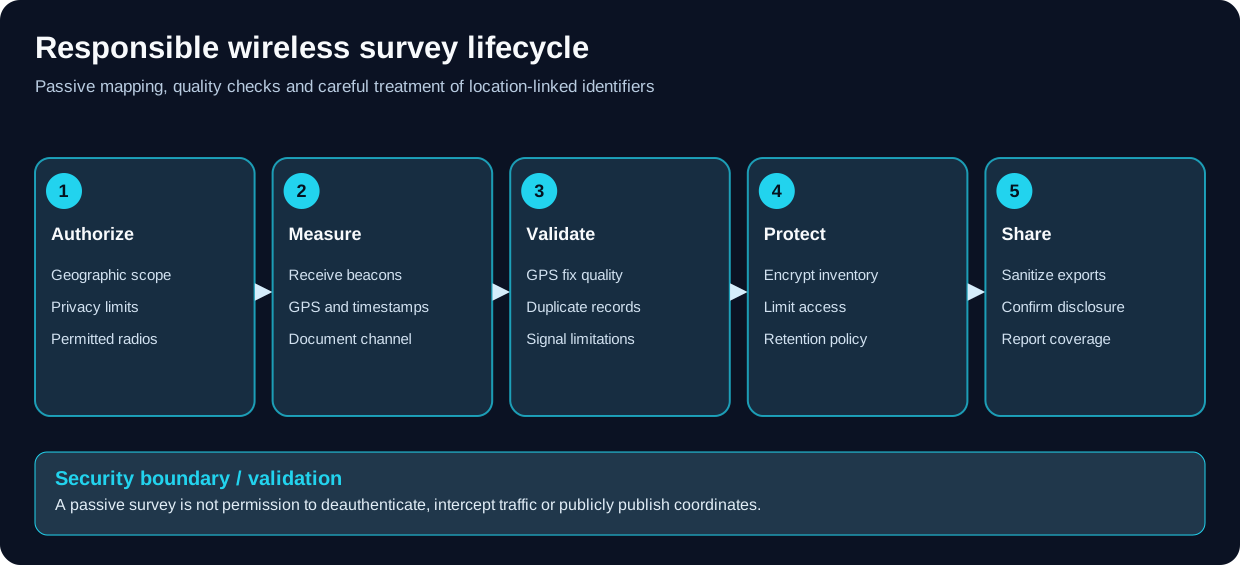
Wireless location identifiers can be sensitive; assess collection and disclosure separately.
- Observe, don't interfere. Avoid deauthentication, impersonation, beacon injection, credential collection or capture of third-party data as part of an ordinary wardrive.
- Fix GPS first. A row without a trustworthy fix cannot reliably support a spatial inventory; a low satellite count or sudden coordinate jump should be annotated.
- Beware limitations. Channel hopping misses brief transmissions; apparent unique-device counts vary by MAC randomization and deduplication; RSSI is not calibrated distance.
- Separate stored records from display counters. Compare counts and sample rows in the final CSV or database.
-
Respect versions. A Flipper
.fapis not ESP32 scanner firmware; a firmware image for one C5 board/port is not automatically correct for another. - Protect data. BSSID + timestamp + coordinates can reveal sensitive sites or movements. A WiGLE upload is a separate disclosure decision.
Wardriving/
├── README.md
├── field-workflow.md
├── data-handling.md
├── sigroam-scout-lite.md
├── esp32-marauder.md
├── biscuit.md
├── awok-dual-c5-biscuit.md
├── wardrive-go.md
└── kismet.md
-
ESP32-S3 DIY honeypots: ShadowSentry/HoneyMire service decoys are separate from passive wardriving inventory; no automatic RF attack attribution.
-
Kismet + Wazuh Wireless IDS Lab: stationary authorized wireless attack monitoring and centralized SIEM correlation, not passive GPS inventory.
-
Wireshark master filters and field cheat sheet: post-capture analysis of authorized packet traces; raw 802.11 management frames require an appropriate radio and fixed-channel collection.
-
Wi-Fi Deauthentication & Disassociation Analysis: a separate, authorized wireless intrusion-monitoring workflow for interpreting disconnect frames and distinguishing spoofing from normal management traffic; unlike passive AP inventory, it needs an 802.11-capable sensor and corroborating logs.
-
SDR and RF: radio fundamentals, spectrum measurements and antenna diagnostics—not a substitute for Wi-Fi MAC-layer logging.
-
Flipper Zero and hardware hacking: UART, GPIO, power and device compatibility.
-
OPSEC: identity, access controls and location-data minimization.
-
CAD & 3D Printing: design printed holders, mounts and antenna brackets for survey gear; the GPS cradle tutorial adds a GNSS module and SMA antenna bulkhead to a handheld.
-
Network Audit Playbook: define assessment scope and reporting.
-
Incident response: contextualize rogue AP findings; a new SSID is not by itself proof of maliciousness.
- SigRoam / Scout Lite
- ESP32 Marauder
- Biscuit DIY / AWOK Dual C5
- Wardrive Go for Android / iOS
- Kismet wardrive mode / WiGLE
Core platform guides last verified on 2026-10-22; additional upstream repository references checked on 2026-10-26. Specific releases and UI labels can change. No hardware tests are claimed by these documents.
Radio/packet source lists: PCAP Tools and the cross-domain index complement controlled surveys; PCAP analysis alone does not authorize live RF operations.
Master Index | Start Here | Legal Notice
- Additional Survey Firmware: PORKCHOP, wardriver.uk & wardriver3000
- AWOK Dynamics Dual C5: Biscuit and Independent Firmware Roles
- Biscuit and Biscuit DIY: Phone-Controlled Wardriving
- ESP32 C5 Wardriver: Setup, Modes & Log Validation
- ESP32 Marauder: Wardriving with GPS and WiGLE
- Kismet: Linux Wireless Surveys and Wardrive Mode
- Piglet Wardriver: Standalone & Mesh Survey Setup
- SigRoam + Flipper Zero + PINGEQUA Scout Lite
- Wardrive Go: Android and iOS Mobile Surveys
- Wardriving Data Handling, Privacy, Exports and WiGLE
- Wardriving Field Procedure and Acceptance Checklist
📂 Folder: Wardriving | ✏️ Suggest an edit | 🗺️ Browse by Topic