Repository navigation
Hashcat Offline Password Auditing and Recovery
Reference review: 2026-11-21. Examples use generated synthetic test data; no GPU benchmark or real account audit was performed.
Caution
Authorized use only. Work with deliberately generated test hashes or data explicitly approved for offline audit. Recovered passwords, potfiles and captured hashes are sensitive; keep them out of Git, tickets and shared screenshots. See Legal Notice.
Hashcat tests candidate passwords against specified offline hashes using supported CPU/GPU compute backends. It does not reverse a cryptographic hash or guarantee recovery. The correct algorithm, serialization, salt and work factor matter more than a generic speed claim.
This is the canonical general Hashcat guide. For WPA/WPA2-PBKDF2 PMKID/EAPOL material in mode 22000, use HCXTools & Hashcat; WPA3-SAE-only and enterprise EAP are not general mode-22000 inputs.
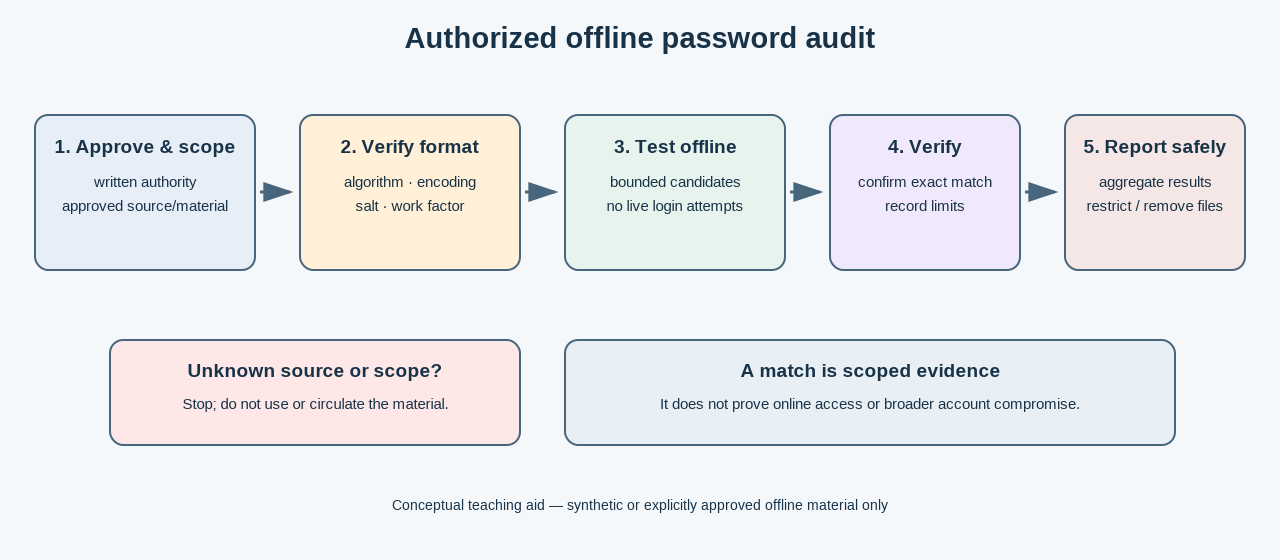
Conceptual workflow: keep testing offline, use only approved material, and avoid exposing recovered plaintext or potfiles.
Obtain Hashcat from the upstream releases or a maintained package. Verify the executable, drivers and compute backend before using any real material.
hashcat --version
hashcat --help
hashcat -I        # List detected compute devices; no cracking job
If a backend is missing, inspect GPU/CPU driver packages, supported compute runtimes and device permissions. A device listed in the OS is not necessarily a usable Hashcat backend.
| Example | Hashcat Mode or Concept | Security Interpretation |
|---|---|---|
| Unsalted raw MD5 | -m 0 |
Fast, unsuitable for password storage |
| Unsalted raw SHA-256 | -m 1400 |
Fast, unsuitable for password storage |
| bcrypt | -m 3200 |
Salted adaptive KDF, cost factor matters |
| WPA-PBKDF2-PMKID/EAPOL | -m 22000 |
WPA2/PSK-compatible captures only, see HCX guide |
| Argon2id / scrypt / PBKDF2 | Format & parameters vary | Check actual Hashcat format support before attempting an audit |
Do not identify a hash format by character count alone. Salts, encodings, application-specific prefixes and iteration counts alter how it is parsed. Consult example hashes for the installed release.
The following creates an invented SHA-256 digest and a three-entry wordlist entirely on your workstation:
mkdir -p ./hashcat-lab && cd ./hashcat-lab
python3 - <<'PY'
import hashlib
password = 'DemoOnly-Training-42'
with open('sample.sha256', 'w', encoding='ascii') as f:
    f.write(hashlib.sha256(password.encode()).hexdigest() + '\n')
with open('test-words.txt', 'w', encoding='utf-8') as f:
    f.write('not-the-password\nDemoOnly-Training-42\nother-example\n')
PY
hashcat -m 1400 -a 0 sample.sha256 test-words.txt --session=pnwc-lab
Here -a 0 is straight dictionary mode. Recovery demonstrates a match to a deliberately weak test candidate not the safety of SHA-256 password storage. A previous potfile result can make subsequent attempts appear instantaneous.
| Strategy | Description | Limit |
|---|---|---|
| Straight wordlist | Try each file entry | Only covers entries provided |
| Rules | Transform each candidate | Workload grows rapidly; transformations depend on syntax |
| Mask | Enumerate known character positions | Combinatorial growth |
| Hybrid / combinator | Combine words and patterns | Sensitive to input assumptions |
| Association / newer attacks | Feature availability varies | Check current --help and source |
For a mask with an alphabet of size A and length L, the naive search space is A^L. For example, eight decimal digits require 100,000,000 candidates; that is not a recovery-time estimate.
| Record | Guidance |
|---|---|
| Input provenance | Document source & authorization; never use scraped credentials |
| Mode & parameters | Save exact mode, cost factors, salt handling and command |
| Candidate source | Check license and whether files include real credentials |
| Hardware | Save backend/device versions and thermal limits |
| Output | Report counts/statistics; avoid exporting recovered plaintext |
| Retention | Encrypt restricted evidence, restrict potfiles, remove synthetic fixtures afterward |
Exhausted means the selected candidate space was tested; it does not prove a password cannot be recovered. Cracked proves a specific match under the tested settings, not that login MFA was bypassed.
Use strong unique passwords or passkeys, throttling/MFA for online attacks and Argon2id (or other modern, properly configured password KDF) with unique random salts for password storage. See OWASP Password Storage.
| Symptom | Check |
|---|---|
| No devices found | Driver/runtime/device permissions, hashcat -I
|
| Token length error | Correct hash format, prefix, encoding & mode |
| Performance unexpectedly low | Cost, memory, thermal limits and backend |
| Found on first iteration | Existing potfile or intentionally known candidate |
| Exhausted | Candidate coverage, not a proof of security |
| Reference | Focus |
|---|---|
| Wordlists & Candidate Generation | Safe sources, tools & hygiene |
| Rainbow Tables | Precomputation vs adaptive salted hashes |
| HCXTools & Hashcat | Wi-Fi conversion & mode 22000 |
| John the Ripper | Alternative offline recovery tool |
| Hashcat Source | Modes, releases, limitations |
| Hashcat Wiki | Examples, rules, masks & options |
Documentation Index | Master Index | Legal Notice
📄 Source: Documentation/hashcat-guide.md | ✏️ Suggest an edit | ⬅️ Back to Technical Guides & Cheat Sheets