Repository navigation
Nmap Network Discovery Service Inventory and Defensive Validation
Upstream documentation reviewed: 2026-11-21. Examples are illustrative; no live scan was executed for this guide.
Caution
Authorized use only. Run active scans only against assets, ports, methods & times expressly covered by written permission. Even discovery may stress embedded devices or trigger alerts. See Legal & Responsible Use.
Nmap (Network Mapper) is an open-source scanner for discovering reachable hosts, TCP/UDP services, service hints and selected configuration data. Use it for asset inventories, change detection, firewall verification and controlled security assessments. It does not prove a host is safe, a service is exploitable, or an OS fingerprint is correct.
| Goal | Nmap Feature | Interpretation |
|---|---|---|
| Find responding lab hosts | Host discovery (-sn) |
Non-response does not mean a host is absent |
| Enumerate services | Port probes (-sT/-sU) |
open, closed & filtered are scan observations |
| Describe service software | Version detection (-sV) |
Banner/version is a clue; verify separately |
| Inspect selected configurations | Nmap Scripting Engine (NSE) | Review each script's network effects before use |
| Preserve inventory | XML/normal/grepable output (-oA) |
Treat hostnames, IPs & banners as sensitive |
Install from official Nmap downloads or your trusted OS package repository, verify the version, and review the platform's privilege requirements. Scan from an isolated, routed lab with a documented target list.
nmap --version
nmap --help
mkdir -p ./nmap-evidence
The reserved TEST-NET address 192.0.2.10 below is a placeholder. Replace it only with an address assigned to a personally controlled lab VM. An unassigned documentation address will not produce a meaningful result.
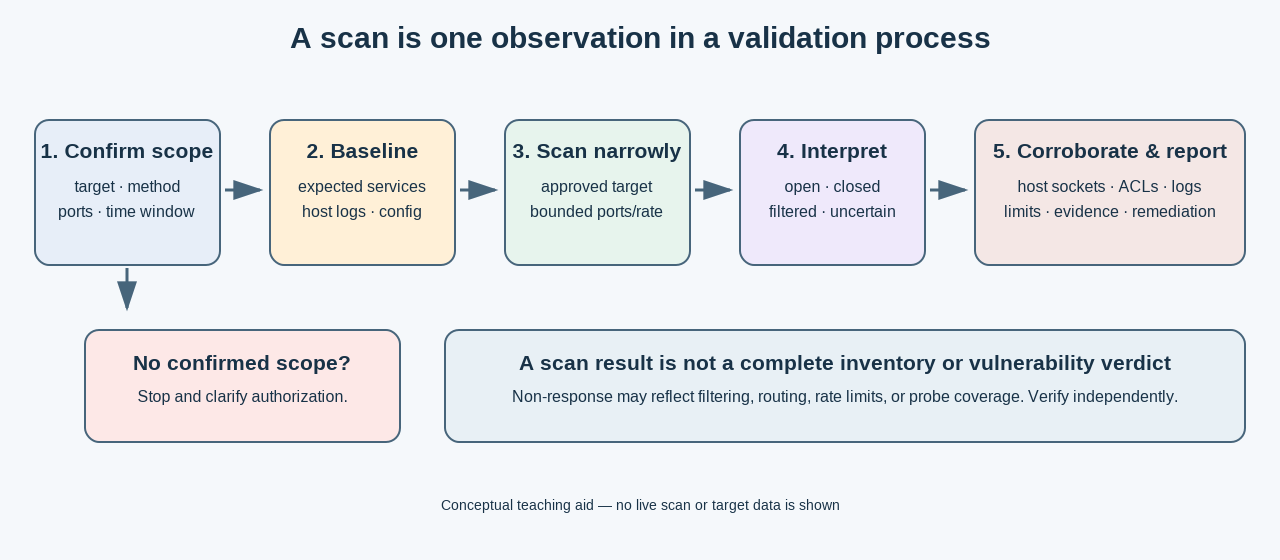
Conceptual workflow: scan observations are evidence to verify, not proof that a host or service is absent, vulnerable, or safe.
- Scope: Record exact permitted IPs, protocols, ports, time window & expected scan rates.
- Baseline: Snapshot the lab VM, enable server logs and record the host's expected listening ports.
- Discover: Try a bounded port selection first, with an explicit target, then widen only if approved.
- Corroborate: Compare Nmap output to firewall rules, listening sockets, service configuration and EDR.
- Report: Save the raw result, command, timestamp, source address, caveats and remediation.
# Replace 192.0.2.10 with your isolated, approved lab VM.
nmap -sT -Pn -p 22,80,443 --reason 192.0.2.10
nmap -sT -Pn -sV --version-light -p 22,80,443 -oA ./nmap-evidence/lab-tcp 192.0.2.10
-Pn skips host discovery and assumes the target is up; it is not a stealth feature. -sT uses the TCP connect method and avoids raw-packet privileges. -sV adds probes that can be intrusive to fragile services. -oA writes XML, normal & grepable formats; XML is preferred for programmatic parsing.
# Small subnet only if every IP falls in the signed test scope.
nmap -sn 192.0.2.0/29
# Only after approving a UDP check; a nonresponse can yield open|filtered.
nmap -sU -p 53,123 --reason 192.0.2.10
UDP probing may be slower and ambiguous. Check firewall logs, application logs and local socket state before concluding that a service is present or absent.
# Read the script description/source before touching a lab endpoint.
nmap --script-help http-title
nmap -sT -p 80 --script http-title 192.0.2.10
Do not blindly run whole NSE categories or scripts labeled intrusive, brute, dos or exploit. Even a nominally informational script may generate traffic or affect poorly implemented systems.
| Finding | Possible Explanation | Validation |
|---|---|---|
TCP open
|
A listener accepted a probe | Check ss -lnt or service manager on the owned host |
TCP filtered
|
Firewall or packet loss prevented a conclusion | Compare ACLs, packet captures & logs |
| UDP `open | filtered` | No decisive response |
| Version guess | Probe matched a banner/signature | Verify installed package, build & patch level |
| Host absent | Discovery probe blocked/dropped | Validate routing, ICMP policy & scope |
Keep the observed state and the analyst's hypothesis separate. Version matching alone is not a CVE finding. Avoid treating missed hosts as evidence of complete coverage.
Save the XML file and SHA-256 checksum; record source interface, command line and scan approval. In an isolated lab, correlate firewall accept/deny logs, Zeek connection records, endpoint listening-port inventory and IDS events. Changes in Nmap output may arise from ACLs, NAT, rate limiting, ephemeral services or transient network failures.
sha256sum ./nmap-evidence/lab-tcp.xml| Symptom | Check |
|---|---|
| No host response | Address/routing/ACL; repeat only within approved scope |
| Privilege error | Prefer -sT or use appropriately delegated privileges |
| Inconsistent versions | Rate limits, proxies, banner masking or SSL/TLS termination |
| Output missing | Working directory & path permissions |
| Scan too slow | Reduce the IP/port scope before altering timing |
- Network Audit Playbook — scoping & evidence
- Nmap Output Analysis AgentFlow — post-scan analysis, not scanner execution
- Network Detection — SIEM/IDS correlation
- Official Nmap Reference, Nmap Documentation & NSE Guide
Documentation Index | Start Here | Legal Notice
📄 Source: Documentation/nmap-guide.md | ✏️ Suggest an edit | ⬅️ Back to Technical Guides & Cheat Sheets