Repository navigation
Drive Assessment and Forensic Write Blocking
Related reading: Portable device SD cards and exports · Encrypted storage and recovery considerations
Digital Forensics · Disk Analysis With Autopsy & KAPE · Hardware Testing · Cable & Blocker Selection
Start with the goal and the condition of the device. An evidence acquisition prioritizes preservation, repeatability and documentation. A recovery job prioritizes readable data and may need to minimize reads on an unstable drive. In both cases, assess and image the source before repairing a filesystem or running stress tests.
| Source | Connection to verify | What can change through an adapter |
|---|---|---|
| 3.5-inch SATA HDD | SATA data and suitable external power, through a validated SATA blocker for evidence | A USB bridge can hide drive health information or report different logical sector geometry. |
| 2.5-inch SATA HDD or SSD | SATA interface and stable power | Marginal USB power can look like a failing drive. Record how the disk was attached. |
| M.2 SATA or M.2 NVMe | Identify protocol from the device specification. Use a matching interface and validated blocker. | M.2 describes a form factor. An enclosure that fits may support only SATA or only NVMe. |
| USB flash drive or external USB drive | Validated blocker supporting USB mass storage and the exact transport or bridge | Enclosure hardware can participate in encryption or sector translation. Preserve and document the original enclosure. |
| SD or microSD | Supported reader and validated write-blocked path | A full-size SD adapter's lock tab signals write protection to the reader. Its enforcement depends on the reader. |
Record manufacturer, model, serial, physical condition, displayed capacity, logical sector size, connector and bridge. Photograph labels when the evidence workflow calls for it. Mark source and destination cables separately. Disable automount before connecting media. Start with trusted acquisition hardware and keep unknown USB cables out of the evidence path.
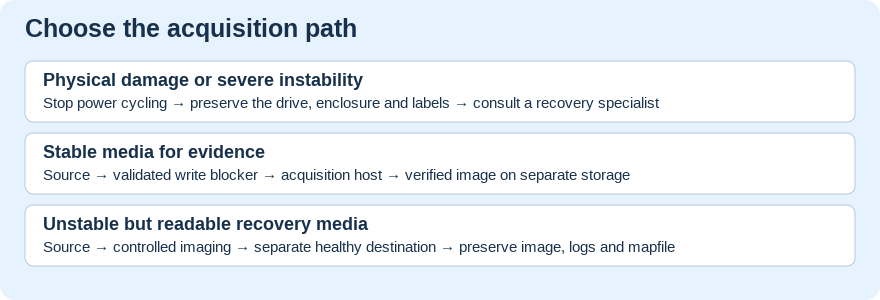
- Prepare the path. Verify that the exact blocker and firmware support the source interface, sector size and host transport. Check its mode before attachment. Use a dedicated destination with room for the acquisition, logs and working copies.
- Validate on sacrificial media. Record a baseline hash. Connect the test media through the blocker and verify reads succeed. Under a documented lab procedure, attempt a known write to the expendable device, then independently verify its contents remain unchanged. Repeat after changing the blocker, firmware, bridge or interface as appropriate. Use NIST CFTT reports to inform selection and lab validation.
- Acquire. Record the source identifiers, blocker model and firmware, acquisition tool/version, UTC timestamps, chosen scope and unreadable sectors. Use a physical image for accessible sectors when appropriate. Document any targeted or logical collection and the limits that drove that choice. If the device is already unlocked and volatile keys matter, follow the live collection workflow before power changes.
- Verify and examine. Run the imaging tool's verification and record the hash algorithm and the bytes or container being hashed. A SHA-256 of an E01 container file identifies the container bytes and can differ from the hash of its decoded disk data. Preserve the original image and logs, then analyze a working copy. Report skipped or unreadable ranges separately from integrity verification.
A validated blocker mediates host writes on supported paths. A USB data blocker intentionally stops data access, and a filesystem read-only mount applies at a different layer. SSD controllers can still perform internal housekeeping. Host write blocking does not freeze internal SSD state or restore data already trimmed.
NIST CFTT hardware write blocker testing · SWGDE Best Practices for Computer Forensic Acquisition
| Observation | Plausible causes | Next action |
|---|---|---|
| Clicking, scraping, liquid damage, burnt smell or repeated spin-up failure | Physical or electrical damage | Stop power cycling. Preserve the drive and enclosure for a recovery specialist. |
| USB disconnects, resets or changing capacity | Cable, power, enclosure, controller or failing media | If physical damage is unlikely, try one known-good compatible path. Stop if the device remains unstable or the data is irreplaceable. |
| Slow reads, timeouts, unreadable sectors or media errors | Deteriorating media or interface errors | Capture existing logs. Prioritize imaging and record bad ranges. Avoid full surface scans and repeated retries on the source. |
| Incorrect filesystem state on otherwise stable hardware | Logical corruption, interrupted writes or encryption | Acquire first. Repair or recover from a copy. Verify keys and distinguish an encrypted volume from an unreadable one. |
Use device identification and existing error logs first. On a stable device, smartctl can read reported health data when the controller and bridge support it. A USB adapter may suppress SMART or NVMe health data. An overall SMART pass is one signal and does not establish that every sector is readable. Avoid long self-tests, write benchmarks, filesystem repair, initialization, TRIM and format operations on evidence or a failing original.
On Linux, lsblk -o NAME,MODEL,SERIAL,TRAN,SIZE,LOG-SEC,RO helps identify the source. The RO field reports the OS view and cannot independently validate a hardware blocker. Review the system log for resets and I/O errors. For unstable readable media, GNU ddrescue can recover easy regions first and resume with its mapfile. Use a separate healthy destination, confirm the source by serial and capacity, save the mapfile outside the source, and preserve it with the image. Use the same source and image when resuming. Limit retries based on symptoms, recovery value and whether the device is degrading. A rescued image with gaps is a partial acquisition and needs a record of those gaps.
GNU ddrescue manual · smartmontools · PNWC WinPE recovery triage
| Tool or device | Job | Selection or verification |
|---|---|---|
| Hardware blocker or forensic imager | Mediate access to stable evidence media | Choose a device with relevant NIST test results for USB, SATA or NVMe as applicable. Compare the tested model, firmware and acquisition path. |
| Trusted USB reader, SATA adapter or NVMe bridge | Identify and diagnose known bench or recovery media | Check protocol, stable power, capacity and sector reporting. Ordinary adapters can permit writes. |
| FTK Imager or Guymager | Acquire healthy media into supported forensic formats | Record version, format and errors. Confirm the tool can verify the selected output. |
| GNU ddrescue | Produce a raw recovery image with state tracked in a mapfile | Use a healthy separate destination and retain the mapfile and failure notes. |
| smartmontools | Read drive identity and available health telemetry | Use the matching transport and determine whether the bridge supports access before interpreting missing attributes. |
| Autopsy or The Sleuth Kit | Examine filesystems and artifacts in a supported forensic image | Work from a copy. Record the view of the data source and the hash of exported artifacts as needed. |
| KAPE | Collect and process selected artifacts under a defined scope | Preserve source paths and scope. Use a disk imager when a sector-level acquisition is required. |
Exterro FTK Downloads · Guymager · Autopsy
Prepare an expendable drive with a known folder and record baseline content hashes. Validate the blocker on that drive, acquire an image, and open a working copy in Autopsy. Confirm that an exported test file matches the baseline. Keep the media identifier, blocker model and firmware, tool version, image hash and verification result in the acquisition notes. In a separate recovery exercise, retain the ddrescue mapfile and compare the fully recovered image with a known source image before practicing interruption and resumption.
📄 Source: IncidentResponse/Digital-Forensics/Disks/drive-assessment-write-blocking.md | ✏️ Suggest an edit | ⬅️ Back to Incident Response