pts add modify talks
 The Public Talk Entry window is displayed when you press the Add Talk or Modify Talk buttons on the Public Talks maintenance page. The Public Talk Entry window is displayed when you press the Add Talk or Modify Talk buttons on the Public Talks maintenance page. |
|---|
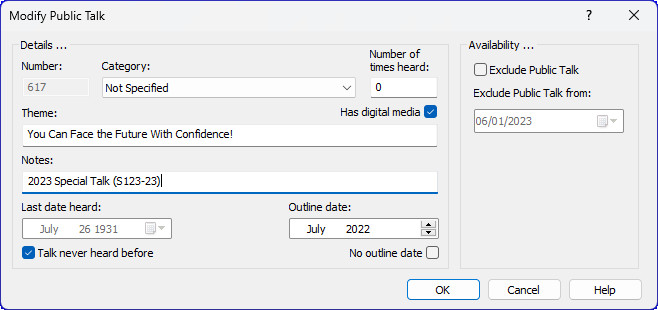
This window allows you to add, edit or delete a public talk. You must press OK for your changes to take effect and the database will get updated. Click Cancel to abort making any changes.
 Did you know that you can also use the Check for New Talks feature? This is the easiest way to keep your database up to date. Please contact me if you find that an outline should be available and we can add it.
To learn more about the features of this window, glance down the table below or highlight the control you are interested in by clicking on the screenshot above.
Number
This is the number of the public talk outline. It is disabled if you are editing an existing talk entry and you will not be allowed to duplicate an existing talk number.
Category
This is the category of the public talk. If you are adding a miscellaneous event, then select "Not Specified".
Number of times heard
This specifies how many times the talk has been heard in your congregation.
Theme
This is the theme for the talk.
Has digital media
Some public talk outlines have official images or videos to be used. Set this option when appropriate.
Notes
Use this field make any notes about this outline. For example, you can note if it is a Special Talk and what it's official reference is.
Last date heard
Press on the arrow to choose a date for when the talk was last heard. You can also click on the separate parts of the date in the edit box and use the arrow keys to adjust the date.
Talk never heard before
If checked, the date entry gets disabled and assigned the date of 26th July, 1931 (this was the date when we took on the name Jehovah's Witnesses). Uncheck this option and the date field will get enabled again and set to today's date.
When checked, it means that you have never heard this talk before in your congregation. By assigning it such an old date, it means it will be correctly placed in any reports that you generate in date order.
Outline Date
Each paper outline has an issue date in the lower left corner (e.g.: 04/18 for April 2018). The database is provided with an initial set of issue dates. These are accurate to the best of my ability however it is your responsibility to ensure these dates are maintained.
No outline date
Set the option No outline date for any custom entry in the database (for example: Circuit Overseer outline).
Exclude Public Talk
Some times you might be instructed to take a talk outline out of circulation for a while. Setting this option will remove the talk number from the drop-down lists when managing your talk exchange.
Exclude Public Talk from
This is to be used in conjunction with the Exclude Public Talk setting. Under normal circumstances you will be informed the date that you need to start excluding the talk from.