pts create unassigned entries
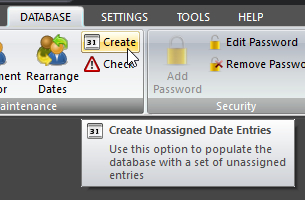 Click Create Unassigned Date Entries on the DATABASE ribbon panel to display this window. Click Create Unassigned Date Entries on the DATABASE ribbon panel to display this window. |
|---|
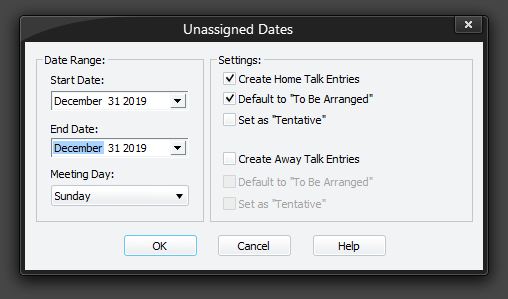
This window allows you to add a bunch of unassigned date records into the Home Talks and / or Away Talks tables. You can optionally set the theme of these newly added records to indicate that they are currently unassigned. Once all your options are set, click the OK button to add the records into the database.
You will find this feature useful if you like to be reminded of which dates are yet to be allocated for a talk or exchange.They become part of the database and show up in your reports. As you assign talks, they will automatically get updated.
 The feature has been developed in such a way, that if you already have some records allocated for some of the days within the chosen date range, that they will simply be skipped. So you won't create duplicate entries in the database.
It is suggested that you only create unassigned records for the Home Talks table, and default them to To Be Arranged. If you find that you use the Away Talks standard report, then you most probably want to include the Away Talks table too.
The best advice is to have a play with the options and see how they affect your reports. You are encouraged to do a Backup of your database before doing this, so that if you get any undesired results, you can easily Restore the previous database.
To learn more about the features of this property page, glance down the table below or highlight the control you are interested in by clicking on the screenshot above.
Start Date
Use this option to select the date from which you want to start adding unassigned records into the database. You don't have to select an actual meeting day, as it will work out the correct initial meeting day from the date you selected automatically.
End Date
Use this option to select the date which you want to end adding unassigned records into the database. You don't have to select an actual meeting day, as it will work out the correct last meeting day from the date you selected automatically.
Meeting Day
Use this drop-down list to select which day of the week that your Public Talk is held on.
It is important that this setting is correct, as it determines what set of dates get added into the database.
Create Home Talk Entries
Specifies if records are actually created and added into the Home Talks database table.
Default to "To Be Arranged"
When set, it will default the talk number field to 1000. This is a special talk number associated with "To Be Arranged".
If you want to change the text to something else, you must use the Public Talks maintenance page and adjust the theme for talk number 1000. Note that you are not allowed to remove this talk number from the database.
Set as "Tentative"
When set, it will default the tentative field.
Create Away Talk Entries
These options behave in exactly the same way as for the aforementioned options. The only difference is that they are applied to the Away Talks database records.