pts db ribbon panel
 |
|| --- |
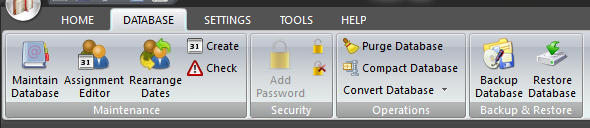
The DATABASE panel is used to manage the underlying database which is at the heart of the Public Talks application.
To learn more about the features of this ribbon panel, glance down the table below or highlight the control you are interested in by clicking on the screenshot above.
Use Maintain Database to add, modify and delete information. You can maintain information for the following areas:
-
- Away / Home Talks
- Brothers
- Congregations
- Categories
- Public talks
- Journal
The purpose of this window is to allow you see at a glance which brothers have been assigned as Chairmen, Interpreters, Watchtower Conductors, Watchtower Readers for a given date range. It also includes the Hospitality and custom role assignments.
You can also modify these assignments either manually, or automatically.This window is also used to highlight any conflicts of assignment.
Use this wizard to change the date of a Home or Away Talk to another date. It is really easy to do as long as you are familiar with each step of the wizard.
This window allows you to add a bunch of unassigned date records into the Home Talks and / or Away Talks tables. You can optionally set the theme of these newly added records to indicate that they are currently unassigned.
Check next home talk exchange has been confirmed and look for unassigned Home Talk numbers (i.e.:1000). You can also perform this check automatically when the application starts. See the Preferences help topic.
A password is added to the database that also encrypts the data held therein and makes it unreadable by other tools.
 Microsoft Access 2007 / 2010 (ACCDB file format) offers new encryption technology that is stronger than that of previous Microsoft Access releases (MDB file format), as it uses a stronger encryption algorithm.
It can be a good idea to change your database password periodically.
You should remove the password if you intend on sending the database to another Public Talks software user (unless you are using the Transfer facility, in which case you should inform the user what the password).
Use the Purge Database feature to physically delete home / away talk assignments (database records) from your database.
Use this to compress your database and reduce the file size. Public Talks automatically does a compact every 30 days (unless you have switched the setting off).
Convert your database between the MDB and ACCDB formats.
Use this feature to backup your active database to another location.
This this feature to restore a previously backed up database (or one that you have received from another user).