-
Notifications
You must be signed in to change notification settings - Fork 0
pts backup database
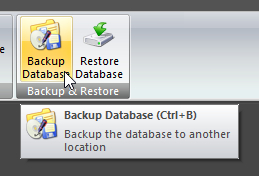
Click Backup Database on the DATABASE ribbon panel. Or press CTRL + B. |
|---|
When you select this option, you are prompted with a standard window box to select where you want to place the backup copy. You must also specify the name of the backup file. It is acceptable to overwrite previously backed up files, but you can never overwrite the Public Talks.MDB / Public Talks.ACCDB which is always in use by the program itself.
Depending upon the file size and where it is being backed up to, a progress window will appear which has a cancel button. You can press this cancel button to abort the backup procedure.
If the backup is successful, an entry (database path and encrypted password) is added to a special log file. This log file is used whenever you want to restore a previously backed up database.
Copyright © 2002 - 2025 by Andrew Truckle. All Rights Reserved.
- Using Public Talks
- Main Application Menu
-
Database Ribbon Panel
- Assignments Editor
- Backup Database
- Check Talk Exchange
- Compact Database
- Convert Database
- Create Unassigned Date Entries
- Database Security
- Maintain Databases
- Purge Database
- Rearrange Dates
- Restore Database
- Help Ribbon Panel
-
Home Ribbon Panel
- Create a Report
-
Manage Custom Reports
- Editing Scripts
- Content Ribbon Panel
- System Ribbon Panel
- Script Command Syntax
-
Tutorials
- Using The Script Editor
-
How To Write Scripts
- Module 1 - The Basics
- Module 2 - Hello, World!
- Module 3 - Multiple Text Blocks
- Module 4 - It's A Date, Then
- Module 5 - Oh, I'm Blushing!
- Module 6 - It is a Rainbow!
- Module 7 - The Font Of All Knowledge
- Module 8 - Queue To The Right
- Module 9 - Memory Like An Elephant
- Module 10 - May I Squeeze In There?
- Module 11 - Move Over, Please
- Module 12 - You Move Over Here
- Module 13 - Is My Back A Funny Colour?
- Module 14 - I'm Going Loopy Here!
- Module 15 - Fields Of Golden... Text
- Module 16 - Man, That Looks Weird
- Module 17 - Inner Peace, Inner Loop
- Advanced Script Features
- Quick Access Toolbar
- Settings Ribbon Panel
- Tools Ribbon Panel
- Revision History
- Contact Information
Click Backup Database on the DATABASE ribbon panel. Or press CTRL + B.