pts tutorial2 module4
(Starts from the new "Dates" script)
| The following commands are used in this module: EOL SHORTDATE_TODAY |
|---|
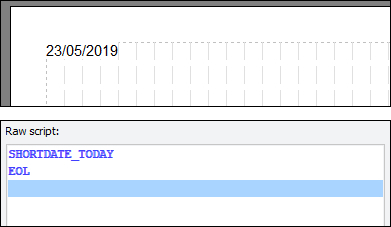 Do the following:
- From the CONTENT ribbon, click Insert Date.
- Select Today.
- Select Short Date.
- Click Insert.
- Insert an EOL command.
Look familiar? The DATE command inserts either:
- Today's Date
- The Range Start Date
- The Range End Date
The range dates would have been chosen on the Custom Reports Management window before you came into the script editor
The editor formats the date according to your choice.
The actual command inserted into the script won't be DATE, it will be something of the form xxxDATE_yyy:
- xxx will be SHORT, LONG or CUSTOM (corresponding to the formatting)
- yyy will be TODAY, STARTDATE or ENDDATE (indicating which date is being displayed)
 The actual date format may differ from yours, since it matches whatever is normal for your Operating System Regional Settings - this is an example of UK format)
In order to use the start or end dates of the date range used in the scripting, you would need to use specific date limits rather than All Entries on the outer page.
The DATE commands require an EOL to be rendered (drawn). This is because they are simply TEXT chunks, we just use a special command to get a certain date into text form instead of supplying the text literally. Since it is nothing more than a TEXT command, everything you can do with TEXT you can do with these. You will learn exactly what you can do with TEXT if you read on.
| Now, please either: Click Cancel Changes Click Save Script followed by Close Script Then when you are ready start a new script called "TextAttribs" (no quotes - attribs is short for attributes, if you're wondering). When you are back with the editor open and waiting, read on. |
|---|
| Previous Module | Next Module |
|---|