pts check talk exchange
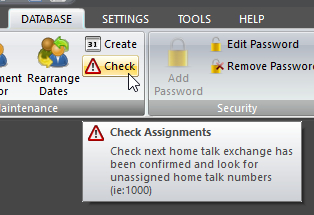 Click Check on the DATABASE ribbon panel to perform the check. Click Check on the DATABASE ribbon panel to perform the check. |
|---|
The application can perform a series of automatic checks every time it starts. You can trigger the check on demand from the Database ribbon panel.
It examines the next talk exchange and will:
- Check to see if the home talk exchange has been confirmed.
- Look for unassigned Home Talk numbers (i.e.:1000).
Home Talk
This window is displayed if this issue is detected:
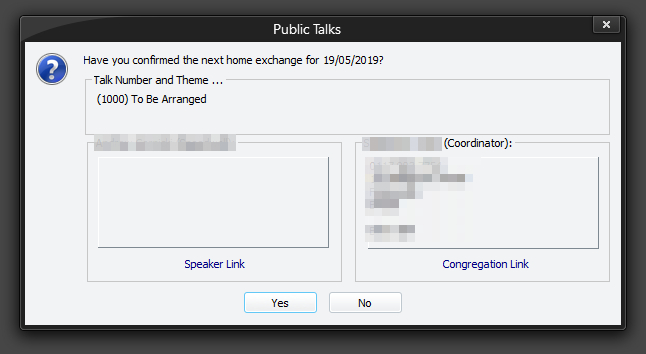
This window provides you with all the available information about the next home talk. This makes it very easy to confirm the exchange. If required, use the Hyperlinks (if you have set them up on the Congregations maintenance page).
 This window will keep displaying when the application starts until you click Yes or the date has passed. This option is off by default.
Talk Number
A pop-up message is displayed when this issue is detected. For example:
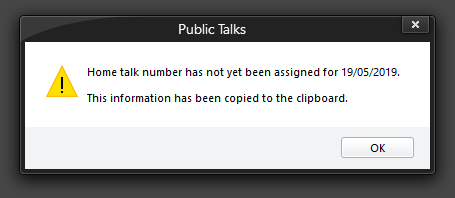
It copies the information to the clipboard. This is useful if you want to paste the details into a text editor.
The way the Check feature works can be adjusted on the application Preferences windows:
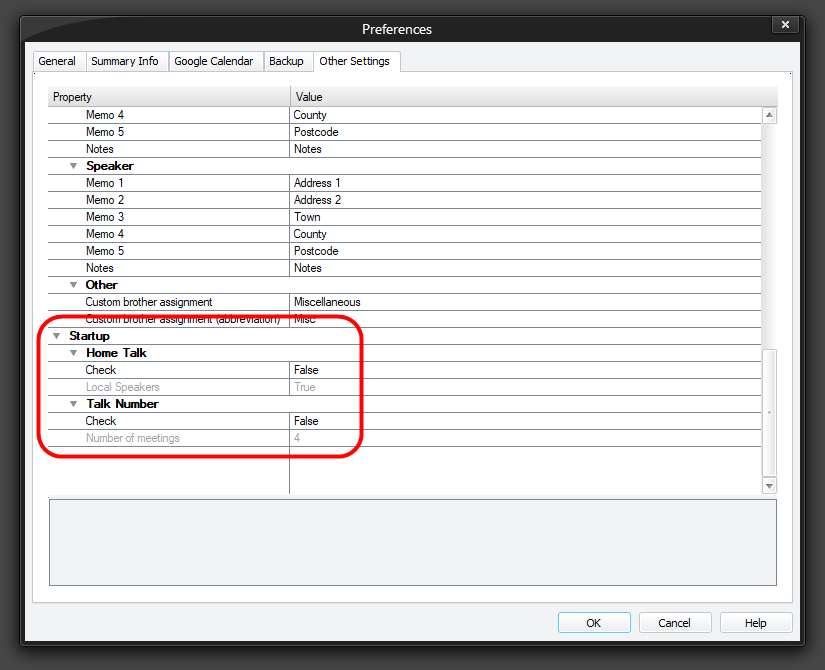
Check (this option is off by default)
The application will examine the next arranged home talk entry and check to see if you have not confirmed the exchange with the speaker or coordinator.
Local Speakers (this option is off by default)
Generally you don't need to contact a local speaker to confirm an exchange as you would have seen them at the meeting. However, for flexibility, this option has been included to allow you to do so if desired. The main option must be set for this one to be enabled.
Check (this option is off by default)
When this option is on, the program will examine the next 1 to 4 arranged home talks for talk number 1000 (this talk number is reserved for To be Arranged).
Number of meetings (this option is disabled by default)
You can set the number of meetings that it will check in advance by using the drop-down list. You can select from 1 to 4 meetings.