pts congregations add new
 Click New Congregation on Congregations maintenance page. Click New Congregation on Congregations maintenance page. |
|---|
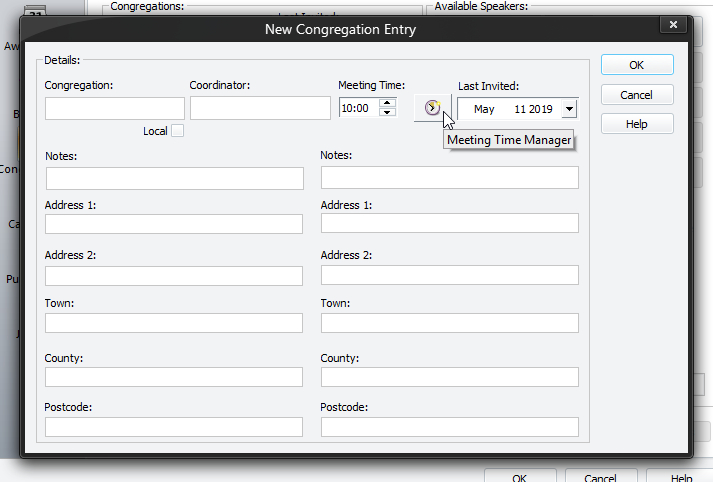
This window allows you to add a new congregation to the database. As a minimum you are required to supply the following information:
- Congregation
- Coordinator
Otherwise the new congregation will not be accepted.
You must close the window by pressing the OK button for your changes to be updated in the database. However, you will be warned if you have duplicated an existing Congregation.
To learn more about the features of this window, glance down the table below or highlight the control you are interested in by clicking on the screenshot above.
Congregation
Please enter the name for the new congregation here.
 The Congregation and Coordinator edit boxes are Intelligent Edit Boxes. Click on the link for more details about what this means.
Local
There can only be one local congregation and this will be your own congregation.
Coordinator
Please enter the name of the Public Talk Coordinator here.
Meeting Time
There are two ways to handle the meeting time:
- If the Congregation always has the Public Talk meeting at the same time, then just enter the time (in 24 hour format).
- If they the congregation alternates meeting time on a yearly basis (or similar) then use the Meeting Time Manager icon (shown in screenshot above). Once the time change information has been entered, the Meeting Time control becomes disabled.
Last Invited
Select the last known date that this congregation was invited to provide speakers at your congregation. Thereafter the application will keep this information to to date as you make talk assignments.
Notes and Memo Information
You may optionally use the note and memo fields to include any additional information about the:
- Congregation
- Coordinator
The **descriptive labels** used for the notes / memos might be different on your version of this window. You can change them in program Preferences.