-
Notifications
You must be signed in to change notification settings - Fork 0
pts purge database
ajtruckle edited this page Jun 5, 2025
·
1 revision
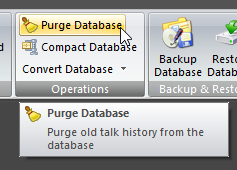 Click Purge Database on the DATABASE ribbon panel to display this window. Click Purge Database on the DATABASE ribbon panel to display this window. |
|---|
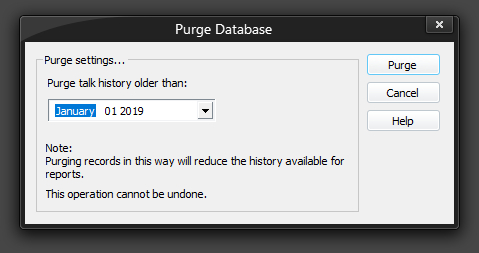
Use the Purge Database feature to physically delete home / away talk assignments (database records) from your database. As indicated, this operation can't be undone and it will reduce the history available.
 Please use this feature with caution and it would be prudent to backup your database first.
Copyright © 2002 - 2025 by Andrew Truckle. All Rights Reserved.
- Using Public Talks
- Main Application Menu
-
Database Ribbon Panel
- Assignments Editor
- Backup Database
- Check Talk Exchange
- Compact Database
- Convert Database
- Create Unassigned Date Entries
- Database Security
- Maintain Databases
- Purge Database
- Rearrange Dates
- Restore Database
- Help Ribbon Panel
-
Home Ribbon Panel
- Create a Report
-
Manage Custom Reports
- Editing Scripts
- Content Ribbon Panel
- System Ribbon Panel
- Script Command Syntax
-
Tutorials
- Using The Script Editor
-
How To Write Scripts
- Module 1 - The Basics
- Module 2 - Hello, World!
- Module 3 - Multiple Text Blocks
- Module 4 - It's A Date, Then
- Module 5 - Oh, I'm Blushing!
- Module 6 - It is a Rainbow!
- Module 7 - The Font Of All Knowledge
- Module 8 - Queue To The Right
- Module 9 - Memory Like An Elephant
- Module 10 - May I Squeeze In There?
- Module 11 - Move Over, Please
- Module 12 - You Move Over Here
- Module 13 - Is My Back A Funny Colour?
- Module 14 - I'm Going Loopy Here!
- Module 15 - Fields Of Golden... Text
- Module 16 - Man, That Looks Weird
- Module 17 - Inner Peace, Inner Loop
- Advanced Script Features
- Quick Access Toolbar
- Settings Ribbon Panel
- Tools Ribbon Panel
- Revision History
- Contact Information