pts tutorial2 module5
(Starts from the new "TextAttribs" script)
| The following commands are used in this module: COLOUR EOL TEXT |
|---|
Before entering our next piece of text, let us explore something new: colour.
 The colour text is written in is considered a font option.
- Click Change Font (a pop-up window is displayed).
- Choose Light Red for the option labelled Colour.
- Click Insert.
Nothing rendered so far, right? Phew!
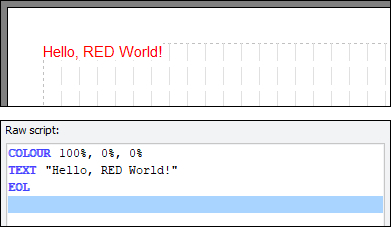
Now insert a TEXT command and EOL as we've learned above, using "Hello, RED World!" as the text (insert it in a single TEXT block for now).
If you have got your EOL in correctly, you should now see your glorious text in light red (colour-blind users may wish to choose a substitute colour and imagine it's red, since people don't usually blush cyan!).
Is that cool or what?
Not impressed, huh?
| Now, please: Click Save Script Optionally click Close Script Then when you are ready, open the "TextAttribs" script and continue with module 6. |
|---|
| Previous Module | Next Module |
|---|