pts settings panel
Overview of the Settings ribbon panel: 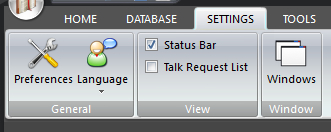
|
|---|
You can customize how Public Talks works by making changes to the application settings. Many features can be switched on or off through this panel or personalized.
To learn more about the features of this ribbon panel, glance down the table below or highlight the control you are interested in by clicking on the screenshot above.
Use the Preferences window to adjust how the application behaves. The settings have been split into five sections:
Public Talks is available in a number of languages. When you change the language that installed with Public Talks, the program will prompt you to automatically shutdown and restart.
- Status Bar
The status bar can be toggled on or off. It is suggested that you leave the status bar visible because feedback and progress monitoring is provided there.
The Talk Request List can be toggled on or off. This is a very handy tool to assist you in making your talk assignments. It is worth reading up on this feature if you are not familiar with it.
- Windows
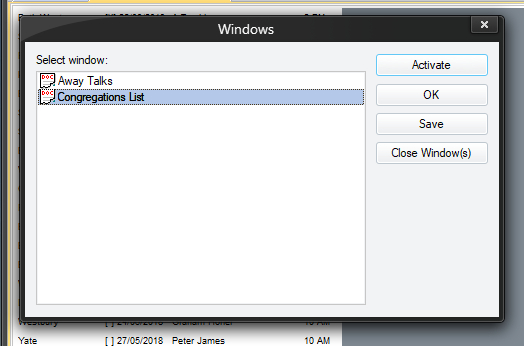 This is a standard windows feature. It shows a list of all your open documents
From here you can select a document and then choose:
- Activate it so that is is visible.
- Save it to your computer. Yes, this is another way to save a document!