pts select database
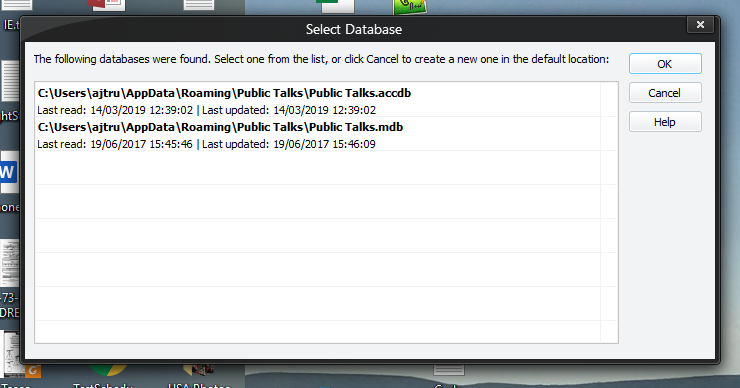
The Select Database window appears when the application is unable to use the file it has listed as its working database. This can occur for a number of reasons:
- The file may no longer exist.
- It may have been renamed.
- You may have changed the password in the software and it no longer matches the database.
- You may have updated your version of Microsoft Office and no longer have the necessary database drivers.
Public Talks searches in a number of common locations, including:
- The folder the application is installed.
- The working folder.
- My Documents (including in a Public Talks subdirectory);
- Public Documents etc..
Only databases that you can use are listed – i.e., only those for which you have the necessary drivers and for which the password you have currently set in the software is valid (if you have no password set, then only databases without password protection will be listed).
 It is possible that the databases listed might not work with your configuration. For example, on my computer MDB databases will only run with the 32 bit edition of Public Talks and ACCDB databases will only run with the 64 bit edition. See the Support Files help topic.
Along with the full path to each database, the dates when it was last read (accessed) and written (updated) are shown; the list is also ordered with the one last written nearest the top, to try to make it easier for you to select the most likely database.
If it cannot find any qualifying databases in all of its locations, or you cancel the window it presents (implying that you don’t like any of its suggestions), the software will create a brand new database for you based on the blank template provided with the program. If, for some reason, even that default cannot be found or used, you will be warned.
It usually tries to default to Public Talks.MDB if it is creating a new database. However, as previously mentioned, this is going to fail if you have a configuration like mine. But don't panic. Please see the Contact Information help topic and get in touch. I will try to assist you.
If you select a file from the dialog, a copy will be made in the working directory and named ‘Public Talks.xxx’, so it won’t affect the file you choose – it always uses a copy.