-
Notifications
You must be signed in to change notification settings - Fork 0
pts blank lines
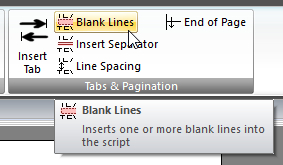
Click Blank Lines on the CONTENT ribbon panel to display the Blank Lines window. Read more: Command Syntax
|
|---|

This issues a blank line with the same height as the current font. Use the slider or type in a number to adjust the number of blank lines to insert.
Note that a blank line will be coloured with any BANNER colour, but will not be coloured with any text back colour.
Although you can choose a simple value using either the slider or by typing in the number, you can also use expressions to calculate a value. If, for example, you were trying to let the report generator control how many blank lines were used between blocks of information, you might use something like this:
$iBlanksBetweenBlocks * 2
You must press Insert (or Update if editing an existing command) for your changes to be applied to the current script in the editor.
Copyright © 2002 - 2025 by Andrew Truckle. All Rights Reserved.
- Using Public Talks
- Main Application Menu
-
Database Ribbon Panel
- Assignments Editor
- Backup Database
- Check Talk Exchange
- Compact Database
- Convert Database
- Create Unassigned Date Entries
- Database Security
- Maintain Databases
- Purge Database
- Rearrange Dates
- Restore Database
- Help Ribbon Panel
-
Home Ribbon Panel
- Create a Report
-
Manage Custom Reports
- Editing Scripts
- Content Ribbon Panel
- System Ribbon Panel
- Script Command Syntax
-
Tutorials
- Using The Script Editor
-
How To Write Scripts
- Module 1 - The Basics
- Module 2 - Hello, World!
- Module 3 - Multiple Text Blocks
- Module 4 - It's A Date, Then
- Module 5 - Oh, I'm Blushing!
- Module 6 - It is a Rainbow!
- Module 7 - The Font Of All Knowledge
- Module 8 - Queue To The Right
- Module 9 - Memory Like An Elephant
- Module 10 - May I Squeeze In There?
- Module 11 - Move Over, Please
- Module 12 - You Move Over Here
- Module 13 - Is My Back A Funny Colour?
- Module 14 - I'm Going Loopy Here!
- Module 15 - Fields Of Golden... Text
- Module 16 - Man, That Looks Weird
- Module 17 - Inner Peace, Inner Loop
- Advanced Script Features
- Quick Access Toolbar
- Settings Ribbon Panel
- Tools Ribbon Panel
- Revision History
- Contact Information
Click Blank Lines on the CONTENT ribbon panel to display the Blank Lines window. Read more: