pts tutorial2 module16
(Continues on from the "Database" script - requires you to follow the previous section first)
| The following commands are used in this module: FIELD LONGDATE_FIELD TALK_THEME |
|---|
Don't those dates from above look a bit funny? Not exactly a format you're used to seeing dates in. You may have noticed on the FIELD window that you could choose the format of the field.
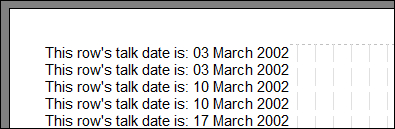 Do the following: Go back to the FIELD command. Double-click it to edit it. Click the Long Date option. Click Update. Look better now? Do the following: Go back to the FIELD command. Double-click it to edit it. Click the Long Date option. Click Update. Look better now? |
|---|
Don't get this date confused with the one we saw near the beginning of this tutorial. That date was taken from your system clock (today), or from the range you specified before opening the script. This date is taken from the database, and is the actual date stored in the table.
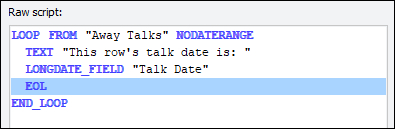 But whoa! Our FIELD command just changed to LONGDATE_FIELD! Don't panic. It is just a special type of FIELD to help the parser know what to do with it. Don't let the fancy name put you off. It still behaves exactly like FIELD, except for how it formats the chunk of text. Similarly the other formats produce their own variations. But whoa! Our FIELD command just changed to LONGDATE_FIELD! Don't panic. It is just a special type of FIELD to help the parser know what to do with it. Don't let the fancy name put you off. It still behaves exactly like FIELD, except for how it formats the chunk of text. Similarly the other formats produce their own variations. |
|---|
 CUSTOMDATE_FIELD's special formatting parameter is covered elsewhere in this help documentation, so it won't be covered here. Notice how these adaptations of the FIELD command are like the DATE command changing depending on formatting and source.
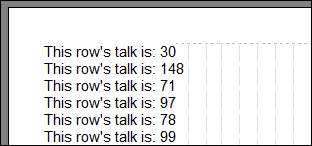 Want to know what Talk theme name is for? Edit the LONGDATE_FIELD command. Choose Talk Number as the field instead of Talk Date. Select "Don't interpret, use contents as is" to begin with. Update it. Edit the TEXT command to say "This row's talk is: " instead. A nice set of talk numbers, eh? Want to know what Talk theme name is for? Edit the LONGDATE_FIELD command. Choose Talk Number as the field instead of Talk Date. Select "Don't interpret, use contents as is" to begin with. Update it. Edit the TEXT command to say "This row's talk is: " instead. A nice set of talk numbers, eh? |
|---|
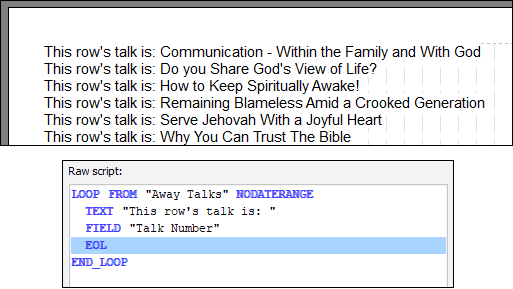 Now try it again: Edit the FIELD command. Format as a Talk theme name. Update it. It translated our talk numbers into proper talk names for us! The parser holds the list of defined talk numbers and their corresponding titles (names), as defined on the Maintenance window - thus, it can translate for us. Now try it again: Edit the FIELD command. Format as a Talk theme name. Update it. It translated our talk numbers into proper talk names for us! The parser holds the list of defined talk numbers and their corresponding titles (names), as defined on the Maintenance window - thus, it can translate for us. |
 This is probably giving you a headache; take a break - there are probably more headaches to come (sorry!).
| Now, please: Click Save Script click Close Script Then when you are ready continue with final module 17. |
|---|
| Previous Module | Next Module |
|---|