pts tutorial3 module3
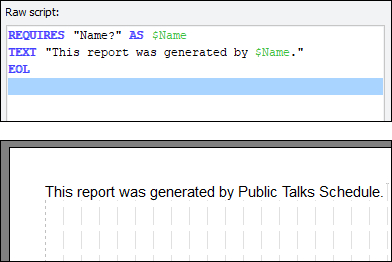 Whenever the parser comes across a word beginning with a dollar sign, it assumes it is a variable and tries to make sense of it. It extracts the word immediately following the dollar sign, and then tries to look up that combination to see if such a variable exists. If it does, it then grabs its current value, and that is rendered on the output instead of the variable's name. Thus, it substitutes the variable's value in place of the variable's name in the script (internally), and then uses the result as normal. Whenever the parser comes across a word beginning with a dollar sign, it assumes it is a variable and tries to make sense of it. It extracts the word immediately following the dollar sign, and then tries to look up that combination to see if such a variable exists. If it does, it then grabs its current value, and that is rendered on the output instead of the variable's name. Thus, it substitutes the variable's value in place of the variable's name in the script (internally), and then uses the result as normal. |
|---|
Notice that since the value is substituted in place of the variable name, the variable reference is embedded directly into the TEXT (or PARAGRAPH) command. It is not possible to use a variable for rendering simple text without embedding it like this. Even if you wanted to change colours or font and thus needed the variable on a raw script line of its own, it must still be part of a TEXT or PARAGRAPH command and within speech marks.
What if you want a dollar sign in the script? Even though the dollar sign is used to indicate a variable, it is possible to get it in a script literally. Depending on how you want it, there are ways: if you want a dollar sign on its own with spaces either side, simply write a single dollar sign on its own in the raw script.
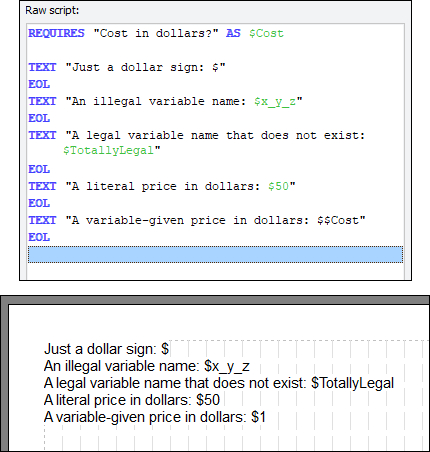 The reason this works is due to how the parser handles various 'wrong' combinations of variables. If a dollar sign is followed by a space, it is not interpreted as a variable and is just drawn as is. This is why the single dollar sign works as above. It is followed by a space, and so is shown literally. If a dollar sign is followed by an illegal variable name, or a legal variable name but for a variable that just doesn't exist, then the dollar sign and the variable name will be shown as is. This is a good indication of whether you have got the variable name wrong, or have not declared it. If the variable name comes out in the rendered output complete with dollar sign, you made a tiny mistake that needs fixing. If a dollar sign is followed immediately by another, the first one is always printed out literally, and the second one is parsed using normal variable rules. The reason this works is due to how the parser handles various 'wrong' combinations of variables. If a dollar sign is followed by a space, it is not interpreted as a variable and is just drawn as is. This is why the single dollar sign works as above. It is followed by a space, and so is shown literally. If a dollar sign is followed by an illegal variable name, or a legal variable name but for a variable that just doesn't exist, then the dollar sign and the variable name will be shown as is. This is a good indication of whether you have got the variable name wrong, or have not declared it. If the variable name comes out in the rendered output complete with dollar sign, you made a tiny mistake that needs fixing. If a dollar sign is followed immediately by another, the first one is always printed out literally, and the second one is parsed using normal variable rules. |
|---|
Since numbers are legal in variable names, beware of trying to show monetary values in a script. If you use $50 in script, this will come out unless you happen to have a variable called $50, in which case it will substitute its value as normal. In that specific case, using two dollar signs together will make the extra dollar sign appear. Rule of thumb: don't make variable names out of pure numbers!
| Previous Module | Next Module |
|---|