pts public talks tab
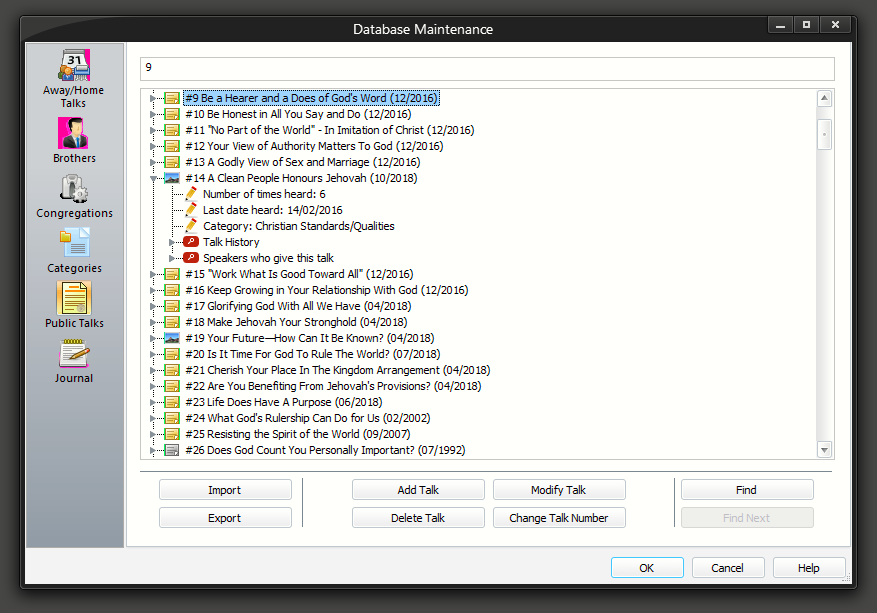
The Public Talks property page allows you to keep track of what public talks you have available. You can add, modify or delete records.
You can also add miscellaneous entries into this table for special purposes. You just have to ensure that you assign them a unique talk number. The following have already been added:
- Circuit Overseer Visit
- Circuit Assembly
- District Convention
To learn more about the features of this property page, glance down the table below or highlight the control you are interested in by clicking on the screenshot above.
This property page is one part of the Maintenance Dialogue. Please click on the link to get an overview of the entire window.
This shows a list of all current talks that you have in your database. At a glance you can tell:
- The talk number, theme and outline date
- How many times the talk has been heard in your congregation
- The last time it was heard in your congregation
- Its assigned category
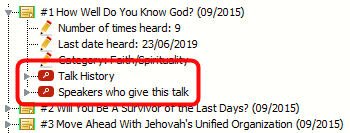 Also, for each talk you will find that there are two expandable branches. Talk History Speakers who give this talk Read more about them below. Also, for each talk you will find that there are two expandable branches. Talk History Speakers who give this talk Read more about them below. |
|---|
Jump To
You can use the Jump To edit box at the top to type in a talk number. The list will automatically locate, select and expand the talk for you in the list.
Talk History Branch
 If you expand the Talk History branch it will provide you with a list of the occasions when the talk has been presented in your congregation. It will provide the date, speaker and his congregation. The information is presented in descending date order. Talk dates which are in the future are indicated with bold text. If you expand the Talk History branch it will provide you with a list of the occasions when the talk has been presented in your congregation. It will provide the date, speaker and his congregation. The information is presented in descending date order. Talk dates which are in the future are indicated with bold text. |
|---|
 The history information is gathered from the Home Talks table in the database. So if you delete entries from the database in the Away / Home maintenance page, you will get less talk history information displayed here.
Speakers Branch
If you expand the Speakers branch it will show you a list of speakers who give this talk.
The list is sorted by congregation and then by speaker. If the talk is one of the speakers favourite outlines then it will be shown with bold text. This might be useful when handling talk coordination.
You might find the Talk Request List more beneficial for this purpose.
Import
This allows you toImport public talk data into the database. There is a separate topic discussing this option. Please click on the link to learn more.
Export
This allows you to export the public talk data into a tab-delimited text file. This button is disabled if there are presently no records in the database table.
Add Talk
This allows you to add a new public talk to the database. It displays the Public Talk Entry window. Click on the link for more details. You will not be allowed to duplicate an existing talk number.
Did you know that you can also use the Check for New Talks feature? This is the easiest way to keep your database up to date. Please contact me if you find that an outline should be available and we can add it.
Modify Talk
This allows you to modify the details of the currently selected talk. It displays the Public Talk Entry window. Click on the link for more details.
Delete Talk
This allows you to delete the currently selected talk from the database.Since this operation cannot be reversed you will be asked to confirm your actions.
It will also get deleted from any speaker who was assigned the selected talk number.
Change Talk Number
This allows you to change the number of the talk. For example, you might have added a talk for a Circuit Overseer visit and used a temporary number, then when you get the actual outline for public use, you can simply renumber the talk.
Find
Press the Find button if you want to jump to specific records. It invokes the Find window.
This option is disabled if the current entry has been modified and the Apply Changes button hasn't been pressed
Find Next
Pressing this button continues the previous search to find the next matching record. This button is disabled if the Find button has not already been pressed, or the searching has reached the end of the records.