Repository navigation
LightMesh

LightMesh:Void mesh:Int32, red:Float32, green:Float32, blue:Float32, range:Float32=0, x:Float32=0, y:Float32=0, z:Float32=0| Parameter | Mode | Type | Default | Description |
|---|---|---|---|---|
mesh |
In | Int32 | required | Mesh handle. |
red |
In | Float32 | required | Red part of the light, 0 to 255. |
green |
In | Float32 | required | Green part of the light, 0 to 255. |
blue |
In | Float32 | required | Blue part of the light, 0 to 255. |
range |
In | Float32 | 0 |
Strength of the light, 0 for the same amount on every vertex. Defaults to 0. |
x |
In | Float32 | 0 |
X position of the light in the mesh's own space. Defaults to 0. |
y |
In | Float32 | 0 |
Y position of the light in the mesh's own space. Defaults to 0. |
z |
In | Float32 | 0 |
Z position of the light in the mesh's own space. Defaults to 0. |
Lights a mesh without any light in the world, by adding color to its vertices once. It is a fast way to bake the look of a light into static geometry, or to fake lights beyond the limit of 8. The mesh must have vertex colors switched on with EntityFX mesh, 2 or the change stays invisible. New meshes have white vertices, so the added light has nothing to brighten until you darken them with VertexColor.
With a range of 0 the color is added to every vertex alike. Otherwise only vertices that face the position get light, and the more directly they face it and the closer they are, the more they get. range scales the strength, so doubling it doubles the light.
The color is added to what the vertices already have and is kept: calling the command again brightens the mesh further, and it is not undone by anything but painting the vertices again.
Graphics3D 320, 240, 0, 2
SetBuffer BackBuffer()
camera = CreateCamera()
PositionEntity camera, 0, 0, -4
ball = CreateSphere(24)
; Start from dark vertices, use them without any light in the world.
surf = GetSurface(ball, 1)
For v = 0 To CountVertices(surf) - 1
	VertexColor surf, v, 20, 20, 30
Next
EntityFX ball, 1 + 2
LightMesh ball, 255, 120, 40, 4, -3, 2, -3
RenderWorld
Flip
WaitKey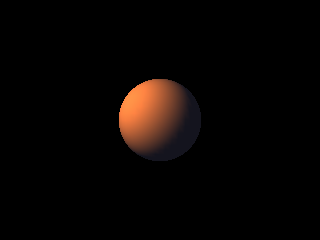
Differences
- Overview
Features (41)
- 3D Studio models
- Asynchronous loading
- blitz-format
- Blitz-Tidy
- Color depth
- Colors
- Console window on Windows
- CPU features
- Culling
- Debug handle checks
- Depth buffer
- DirectX models
- Displays
- DPI scaling on Windows
- Fullscreen
- glTF models
- Image formats
- IPv6
- Language
- Large Meshes
- Lost graphics device
- Many lights
- Memory
- Mip maps
- Movie controls
- Multiplayer
- Number suffixes
- Numbers of other sizes
- Parameter modes (In, Out, InOut)
- Presentation sync
- Samplers
- Saving pictures
- Scan Codes
- Sound resampling
- Spherical fog
- Sprite depth fade (soft edges)
- Sprite shapes
- The windows of BlitzPlus
- Types everywhere
- Userlib declarations
- Warnings
Commands (333)
- ActivateWindow
- ActiveObjects
- ActiveWindow
- AddVertex
- AnimateMD2
- AntiAlias
- AppTitle
- AsyncLoading 〔BlitzLLVM〕
- AsyncSaving 〔BlitzLLVM〕
- AvailVidMem
- BackBuffer
- BrushTexture
- BSPAmbientLight
- BSPLighting
- BufferDirty
- Byte 〔BlitzLLVM〕
- ByteSwap 〔BlitzLLVM〕
- CameraFogMode
- CanvasBuffer
- ChannelPan
- ChannelPitch
- ChannelPlaying
- ChannelVolume
- ClientHeight
- ClientWidth
- CloseMovie
- Collisions
- CollisionTime
- Confirm
- CopyPixel
- CopyPixelFast
- CopyRect
- CountDisplayModes 〔BlitzLLVM〕
- CountDisplays 〔BlitzLLVM〕
- CountGfxDrivers
- CountGfxModes
- CountHostAddresses
- CountHostIPs
- CountRefreshRates 〔BlitzLLVM〕
- CreateButton
- CreateCanvas
- CreateComboBox
- CreateHtmlView 〔BlitzLLVM〕
- CreateImage
- CreateLabel
- CreateListBox
- CreateListener
- CreateMenu
- CreatePlane
- CreateTabber
- CreateTCPServer
- CreateTerrain
- CreateTextArea
- CreateTexture
- CreateToolBar
- CreateUDPStream
- CreateWindow
- DebugObjects
- Desktop
- DesktopBuffer
- DirectInputEnabled
- DisplayDepth 〔BlitzLLVM〕
- DisplayHeight 〔BlitzLLVM〕
- DisplayModeDepth 〔BlitzLLVM〕
- DisplayModeHeight 〔BlitzLLVM〕
- DisplayModeRefreshRate 〔BlitzLLVM〕
- DisplayModeWidth 〔BlitzLLVM〕
- DisplayName 〔BlitzLLVM〕
- DisplayRefreshRate 〔BlitzLLVM〕
- DisplayScale 〔BlitzLLVM〕
- DisplayWidth 〔BlitzLLVM〕
- DisplayX 〔BlitzLLVM〕
- DisplayY 〔BlitzLLVM〕
- Double 〔BlitzLLVM〕
- DrawBlockRect
- DrawImage
- DrawImageRect
- DrawMovie
- EmitSound
- EnableDirectInput
- EndGraphics
- EntityDepthFade 〔BlitzLLVM〕
- EntityLighting
- EntityStatic 〔BlitzLLVM〕
- EntityTexture
- Flip
- FlipCanvas
- FlushJoy
- FlushKeys
- FlushMouse
- FontHeight
- FontWidth
- FormatTextAreaText
- FreeFont
- FreeImage
- FreeSound
- FreeTexture
- FrontBuffer
- GammaBlue
- GammaGreen
- GammaRed
- GetBrushTexture
- GetHostAddress
- GetJoy
- GetKey
- GetMouse
- GetMovieTexture 〔BlitzLLVM〕
- GetSurfaceBrush
- GetTCPStreamAddress
- GetUDPMsgAddress
- GetUDPStreamAddress
- GfxDriver3D
- GfxDriverCaps3D
- GfxDriverName
- GfxModeDepth
- GfxModeExists
- GfxModeFormat
- GfxModeHeight
- GfxModeWidth
- GrabImage
- Graphics
- Graphics3D
- GraphicsDepth
- GraphicsFormat
- Half 〔BlitzLLVM〕
- HidePointer
- HostIP
- HtmlViewEventURL 〔BlitzLLVM〕
- HtmlViewRun 〔BlitzLLVM〕
- HtmlViewStatus 〔BlitzLLVM〕
- HWMultiTex
- HWRawInput
- ImageBuffer
- ImagesCollide
- Include
- Input
- Int
- JoyChanged
- JoyDeviceConnected
- JoyDeviceCount
- JoyDeviceName
- JoyHat
- JoyType
- JoyWait
- KeyboardChanged
- KeyboardDeviceConnected
- KeyboardDeviceCount
- KeyboardDeviceName
- KeyDown
- KeyHit
- LastJoyDevice
- LastKeyboardDevice
- LastMouseDevice
- LeadingZeros 〔BlitzLLVM〕
- Load3DSound
- LoadAnimMesh
- LoadAnimTexture
- LoadBSP
- LoadBuffer
- LoaderMatrix
- LoadFont
- LoadImage
- LoadMesh
- LoadSound
- LoadTerrain
- LoadTexture
- Locate
- LockBuffer
- LockedFormat
- LockedPitch
- LockedPixels
- LockMouse
- LockTextArea
- Long 〔BlitzLLVM〕
- LoopMovie 〔BlitzLLVM〕
- LoopSound
- MaximizeWindow
- MeshCullBox
- Microseconds 〔BlitzLLVM〕
- MinimizeWindow
- ModifyTerrain
- MouseChanged
- MouseDeviceConnected
- MouseDeviceCount
- MouseDeviceName
- MouseDown
- MouseHit
- MouseX
- MouseXSpeed
- MouseY
- MouseYSpeed
- MouseZ
- MouseZSpeed
- MoveMouse
- MovieHeight
- MovieLength 〔BlitzLLVM〕
- MoviePlaying
- MoviePosition 〔BlitzLLVM〕
- MovieVolume 〔BlitzLLVM〕
- MovieWidth
- Notify
- OpenMovie
- OpenTCPStream
- PauseChannel
- PauseMovie 〔BlitzLLVM〕
- PickedTime
- PlayCDTrack
- PlayMovie 〔BlitzLLVM〕
- PlayMusic
- PlaySound
- PopCount 〔BlitzLLVM〕
- Proceed
- ProfileBegin
- ProfileEnable
- ProfileEnd
- ProfileFlipCount
- ProfileFPS
- ProfileItemCount
- ProfileItemName
- ProfileOutput
- ProfileSample
- ProfileSlow
- ProfileValue
- ProjectedX
- ProjectedZ
- QueryObject
- RawInput
- RawInputEnabled
- ReadPixel
- ReadPixel64 〔BlitzLLVM〕
- ReadPixelFast
- ReadPixelFast64 〔BlitzLLVM〕
- RefreshRateAt 〔BlitzLLVM〕
- RenderWorld
- RequestColor
- RequestDir
- RequestFile
- RequestFont
- ResizeImage
- ResumeChannel
- RotL 〔BlitzLLVM〕
- RotR 〔BlitzLLVM〕
- RuntimeError
- SatByte 〔BlitzLLVM〕
- SatInt 〔BlitzLLVM〕
- SatLong 〔BlitzLLVM〕
- SatShort 〔BlitzLLVM〕
- SatUByte 〔BlitzLLVM〕
- SatUInt 〔BlitzLLVM〕
- SatULong 〔BlitzLLVM〕
- SatUShort 〔BlitzLLVM〕
- SaveBuffer
- SaveImage
- ScaleImage
- ScanLine
- SeekMovie 〔BlitzLLVM〕
- SendUDPMsg
- SendUDPMsgTo
- SetBuffer
- SetCubeFace
- SetCubeMode
- SetFont
- SetGadgetFont
- SetGamma
- SetGfxDriver
- SetMenuText
- SetMinWindowSize
- SetSamplerAddressModeU 〔BlitzLLVM〕
- SetSamplerAddressModeV 〔BlitzLLVM〕
- SetSamplerAddressModeW 〔BlitzLLVM〕
- SetSamplerAnisotropy 〔BlitzLLVM〕
- SetSamplerBorderColor 〔BlitzLLVM〕
- SetSamplerFilterMag 〔BlitzLLVM〕
- SetSamplerFilterMin 〔BlitzLLVM〕
- SetSamplerFilterMip 〔BlitzLLVM〕
- SetSamplerLodBias 〔BlitzLLVM〕
- SetTextAreaFont
- SetToolBarTips
- Short 〔BlitzLLVM〕
- ShowPointer
- Single 〔BlitzLLVM〕
- SoundPan
- SoundPitch
- SoundVolume
- SpriteDepthFade 〔BlitzLLVM〕
- SpriteViewMode
- StartNetGame
- Stats3D
- Step
- Stop
- StopChannel
- StopMovie 〔BlitzLLVM〕
- StringHeight
- StringWidth
- SystemProperty
- TCPStreamIP
- TerrainDetail
- TerrainShading
- Text
- TextureBlend
- TextureBuffer
- TextureCoords
- TextureHeight
- TextureName
- TextureWidth
- TFormImage
- TotalVidMem
- TrailingZeros 〔BlitzLLVM〕
- UByte 〔BlitzLLVM〕
- UDPMsgIP
- UDPStreamIP
- UInt 〔BlitzLLVM〕
- ULong 〔BlitzLLVM〕
- UnlockMouse
- UpdateGamma
- UpdateWindowMenu
- UShort 〔BlitzLLVM〕
- VertexTexCoords
- VertexW
- VKeyDown
- VKeyHit
- VWait
- WaitJoy
- WBuffer
- WindowScale 〔BlitzLLVM〕
- WindowScaling 〔BlitzLLVM〕
- WireFrame
- Write
- WritePixel
- WritePixel64 〔BlitzLLVM〕
- WritePixelFast
- WritePixelFast64 〔BlitzLLVM〕
Language Features
- Overview
Math (31)
- Overview
- Abs
- ACos
- ASin
- ATan
- ATan2
- ByteSwap 〔BlitzLLVM〕
- Ceil
- Cos
- Exp
- Floor
- LeadingZeros 〔BlitzLLVM〕
- Log
- Log10
- Mod
- Pi
- PopCount 〔BlitzLLVM〕
- RotL 〔BlitzLLVM〕
- RotR 〔BlitzLLVM〕
- SatByte 〔BlitzLLVM〕
- SatInt 〔BlitzLLVM〕
- SatLong 〔BlitzLLVM〕
- SatShort 〔BlitzLLVM〕
- SatUByte 〔BlitzLLVM〕
- SatUInt 〔BlitzLLVM〕
- SatULong 〔BlitzLLVM〕
- SatUShort 〔BlitzLLVM〕
- Sgn
- Sin
- Sqr
- Tan
- TrailingZeros 〔BlitzLLVM〕
Time & Date (8)
BlitzBasic
- Overview
Buffers and Pixels (20)
- Overview
- BackBuffer
- BufferDirty
- CopyPixel
- CopyPixelFast
- CopyRect
- FrontBuffer
- GraphicsBuffer
- LoadBuffer
- LockBuffer
- ReadPixel
- ReadPixel64 〔BlitzLLVM〕
- ReadPixelFast
- ReadPixelFast64 〔BlitzLLVM〕
- SaveBuffer
- SetBuffer
- UnlockBuffer
- WritePixel
- WritePixel64 〔BlitzLLVM〕
- WritePixelFast
- WritePixelFast64 〔BlitzLLVM〕
Display (46)
- Overview
- AvailVidMem
- CountDisplayModes 〔BlitzLLVM〕
- CountDisplays 〔BlitzLLVM〕
- CountGfxDrivers
- CountGfxModes
- CountRefreshRates 〔BlitzLLVM〕
- DisplayDepth 〔BlitzLLVM〕
- DisplayHeight 〔BlitzLLVM〕
- DisplayModeDepth 〔BlitzLLVM〕
- DisplayModeHeight 〔BlitzLLVM〕
- DisplayModeRefreshRate 〔BlitzLLVM〕
- DisplayModeWidth 〔BlitzLLVM〕
- DisplayName 〔BlitzLLVM〕
- DisplayRefreshRate 〔BlitzLLVM〕
- DisplayScale 〔BlitzLLVM〕
- DisplayWidth 〔BlitzLLVM〕
- DisplayX 〔BlitzLLVM〕
- DisplayY 〔BlitzLLVM〕
- EndGraphics
- Flip
- GammaBlue
- GammaGreen
- GammaRed
- GfxDriver 〔BlitzLLVM〕
- GfxDriverName
- GfxModeDepth
- GfxModeExists
- GfxModeFormat
- GfxModeHeight
- GfxModeWidth
- Graphics
- GraphicsDepth
- GraphicsFormat
- GraphicsHeight
- GraphicsLost
- GraphicsPalette
- GraphicsWidth
- HidePointer
- PrimaryDisplay 〔BlitzLLVM〕
- RefreshRateAt 〔BlitzLLVM〕
- SetGamma
- SetGfxDriver
- ShowPointer
- TotalVidMem
- UpdateGamma
- VWait
Fonts and Text (12)
Images (39)
- Overview
- AsyncLoading 〔BlitzLLVM〕
- AsyncSaving 〔BlitzLLVM〕
- AutoMidHandle
- CopyImage
- CreateImage
- DrawBlock
- DrawBlockRect
- DrawImage
- DrawImageRect
- FreeImage
- GrabImage
- HandleImage
- ImageBuffer
- ImageFrameDelay
- ImageFrames
- ImageHeight
- ImageReady 〔BlitzLLVM〕
- ImageRectCollide
- ImageRectOverlap
- ImagesCollide
- ImagesOverlap
- ImageWidth
- ImageXHandle
- ImageYHandle
- LoadAnimImage
- LoadImage
- MaskImage
- MidHandle
- RectsOverlap
- ResizeImage
- RotateImage
- SaveImage
- SavesFailed 〔BlitzLLVM〕
- SavesPending 〔BlitzLLVM〕
- ScaleImage
- TFormFilter
- TFormImage
- TileBlock
- TileImage
Mouse (25)
- Overview
- DirectInputEnabled
- EnableDirectInput
- FlushMouse
- GetMouse
- HWRawInput
- LastMouseDevice
- LockMouse
- MouseChanged
- MouseDeviceConnected
- MouseDeviceCount
- MouseDeviceName
- MouseDown
- MouseHit
- MouseWait
- MouseX
- MouseXSpeed
- MouseY
- MouseYSpeed
- MouseZ
- MouseZSpeed
- MoveMouse
- RawInput
- RawInputEnabled
- UnlockMouse
- WaitMouse
Movies (15)
- Overview
- CloseMovie
- DrawMovie
- GetMovieTexture 〔BlitzLLVM〕
- LoopMovie 〔BlitzLLVM〕
- MovieHeight
- MovieLength 〔BlitzLLVM〕
- MoviePlaying
- MoviePosition 〔BlitzLLVM〕
- MovieVolume 〔BlitzLLVM〕
- MovieWidth
- OpenMovie
- PauseMovie 〔BlitzLLVM〕
- PlayMovie 〔BlitzLLVM〕
- SeekMovie 〔BlitzLLVM〕
- StopMovie 〔BlitzLLVM〕
Network (26)
- Overview
- AcceptTCPStream
- CloseTCPServer
- CloseTCPStream
- CloseUDPStream
- CountHostAddresses
- CountHostIPs
- CreateTCPServer
- CreateUDPStream
- DottedIP
- GetHostAddress
- GetTCPStreamAddress
- GetUDPMsgAddress
- GetUDPStreamAddress
- HostIP
- OpenTCPStream
- RecvUDPMsg
- SendUDPMsg
- SendUDPMsgTo
- TCPStreamIP
- TCPStreamPort
- TCPTimeouts
- UDPMsgIP
- UDPMsgPort
- UDPStreamIP
- UDPStreamPort
- UDPTimeouts
Blitz3D
- Overview
3D Sound (2)
Animation (16)
BSP (4)
- Overview
- BSPAmbientLight
- BSPLighting
- BSPLightmapColor 〔BlitzLLVM〕
- LoadBSP
Display (9)
- Overview
- CountGfxModes3D
- GfxDriver3D
- GfxDriverCaps3D
- GfxMode3D
- GfxMode3DExists
- GfxMode3DHeight 〔BlitzLLVM〕
- GfxMode3DWidth 〔BlitzLLVM〕
- Graphics3D
- Windowed3D
Entities (44)
- Overview
- AlignToVector
- CopyEntity
- CountChildren
- CreatePivot
- EntityAlpha
- EntityAutoFade
- EntityBlend
- EntityClass
- EntityColor
- EntityDepthFade 〔BlitzLLVM〕
- EntityDistance
- EntityFX
- EntityInView
- EntityLightChannel 〔BlitzLLVM〕
- EntityLighting
- EntityName
- EntityOrder
- EntityParent
- EntityPitch
- EntityReady 〔BlitzLLVM〕
- EntityRoll
- EntityShininess
- EntityStatic 〔BlitzLLVM〕
- EntityTexture
- EntityX
- EntityY
- EntityYaw
- EntityZ
- FindChild
- FreeEntity
- GetChild
- GetMatElement
- GetParent
- HideEntity
- MoveEntity
- NameEntity
- PaintEntity
- PointEntity
- PositionEntity
- RotateEntity
- ScaleEntity
- ShowEntity
- TranslateEntity
- TurnEntity
Lights (5)
Sprites (7)
Surfaces (29)
- Overview
- AddTriangle
- AddVertex
- ClearSurface
- CountSurfaces
- CountTriangles
- CountVertices
- CreateSurface
- FindSurface
- GetSurface
- PaintSurface
- TriangleVertex
- UpdateNormals
- VertexAlpha
- VertexBlue
- VertexColor
- VertexCoords
- VertexGreen
- VertexNormal
- VertexNX
- VertexNY
- VertexNZ
- VertexRed
- VertexTexCoords
- VertexU
- VertexV
- VertexW
- VertexX
- VertexY
- VertexZ
Textures (51)
- Overview
- AtlasTexture
- ClearTextureFilters
- CreateSampler 〔BlitzLLVM〕
- CreateTexture
- FreeSampler 〔BlitzLLVM〕
- FreeTexture
- GetSamplerAddressModeU 〔BlitzLLVM〕
- GetSamplerAddressModeV 〔BlitzLLVM〕
- GetSamplerAddressModeW 〔BlitzLLVM〕
- GetSamplerAnisotropy 〔BlitzLLVM〕
- GetSamplerBorderColorA 〔BlitzLLVM〕
- GetSamplerBorderColorB 〔BlitzLLVM〕
- GetSamplerBorderColorG 〔BlitzLLVM〕
- GetSamplerBorderColorR 〔BlitzLLVM〕
- GetSamplerFilterMag 〔BlitzLLVM〕
- GetSamplerFilterMin 〔BlitzLLVM〕
- GetSamplerFilterMip 〔BlitzLLVM〕
- GetSamplerLodBias 〔BlitzLLVM〕
- GetSamplerLodMax 〔BlitzLLVM〕
- GetSamplerLodMin 〔BlitzLLVM〕
- LoadAnimTexture
- LoadAtlas
- LoadTexture
- PositionTexture
- RotateTexture
- SaveTexture 〔BlitzLLVM〕
- ScaleTexture
- SetCubeFace
- SetCubeMode
- SetSamplerAddressModeU 〔BlitzLLVM〕
- SetSamplerAddressModeV 〔BlitzLLVM〕
- SetSamplerAddressModeW 〔BlitzLLVM〕
- SetSamplerAnisotropy 〔BlitzLLVM〕
- SetSamplerBorderColor 〔BlitzLLVM〕
- SetSamplerFilterMag 〔BlitzLLVM〕
- SetSamplerFilterMin 〔BlitzLLVM〕
- SetSamplerFilterMip 〔BlitzLLVM〕
- SetSamplerLodBias 〔BlitzLLVM〕
- SetSamplerLodMax 〔BlitzLLVM〕
- SetSamplerLodMin 〔BlitzLLVM〕
- SetTextureSampler 〔BlitzLLVM〕
- TextureBlend
- TextureBuffer
- TextureCoords
- TextureFilter
- TextureFrameDelay
- TextureFrames
- TextureHeight
- TextureName
- TextureReady 〔BlitzLLVM〕
- TextureWidth
World (20)
BlitzPlus
- Overview
Gadgets (50)
- Overview
- ActivateGadget
- AddGadgetItem
- ButtonState
- ClearGadgetItems
- CountGadgetItems
- CreateButton
- CreateComboBox
- CreateHtmlView 〔BlitzLLVM〕
- CreateLabel
- CreateListBox
- CreatePanel
- CreateProgBar
- CreateSlider
- CreateTabber
- DisableGadget
- EnableGadget
- FreeGadget
- GadgetFont
- GadgetGroup
- GadgetHeight
- GadgetItemText
- GadgetText
- GadgetWidth
- GadgetX
- GadgetY
- HideGadget
- HtmlViewBack 〔BlitzLLVM〕
- HtmlViewCurrentURL 〔BlitzLLVM〕
- HtmlViewEventURL 〔BlitzLLVM〕
- HtmlViewForward 〔BlitzLLVM〕
- HtmlViewGo 〔BlitzLLVM〕
- HtmlViewRun 〔BlitzLLVM〕
- HtmlViewStatus 〔BlitzLLVM〕
- InsertGadgetItem
- ModifyGadgetItem
- RemoveGadgetItem
- SelectedGadgetItem
- SelectGadgetItem
- SetButtonState
- SetGadgetFont
- SetGadgetLayout
- SetGadgetShape
- SetGadgetText
- SetPanelColor
- SetPanelImage
- SetSliderRange
- SetSliderValue
- ShowGadget
- SliderValue
- UpdateProgBar