Repository navigation
RequestColor
Narta Xaymar Dirks edited this page Oct 31, 2026
·
6 revisions

RequestColor:Int32 red:Int32=255, green:Int32=255, blue:Int32=255| Parameter | Mode | Type | Default | Description |
|---|---|---|---|---|
red |
In | Int32 | 255 |
Red the sliders start at, 0 to 255. Defaults to 255. |
green |
In | Int32 | 255 |
Green the sliders start at, 0 to 255. Defaults to 255. |
blue |
In | Int32 | 255 |
Blue the sliders start at, 0 to 255. Defaults to 255. |
Returns: 1 if the user pressed OK, 0 if the dialog was cancelled.
Opens a color picker with three sliders and waits until the user presses OK or Cancel. Read the picked color with RequestedRed, RequestedGreen and RequestedBlue. While the picker is open nothing else in the program window reacts.
- The picker is drawn by the runtime inside the program's active window (the window of
Graphicswhere there is none) and is simpler than the Windows color dialog: three sliders and a preview, no palette and no custom colors. Return confirms and Escape cancels; the mouse counts in that window only.
Graphics 480, 300, 32, 2
win   = CreateWindow("Pick", 20, 20, 240, 140, Desktop(), 3)
swatch = CreatePanel(20, 20, 100, 60, win)
If RequestColor(40, 120, 200) Then
	SetPanelColor swatch, RequestedRed(), RequestedGreen(), RequestedBlue()
EndIf
Repeat
Until WaitEvent() = $803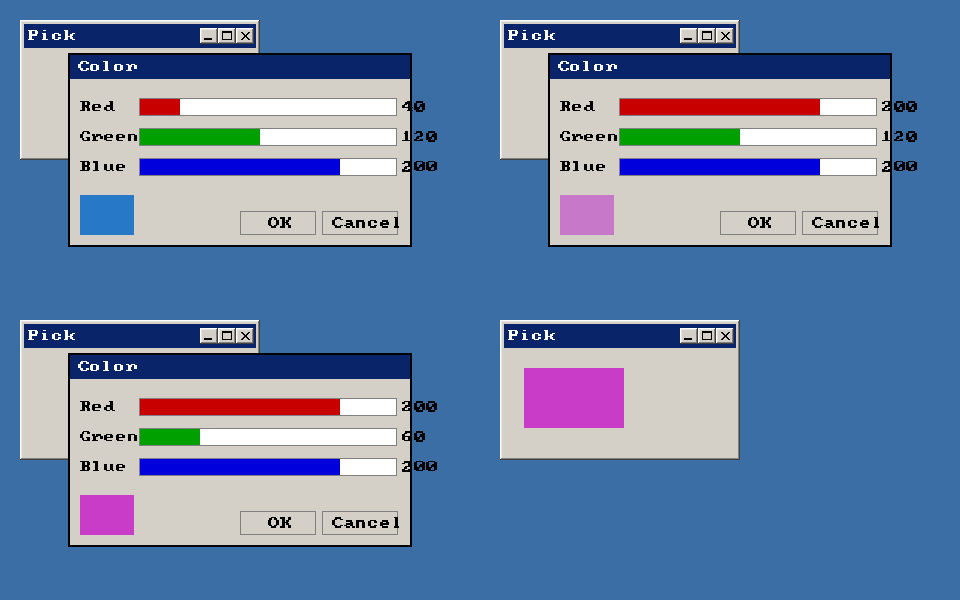
Differences
- Overview
Features (41)
- 3D Studio models
- Asynchronous loading
- blitz-format
- Blitz-Tidy
- Color depth
- Colors
- Console window on Windows
- CPU features
- Culling
- Debug handle checks
- Depth buffer
- DirectX models
- Displays
- DPI scaling on Windows
- Fullscreen
- glTF models
- Image formats
- IPv6
- Language
- Large Meshes
- Lost graphics device
- Many lights
- Memory
- Mip maps
- Movie controls
- Multiplayer
- Number suffixes
- Numbers of other sizes
- Parameter modes (In, Out, InOut)
- Presentation sync
- Samplers
- Saving pictures
- Scan Codes
- Sound resampling
- Spherical fog
- Sprite depth fade (soft edges)
- Sprite shapes
- The windows of BlitzPlus
- Types everywhere
- Userlib declarations
- Warnings
Commands (333)
- ActivateWindow
- ActiveObjects
- ActiveWindow
- AddVertex
- AnimateMD2
- AntiAlias
- AppTitle
- AsyncLoading 〔BlitzLLVM〕
- AsyncSaving 〔BlitzLLVM〕
- AvailVidMem
- BackBuffer
- BrushTexture
- BSPAmbientLight
- BSPLighting
- BufferDirty
- Byte 〔BlitzLLVM〕
- ByteSwap 〔BlitzLLVM〕
- CameraFogMode
- CanvasBuffer
- ChannelPan
- ChannelPitch
- ChannelPlaying
- ChannelVolume
- ClientHeight
- ClientWidth
- CloseMovie
- Collisions
- CollisionTime
- Confirm
- CopyPixel
- CopyPixelFast
- CopyRect
- CountDisplayModes 〔BlitzLLVM〕
- CountDisplays 〔BlitzLLVM〕
- CountGfxDrivers
- CountGfxModes
- CountHostAddresses
- CountHostIPs
- CountRefreshRates 〔BlitzLLVM〕
- CreateButton
- CreateCanvas
- CreateComboBox
- CreateHtmlView 〔BlitzLLVM〕
- CreateImage
- CreateLabel
- CreateListBox
- CreateListener
- CreateMenu
- CreatePlane
- CreateTabber
- CreateTCPServer
- CreateTerrain
- CreateTextArea
- CreateTexture
- CreateToolBar
- CreateUDPStream
- CreateWindow
- DebugObjects
- Desktop
- DesktopBuffer
- DirectInputEnabled
- DisplayDepth 〔BlitzLLVM〕
- DisplayHeight 〔BlitzLLVM〕
- DisplayModeDepth 〔BlitzLLVM〕
- DisplayModeHeight 〔BlitzLLVM〕
- DisplayModeRefreshRate 〔BlitzLLVM〕
- DisplayModeWidth 〔BlitzLLVM〕
- DisplayName 〔BlitzLLVM〕
- DisplayRefreshRate 〔BlitzLLVM〕
- DisplayScale 〔BlitzLLVM〕
- DisplayWidth 〔BlitzLLVM〕
- DisplayX 〔BlitzLLVM〕
- DisplayY 〔BlitzLLVM〕
- Double 〔BlitzLLVM〕
- DrawBlockRect
- DrawImage
- DrawImageRect
- DrawMovie
- EmitSound
- EnableDirectInput
- EndGraphics
- EntityDepthFade 〔BlitzLLVM〕
- EntityLighting
- EntityStatic 〔BlitzLLVM〕
- EntityTexture
- Flip
- FlipCanvas
- FlushJoy
- FlushKeys
- FlushMouse
- FontHeight
- FontWidth
- FormatTextAreaText
- FreeFont
- FreeImage
- FreeSound
- FreeTexture
- FrontBuffer
- GammaBlue
- GammaGreen
- GammaRed
- GetBrushTexture
- GetHostAddress
- GetJoy
- GetKey
- GetMouse
- GetMovieTexture 〔BlitzLLVM〕
- GetSurfaceBrush
- GetTCPStreamAddress
- GetUDPMsgAddress
- GetUDPStreamAddress
- GfxDriver3D
- GfxDriverCaps3D
- GfxDriverName
- GfxModeDepth
- GfxModeExists
- GfxModeFormat
- GfxModeHeight
- GfxModeWidth
- GrabImage
- Graphics
- Graphics3D
- GraphicsDepth
- GraphicsFormat
- Half 〔BlitzLLVM〕
- HidePointer
- HostIP
- HtmlViewEventURL 〔BlitzLLVM〕
- HtmlViewRun 〔BlitzLLVM〕
- HtmlViewStatus 〔BlitzLLVM〕
- HWMultiTex
- HWRawInput
- ImageBuffer
- ImagesCollide
- Include
- Input
- Int
- JoyChanged
- JoyDeviceConnected
- JoyDeviceCount
- JoyDeviceName
- JoyHat
- JoyType
- JoyWait
- KeyboardChanged
- KeyboardDeviceConnected
- KeyboardDeviceCount
- KeyboardDeviceName
- KeyDown
- KeyHit
- LastJoyDevice
- LastKeyboardDevice
- LastMouseDevice
- LeadingZeros 〔BlitzLLVM〕
- Load3DSound
- LoadAnimMesh
- LoadAnimTexture
- LoadBSP
- LoadBuffer
- LoaderMatrix
- LoadFont
- LoadImage
- LoadMesh
- LoadSound
- LoadTerrain
- LoadTexture
- Locate
- LockBuffer
- LockedFormat
- LockedPitch
- LockedPixels
- LockMouse
- LockTextArea
- Long 〔BlitzLLVM〕
- LoopMovie 〔BlitzLLVM〕
- LoopSound
- MaximizeWindow
- MeshCullBox
- Microseconds 〔BlitzLLVM〕
- MinimizeWindow
- ModifyTerrain
- MouseChanged
- MouseDeviceConnected
- MouseDeviceCount
- MouseDeviceName
- MouseDown
- MouseHit
- MouseX
- MouseXSpeed
- MouseY
- MouseYSpeed
- MouseZ
- MouseZSpeed
- MoveMouse
- MovieHeight
- MovieLength 〔BlitzLLVM〕
- MoviePlaying
- MoviePosition 〔BlitzLLVM〕
- MovieVolume 〔BlitzLLVM〕
- MovieWidth
- Notify
- OpenMovie
- OpenTCPStream
- PauseChannel
- PauseMovie 〔BlitzLLVM〕
- PickedTime
- PlayCDTrack
- PlayMovie 〔BlitzLLVM〕
- PlayMusic
- PlaySound
- PopCount 〔BlitzLLVM〕
- Proceed
- ProfileBegin
- ProfileEnable
- ProfileEnd
- ProfileFlipCount
- ProfileFPS
- ProfileItemCount
- ProfileItemName
- ProfileOutput
- ProfileSample
- ProfileSlow
- ProfileValue
- ProjectedX
- ProjectedZ
- QueryObject
- RawInput
- RawInputEnabled
- ReadPixel
- ReadPixel64 〔BlitzLLVM〕
- ReadPixelFast
- ReadPixelFast64 〔BlitzLLVM〕
- RefreshRateAt 〔BlitzLLVM〕
- RenderWorld
- RequestColor
- RequestDir
- RequestFile
- RequestFont
- ResizeImage
- ResumeChannel
- RotL 〔BlitzLLVM〕
- RotR 〔BlitzLLVM〕
- RuntimeError
- SatByte 〔BlitzLLVM〕
- SatInt 〔BlitzLLVM〕
- SatLong 〔BlitzLLVM〕
- SatShort 〔BlitzLLVM〕
- SatUByte 〔BlitzLLVM〕
- SatUInt 〔BlitzLLVM〕
- SatULong 〔BlitzLLVM〕
- SatUShort 〔BlitzLLVM〕
- SaveBuffer
- SaveImage
- ScaleImage
- ScanLine
- SeekMovie 〔BlitzLLVM〕
- SendUDPMsg
- SendUDPMsgTo
- SetBuffer
- SetCubeFace
- SetCubeMode
- SetFont
- SetGadgetFont
- SetGamma
- SetGfxDriver
- SetMenuText
- SetMinWindowSize
- SetSamplerAddressModeU 〔BlitzLLVM〕
- SetSamplerAddressModeV 〔BlitzLLVM〕
- SetSamplerAddressModeW 〔BlitzLLVM〕
- SetSamplerAnisotropy 〔BlitzLLVM〕
- SetSamplerBorderColor 〔BlitzLLVM〕
- SetSamplerFilterMag 〔BlitzLLVM〕
- SetSamplerFilterMin 〔BlitzLLVM〕
- SetSamplerFilterMip 〔BlitzLLVM〕
- SetSamplerLodBias 〔BlitzLLVM〕
- SetTextAreaFont
- SetToolBarTips
- Short 〔BlitzLLVM〕
- ShowPointer
- Single 〔BlitzLLVM〕
- SoundPan
- SoundPitch
- SoundVolume
- SpriteDepthFade 〔BlitzLLVM〕
- SpriteViewMode
- StartNetGame
- Stats3D
- Step
- Stop
- StopChannel
- StopMovie 〔BlitzLLVM〕
- StringHeight
- StringWidth
- SystemProperty
- TCPStreamIP
- TerrainDetail
- TerrainShading
- Text
- TextureBlend
- TextureBuffer
- TextureCoords
- TextureHeight
- TextureName
- TextureWidth
- TFormImage
- TotalVidMem
- TrailingZeros 〔BlitzLLVM〕
- UByte 〔BlitzLLVM〕
- UDPMsgIP
- UDPStreamIP
- UInt 〔BlitzLLVM〕
- ULong 〔BlitzLLVM〕
- UnlockMouse
- UpdateGamma
- UpdateWindowMenu
- UShort 〔BlitzLLVM〕
- VertexTexCoords
- VertexW
- VKeyDown
- VKeyHit
- VWait
- WaitJoy
- WBuffer
- WindowScale 〔BlitzLLVM〕
- WindowScaling 〔BlitzLLVM〕
- WireFrame
- Write
- WritePixel
- WritePixel64 〔BlitzLLVM〕
- WritePixelFast
- WritePixelFast64 〔BlitzLLVM〕
Language Features
- Overview
Math (31)
- Overview
- Abs
- ACos
- ASin
- ATan
- ATan2
- ByteSwap 〔BlitzLLVM〕
- Ceil
- Cos
- Exp
- Floor
- LeadingZeros 〔BlitzLLVM〕
- Log
- Log10
- Mod
- Pi
- PopCount 〔BlitzLLVM〕
- RotL 〔BlitzLLVM〕
- RotR 〔BlitzLLVM〕
- SatByte 〔BlitzLLVM〕
- SatInt 〔BlitzLLVM〕
- SatLong 〔BlitzLLVM〕
- SatShort 〔BlitzLLVM〕
- SatUByte 〔BlitzLLVM〕
- SatUInt 〔BlitzLLVM〕
- SatULong 〔BlitzLLVM〕
- SatUShort 〔BlitzLLVM〕
- Sgn
- Sin
- Sqr
- Tan
- TrailingZeros 〔BlitzLLVM〕
Time & Date (8)
BlitzBasic
- Overview
Buffers and Pixels (20)
- Overview
- BackBuffer
- BufferDirty
- CopyPixel
- CopyPixelFast
- CopyRect
- FrontBuffer
- GraphicsBuffer
- LoadBuffer
- LockBuffer
- ReadPixel
- ReadPixel64 〔BlitzLLVM〕
- ReadPixelFast
- ReadPixelFast64 〔BlitzLLVM〕
- SaveBuffer
- SetBuffer
- UnlockBuffer
- WritePixel
- WritePixel64 〔BlitzLLVM〕
- WritePixelFast
- WritePixelFast64 〔BlitzLLVM〕
Display (46)
- Overview
- AvailVidMem
- CountDisplayModes 〔BlitzLLVM〕
- CountDisplays 〔BlitzLLVM〕
- CountGfxDrivers
- CountGfxModes
- CountRefreshRates 〔BlitzLLVM〕
- DisplayDepth 〔BlitzLLVM〕
- DisplayHeight 〔BlitzLLVM〕
- DisplayModeDepth 〔BlitzLLVM〕
- DisplayModeHeight 〔BlitzLLVM〕
- DisplayModeRefreshRate 〔BlitzLLVM〕
- DisplayModeWidth 〔BlitzLLVM〕
- DisplayName 〔BlitzLLVM〕
- DisplayRefreshRate 〔BlitzLLVM〕
- DisplayScale 〔BlitzLLVM〕
- DisplayWidth 〔BlitzLLVM〕
- DisplayX 〔BlitzLLVM〕
- DisplayY 〔BlitzLLVM〕
- EndGraphics
- Flip
- GammaBlue
- GammaGreen
- GammaRed
- GfxDriver 〔BlitzLLVM〕
- GfxDriverName
- GfxModeDepth
- GfxModeExists
- GfxModeFormat
- GfxModeHeight
- GfxModeWidth
- Graphics
- GraphicsDepth
- GraphicsFormat
- GraphicsHeight
- GraphicsLost
- GraphicsPalette
- GraphicsWidth
- HidePointer
- PrimaryDisplay 〔BlitzLLVM〕
- RefreshRateAt 〔BlitzLLVM〕
- SetGamma
- SetGfxDriver
- ShowPointer
- TotalVidMem
- UpdateGamma
- VWait
Fonts and Text (12)
Images (39)
- Overview
- AsyncLoading 〔BlitzLLVM〕
- AsyncSaving 〔BlitzLLVM〕
- AutoMidHandle
- CopyImage
- CreateImage
- DrawBlock
- DrawBlockRect
- DrawImage
- DrawImageRect
- FreeImage
- GrabImage
- HandleImage
- ImageBuffer
- ImageFrameDelay
- ImageFrames
- ImageHeight
- ImageReady 〔BlitzLLVM〕
- ImageRectCollide
- ImageRectOverlap
- ImagesCollide
- ImagesOverlap
- ImageWidth
- ImageXHandle
- ImageYHandle
- LoadAnimImage
- LoadImage
- MaskImage
- MidHandle
- RectsOverlap
- ResizeImage
- RotateImage
- SaveImage
- SavesFailed 〔BlitzLLVM〕
- SavesPending 〔BlitzLLVM〕
- ScaleImage
- TFormFilter
- TFormImage
- TileBlock
- TileImage
Mouse (25)
- Overview
- DirectInputEnabled
- EnableDirectInput
- FlushMouse
- GetMouse
- HWRawInput
- LastMouseDevice
- LockMouse
- MouseChanged
- MouseDeviceConnected
- MouseDeviceCount
- MouseDeviceName
- MouseDown
- MouseHit
- MouseWait
- MouseX
- MouseXSpeed
- MouseY
- MouseYSpeed
- MouseZ
- MouseZSpeed
- MoveMouse
- RawInput
- RawInputEnabled
- UnlockMouse
- WaitMouse
Movies (15)
- Overview
- CloseMovie
- DrawMovie
- GetMovieTexture 〔BlitzLLVM〕
- LoopMovie 〔BlitzLLVM〕
- MovieHeight
- MovieLength 〔BlitzLLVM〕
- MoviePlaying
- MoviePosition 〔BlitzLLVM〕
- MovieVolume 〔BlitzLLVM〕
- MovieWidth
- OpenMovie
- PauseMovie 〔BlitzLLVM〕
- PlayMovie 〔BlitzLLVM〕
- SeekMovie 〔BlitzLLVM〕
- StopMovie 〔BlitzLLVM〕
Network (26)
- Overview
- AcceptTCPStream
- CloseTCPServer
- CloseTCPStream
- CloseUDPStream
- CountHostAddresses
- CountHostIPs
- CreateTCPServer
- CreateUDPStream
- DottedIP
- GetHostAddress
- GetTCPStreamAddress
- GetUDPMsgAddress
- GetUDPStreamAddress
- HostIP
- OpenTCPStream
- RecvUDPMsg
- SendUDPMsg
- SendUDPMsgTo
- TCPStreamIP
- TCPStreamPort
- TCPTimeouts
- UDPMsgIP
- UDPMsgPort
- UDPStreamIP
- UDPStreamPort
- UDPTimeouts
Blitz3D
- Overview
3D Sound (2)
Animation (16)
BSP (4)
- Overview
- BSPAmbientLight
- BSPLighting
- BSPLightmapColor 〔BlitzLLVM〕
- LoadBSP
Display (9)
- Overview
- CountGfxModes3D
- GfxDriver3D
- GfxDriverCaps3D
- GfxMode3D
- GfxMode3DExists
- GfxMode3DHeight 〔BlitzLLVM〕
- GfxMode3DWidth 〔BlitzLLVM〕
- Graphics3D
- Windowed3D
Entities (44)
- Overview
- AlignToVector
- CopyEntity
- CountChildren
- CreatePivot
- EntityAlpha
- EntityAutoFade
- EntityBlend
- EntityClass
- EntityColor
- EntityDepthFade 〔BlitzLLVM〕
- EntityDistance
- EntityFX
- EntityInView
- EntityLightChannel 〔BlitzLLVM〕
- EntityLighting
- EntityName
- EntityOrder
- EntityParent
- EntityPitch
- EntityReady 〔BlitzLLVM〕
- EntityRoll
- EntityShininess
- EntityStatic 〔BlitzLLVM〕
- EntityTexture
- EntityX
- EntityY
- EntityYaw
- EntityZ
- FindChild
- FreeEntity
- GetChild
- GetMatElement
- GetParent
- HideEntity
- MoveEntity
- NameEntity
- PaintEntity
- PointEntity
- PositionEntity
- RotateEntity
- ScaleEntity
- ShowEntity
- TranslateEntity
- TurnEntity
Lights (5)
Sprites (7)
Surfaces (29)
- Overview
- AddTriangle
- AddVertex
- ClearSurface
- CountSurfaces
- CountTriangles
- CountVertices
- CreateSurface
- FindSurface
- GetSurface
- PaintSurface
- TriangleVertex
- UpdateNormals
- VertexAlpha
- VertexBlue
- VertexColor
- VertexCoords
- VertexGreen
- VertexNormal
- VertexNX
- VertexNY
- VertexNZ
- VertexRed
- VertexTexCoords
- VertexU
- VertexV
- VertexW
- VertexX
- VertexY
- VertexZ
Textures (51)
- Overview
- AtlasTexture
- ClearTextureFilters
- CreateSampler 〔BlitzLLVM〕
- CreateTexture
- FreeSampler 〔BlitzLLVM〕
- FreeTexture
- GetSamplerAddressModeU 〔BlitzLLVM〕
- GetSamplerAddressModeV 〔BlitzLLVM〕
- GetSamplerAddressModeW 〔BlitzLLVM〕
- GetSamplerAnisotropy 〔BlitzLLVM〕
- GetSamplerBorderColorA 〔BlitzLLVM〕
- GetSamplerBorderColorB 〔BlitzLLVM〕
- GetSamplerBorderColorG 〔BlitzLLVM〕
- GetSamplerBorderColorR 〔BlitzLLVM〕
- GetSamplerFilterMag 〔BlitzLLVM〕
- GetSamplerFilterMin 〔BlitzLLVM〕
- GetSamplerFilterMip 〔BlitzLLVM〕
- GetSamplerLodBias 〔BlitzLLVM〕
- GetSamplerLodMax 〔BlitzLLVM〕
- GetSamplerLodMin 〔BlitzLLVM〕
- LoadAnimTexture
- LoadAtlas
- LoadTexture
- PositionTexture
- RotateTexture
- SaveTexture 〔BlitzLLVM〕
- ScaleTexture
- SetCubeFace
- SetCubeMode
- SetSamplerAddressModeU 〔BlitzLLVM〕
- SetSamplerAddressModeV 〔BlitzLLVM〕
- SetSamplerAddressModeW 〔BlitzLLVM〕
- SetSamplerAnisotropy 〔BlitzLLVM〕
- SetSamplerBorderColor 〔BlitzLLVM〕
- SetSamplerFilterMag 〔BlitzLLVM〕
- SetSamplerFilterMin 〔BlitzLLVM〕
- SetSamplerFilterMip 〔BlitzLLVM〕
- SetSamplerLodBias 〔BlitzLLVM〕
- SetSamplerLodMax 〔BlitzLLVM〕
- SetSamplerLodMin 〔BlitzLLVM〕
- SetTextureSampler 〔BlitzLLVM〕
- TextureBlend
- TextureBuffer
- TextureCoords
- TextureFilter
- TextureFrameDelay
- TextureFrames
- TextureHeight
- TextureName
- TextureReady 〔BlitzLLVM〕
- TextureWidth
World (20)
BlitzPlus
- Overview
Gadgets (50)
- Overview
- ActivateGadget
- AddGadgetItem
- ButtonState
- ClearGadgetItems
- CountGadgetItems
- CreateButton
- CreateComboBox
- CreateHtmlView 〔BlitzLLVM〕
- CreateLabel
- CreateListBox
- CreatePanel
- CreateProgBar
- CreateSlider
- CreateTabber
- DisableGadget
- EnableGadget
- FreeGadget
- GadgetFont
- GadgetGroup
- GadgetHeight
- GadgetItemText
- GadgetText
- GadgetWidth
- GadgetX
- GadgetY
- HideGadget
- HtmlViewBack 〔BlitzLLVM〕
- HtmlViewCurrentURL 〔BlitzLLVM〕
- HtmlViewEventURL 〔BlitzLLVM〕
- HtmlViewForward 〔BlitzLLVM〕
- HtmlViewGo 〔BlitzLLVM〕
- HtmlViewRun 〔BlitzLLVM〕
- HtmlViewStatus 〔BlitzLLVM〕
- InsertGadgetItem
- ModifyGadgetItem
- RemoveGadgetItem
- SelectedGadgetItem
- SelectGadgetItem
- SetButtonState
- SetGadgetFont
- SetGadgetLayout
- SetGadgetShape
- SetGadgetText
- SetPanelColor
- SetPanelImage
- SetSliderRange
- SetSliderValue
- ShowGadget
- SliderValue
- UpdateProgBar