Repository navigation
HandleImage
Narta Xaymar Dirks edited this page Oct 28, 2026
·
5 revisions


HandleImage:Void image:Int32, x:Int32, y:Int32| Parameter | Mode | Type | Default | Description |
|---|---|---|---|---|
image |
In | Int32 | required | The image. |
x |
In | Int32 | required | Horizontal position of the handle, counted from the left edge. |
y |
In | Int32 | required | Vertical position of the handle, counted from the top edge. |
Sets the handle of an image: the point of the image that is placed at the position given to DrawImage. The handle is measured from the top left corner of the image, and it is also the point around which RotateImage and ScaleImage work. It may lie outside of the image.
Graphics 320, 240, 0, 2
SetBuffer BackBuffer()
Local img = CreateImage(60, 40)
SetBuffer ImageBuffer(img)
Color 255, 160, 0
Rect 0, 0, 60, 40, 1
Color 0, 0, 0
Rect 20, 12, 20, 16, 1
SetBuffer BackBuffer()
Cls
HandleImage img, 0, 0
DrawImage img, 100, 60
HandleImage img, 30, 20
DrawImage img, 100, 160
Color 255, 255, 255
Line 80, 60, 120, 60 : Line 100, 40, 100, 80
Line 80, 160, 120, 160 : Line 100, 140, 100, 180
Text 180, 60, "handle 0, 0", 0, 1
Text 180, 160, "handle 30, 20", 0, 1
Flip
WaitKey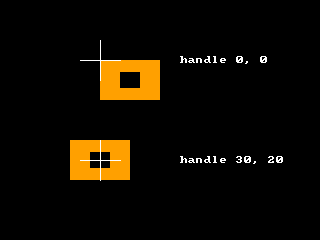
CopyImage, CreateImage, DrawImage, FreeImage, GrabImage, LoadAnimImage, LoadImage, MaskImage
Differences
- Overview
Features (41)
- 3D Studio models
- Asynchronous loading
- blitz-format
- Blitz-Tidy
- Color depth
- Colors
- Console window on Windows
- CPU features
- Culling
- Debug handle checks
- Depth buffer
- DirectX models
- Displays
- DPI scaling on Windows
- Fullscreen
- glTF models
- Image formats
- IPv6
- Language
- Large Meshes
- Lost graphics device
- Many lights
- Memory
- Mip maps
- Movie controls
- Multiplayer
- Number suffixes
- Numbers of other sizes
- Parameter modes (In, Out, InOut)
- Presentation sync
- Samplers
- Saving pictures
- Scan Codes
- Sound resampling
- Spherical fog
- Sprite depth fade (soft edges)
- Sprite shapes
- The windows of BlitzPlus
- Types everywhere
- Userlib declarations
- Warnings
Commands (332)
- ActivateWindow
- ActiveObjects
- ActiveWindow
- AddVertex
- AnimateMD2
- AntiAlias
- AppTitle
- AsyncLoading 〔BlitzLLVM〕
- AsyncSaving 〔BlitzLLVM〕
- AvailVidMem
- BrushTexture
- BSPAmbientLight
- BSPLighting
- BufferDirty
- Byte 〔BlitzLLVM〕
- ByteSwap 〔BlitzLLVM〕
- CameraFogMode
- CanvasBuffer
- ChannelPan
- ChannelPitch
- ChannelPlaying
- ChannelVolume
- ClientHeight
- ClientWidth
- CloseMovie
- Collisions
- CollisionTime
- Confirm
- CopyPixel
- CopyPixelFast
- CopyRect
- CountDisplayModes 〔BlitzLLVM〕
- CountDisplays 〔BlitzLLVM〕
- CountGfxDrivers
- CountGfxModes
- CountHostAddresses
- CountHostIPs
- CountRefreshRates 〔BlitzLLVM〕
- CreateButton
- CreateCanvas
- CreateComboBox
- CreateHtmlView 〔BlitzLLVM〕
- CreateImage
- CreateLabel
- CreateListBox
- CreateListener
- CreateMenu
- CreatePlane
- CreateTabber
- CreateTCPServer
- CreateTerrain
- CreateTextArea
- CreateTexture
- CreateToolBar
- CreateUDPStream
- CreateWindow
- DebugObjects
- Desktop
- DesktopBuffer
- DirectInputEnabled
- DisplayDepth 〔BlitzLLVM〕
- DisplayHeight 〔BlitzLLVM〕
- DisplayModeDepth 〔BlitzLLVM〕
- DisplayModeHeight 〔BlitzLLVM〕
- DisplayModeRefreshRate 〔BlitzLLVM〕
- DisplayModeWidth 〔BlitzLLVM〕
- DisplayName 〔BlitzLLVM〕
- DisplayRefreshRate 〔BlitzLLVM〕
- DisplayScale 〔BlitzLLVM〕
- DisplayWidth 〔BlitzLLVM〕
- DisplayX 〔BlitzLLVM〕
- DisplayY 〔BlitzLLVM〕
- Double 〔BlitzLLVM〕
- DrawBlockRect
- DrawImage
- DrawImageRect
- DrawMovie
- EmitSound
- EnableDirectInput
- EndGraphics
- EntityDepthFade 〔BlitzLLVM〕
- EntityLighting
- EntityStatic 〔BlitzLLVM〕
- EntityTexture
- Flip
- FlipCanvas
- FlushJoy
- FlushKeys
- FlushMouse
- FontHeight
- FontWidth
- FormatTextAreaText
- FreeFont
- FreeImage
- FreeSound
- FreeTexture
- FrontBuffer
- GammaBlue
- GammaGreen
- GammaRed
- GetBrushTexture
- GetHostAddress
- GetJoy
- GetKey
- GetMouse
- GetMovieTexture 〔BlitzLLVM〕
- GetSurfaceBrush
- GetTCPStreamAddress
- GetUDPMsgAddress
- GetUDPStreamAddress
- GfxDriver3D
- GfxDriverCaps3D
- GfxDriverName
- GfxModeDepth
- GfxModeExists
- GfxModeFormat
- GfxModeHeight
- GfxModeWidth
- GrabImage
- Graphics
- Graphics3D
- GraphicsDepth
- GraphicsFormat
- Half 〔BlitzLLVM〕
- HidePointer
- HostIP
- HtmlViewEventURL 〔BlitzLLVM〕
- HtmlViewRun 〔BlitzLLVM〕
- HtmlViewStatus 〔BlitzLLVM〕
- HWMultiTex
- HWRawInput
- ImageBuffer
- ImagesCollide
- Include
- Input
- Int
- JoyChanged
- JoyDeviceConnected
- JoyDeviceCount
- JoyDeviceName
- JoyHat
- JoyType
- JoyWait
- KeyboardChanged
- KeyboardDeviceConnected
- KeyboardDeviceCount
- KeyboardDeviceName
- KeyDown
- KeyHit
- LastJoyDevice
- LastKeyboardDevice
- LastMouseDevice
- LeadingZeros 〔BlitzLLVM〕
- Load3DSound
- LoadAnimMesh
- LoadAnimTexture
- LoadBSP
- LoadBuffer
- LoaderMatrix
- LoadFont
- LoadImage
- LoadMesh
- LoadSound
- LoadTerrain
- LoadTexture
- Locate
- LockBuffer
- LockedFormat
- LockedPitch
- LockedPixels
- LockMouse
- LockTextArea
- Long 〔BlitzLLVM〕
- LoopMovie 〔BlitzLLVM〕
- LoopSound
- MaximizeWindow
- MeshCullBox
- Microseconds 〔BlitzLLVM〕
- MinimizeWindow
- ModifyTerrain
- MouseChanged
- MouseDeviceConnected
- MouseDeviceCount
- MouseDeviceName
- MouseDown
- MouseHit
- MouseX
- MouseXSpeed
- MouseY
- MouseYSpeed
- MouseZ
- MouseZSpeed
- MoveMouse
- MovieHeight
- MovieLength 〔BlitzLLVM〕
- MoviePlaying
- MoviePosition 〔BlitzLLVM〕
- MovieVolume 〔BlitzLLVM〕
- MovieWidth
- Notify
- OpenMovie
- OpenTCPStream
- PauseChannel
- PauseMovie 〔BlitzLLVM〕
- PickedTime
- PlayCDTrack
- PlayMovie 〔BlitzLLVM〕
- PlayMusic
- PlaySound
- PopCount 〔BlitzLLVM〕
- Proceed
- ProfileBegin
- ProfileEnable
- ProfileEnd
- ProfileFlipCount
- ProfileFPS
- ProfileItemCount
- ProfileItemName
- ProfileOutput
- ProfileSample
- ProfileSlow
- ProfileValue
- ProjectedX
- ProjectedZ
- QueryObject
- RawInput
- RawInputEnabled
- ReadPixel
- ReadPixel64 〔BlitzLLVM〕
- ReadPixelFast
- ReadPixelFast64 〔BlitzLLVM〕
- RefreshRateAt 〔BlitzLLVM〕
- RenderWorld
- RequestColor
- RequestDir
- RequestFile
- RequestFont
- ResizeImage
- ResumeChannel
- RotL 〔BlitzLLVM〕
- RotR 〔BlitzLLVM〕
- RuntimeError
- SatByte 〔BlitzLLVM〕
- SatInt 〔BlitzLLVM〕
- SatLong 〔BlitzLLVM〕
- SatShort 〔BlitzLLVM〕
- SatUByte 〔BlitzLLVM〕
- SatUInt 〔BlitzLLVM〕
- SatULong 〔BlitzLLVM〕
- SatUShort 〔BlitzLLVM〕
- SaveBuffer
- SaveImage
- ScaleImage
- ScanLine
- SeekMovie 〔BlitzLLVM〕
- SendUDPMsg
- SendUDPMsgTo
- SetBuffer
- SetCubeFace
- SetCubeMode
- SetFont
- SetGadgetFont
- SetGamma
- SetGfxDriver
- SetMenuText
- SetMinWindowSize
- SetSamplerAddressModeU 〔BlitzLLVM〕
- SetSamplerAddressModeV 〔BlitzLLVM〕
- SetSamplerAddressModeW 〔BlitzLLVM〕
- SetSamplerAnisotropy 〔BlitzLLVM〕
- SetSamplerBorderColor 〔BlitzLLVM〕
- SetSamplerFilterMag 〔BlitzLLVM〕
- SetSamplerFilterMin 〔BlitzLLVM〕
- SetSamplerFilterMip 〔BlitzLLVM〕
- SetSamplerLodBias 〔BlitzLLVM〕
- SetTextAreaFont
- SetToolBarTips
- Short 〔BlitzLLVM〕
- ShowPointer
- Single 〔BlitzLLVM〕
- SoundPan
- SoundPitch
- SoundVolume
- SpriteDepthFade 〔BlitzLLVM〕
- SpriteViewMode
- StartNetGame
- Stats3D
- Step
- Stop
- StopChannel
- StopMovie 〔BlitzLLVM〕
- StringHeight
- StringWidth
- SystemProperty
- TCPStreamIP
- TerrainDetail
- TerrainShading
- Text
- TextureBlend
- TextureBuffer
- TextureCoords
- TextureHeight
- TextureName
- TextureWidth
- TFormImage
- TotalVidMem
- TrailingZeros 〔BlitzLLVM〕
- UByte 〔BlitzLLVM〕
- UDPMsgIP
- UDPStreamIP
- UInt 〔BlitzLLVM〕
- ULong 〔BlitzLLVM〕
- UnlockMouse
- UpdateGamma
- UpdateWindowMenu
- UShort 〔BlitzLLVM〕
- VertexTexCoords
- VertexW
- VKeyDown
- VKeyHit
- VWait
- WaitJoy
- WBuffer
- WindowScale 〔BlitzLLVM〕
- WindowScaling 〔BlitzLLVM〕
- WireFrame
- Write
- WritePixel
- WritePixel64 〔BlitzLLVM〕
- WritePixelFast
- WritePixelFast64 〔BlitzLLVM〕
Language Features
- Overview
Math (31)
- Overview
- Abs
- ACos
- ASin
- ATan
- ATan2
- ByteSwap 〔BlitzLLVM〕
- Ceil
- Cos
- Exp
- Floor
- LeadingZeros 〔BlitzLLVM〕
- Log
- Log10
- Mod
- Pi
- PopCount 〔BlitzLLVM〕
- RotL 〔BlitzLLVM〕
- RotR 〔BlitzLLVM〕
- SatByte 〔BlitzLLVM〕
- SatInt 〔BlitzLLVM〕
- SatLong 〔BlitzLLVM〕
- SatShort 〔BlitzLLVM〕
- SatUByte 〔BlitzLLVM〕
- SatUInt 〔BlitzLLVM〕
- SatULong 〔BlitzLLVM〕
- SatUShort 〔BlitzLLVM〕
- Sgn
- Sin
- Sqr
- Tan
- TrailingZeros 〔BlitzLLVM〕
Time & Date (8)
BlitzBasic
- Overview
Buffers and Pixels (20)
- Overview
- BackBuffer
- BufferDirty
- CopyPixel
- CopyPixelFast
- CopyRect
- FrontBuffer
- GraphicsBuffer
- LoadBuffer
- LockBuffer
- ReadPixel
- ReadPixel64 〔BlitzLLVM〕
- ReadPixelFast
- ReadPixelFast64 〔BlitzLLVM〕
- SaveBuffer
- SetBuffer
- UnlockBuffer
- WritePixel
- WritePixel64 〔BlitzLLVM〕
- WritePixelFast
- WritePixelFast64 〔BlitzLLVM〕
Display (46)
- Overview
- AvailVidMem
- CountDisplayModes 〔BlitzLLVM〕
- CountDisplays 〔BlitzLLVM〕
- CountGfxDrivers
- CountGfxModes
- CountRefreshRates 〔BlitzLLVM〕
- DisplayDepth 〔BlitzLLVM〕
- DisplayHeight 〔BlitzLLVM〕
- DisplayModeDepth 〔BlitzLLVM〕
- DisplayModeHeight 〔BlitzLLVM〕
- DisplayModeRefreshRate 〔BlitzLLVM〕
- DisplayModeWidth 〔BlitzLLVM〕
- DisplayName 〔BlitzLLVM〕
- DisplayRefreshRate 〔BlitzLLVM〕
- DisplayScale 〔BlitzLLVM〕
- DisplayWidth 〔BlitzLLVM〕
- DisplayX 〔BlitzLLVM〕
- DisplayY 〔BlitzLLVM〕
- EndGraphics
- Flip
- GammaBlue
- GammaGreen
- GammaRed
- GfxDriver 〔BlitzLLVM〕
- GfxDriverName
- GfxModeDepth
- GfxModeExists
- GfxModeFormat
- GfxModeHeight
- GfxModeWidth
- Graphics
- GraphicsDepth
- GraphicsFormat
- GraphicsHeight
- GraphicsLost
- GraphicsPalette
- GraphicsWidth
- HidePointer
- PrimaryDisplay 〔BlitzLLVM〕
- RefreshRateAt 〔BlitzLLVM〕
- SetGamma
- SetGfxDriver
- ShowPointer
- TotalVidMem
- UpdateGamma
- VWait
Fonts and Text (12)
Images (39)
- Overview
- AsyncLoading 〔BlitzLLVM〕
- AsyncSaving 〔BlitzLLVM〕
- AutoMidHandle
- CopyImage
- CreateImage
- DrawBlock
- DrawBlockRect
- DrawImage
- DrawImageRect
- FreeImage
- GrabImage
- HandleImage
- ImageBuffer
- ImageFrameDelay
- ImageFrames
- ImageHeight
- ImageReady 〔BlitzLLVM〕
- ImageRectCollide
- ImageRectOverlap
- ImagesCollide
- ImagesOverlap
- ImageWidth
- ImageXHandle
- ImageYHandle
- LoadAnimImage
- LoadImage
- MaskImage
- MidHandle
- RectsOverlap
- ResizeImage
- RotateImage
- SaveImage
- SavesFailed 〔BlitzLLVM〕
- SavesPending 〔BlitzLLVM〕
- ScaleImage
- TFormFilter
- TFormImage
- TileBlock
- TileImage
Mouse (25)
- Overview
- DirectInputEnabled
- EnableDirectInput
- FlushMouse
- GetMouse
- HWRawInput
- LastMouseDevice
- LockMouse
- MouseChanged
- MouseDeviceConnected
- MouseDeviceCount
- MouseDeviceName
- MouseDown
- MouseHit
- MouseWait
- MouseX
- MouseXSpeed
- MouseY
- MouseYSpeed
- MouseZ
- MouseZSpeed
- MoveMouse
- RawInput
- RawInputEnabled
- UnlockMouse
- WaitMouse
Movies (15)
- Overview
- CloseMovie
- DrawMovie
- GetMovieTexture 〔BlitzLLVM〕
- LoopMovie 〔BlitzLLVM〕
- MovieHeight
- MovieLength 〔BlitzLLVM〕
- MoviePlaying
- MoviePosition 〔BlitzLLVM〕
- MovieVolume 〔BlitzLLVM〕
- MovieWidth
- OpenMovie
- PauseMovie 〔BlitzLLVM〕
- PlayMovie 〔BlitzLLVM〕
- SeekMovie 〔BlitzLLVM〕
- StopMovie 〔BlitzLLVM〕
Network (26)
- Overview
- AcceptTCPStream
- CloseTCPServer
- CloseTCPStream
- CloseUDPStream
- CountHostAddresses
- CountHostIPs
- CreateTCPServer
- CreateUDPStream
- DottedIP
- GetHostAddress
- GetTCPStreamAddress
- GetUDPMsgAddress
- GetUDPStreamAddress
- HostIP
- OpenTCPStream
- RecvUDPMsg
- SendUDPMsg
- SendUDPMsgTo
- TCPStreamIP
- TCPStreamPort
- TCPTimeouts
- UDPMsgIP
- UDPMsgPort
- UDPStreamIP
- UDPStreamPort
- UDPTimeouts
Blitz3D
- Overview
3D Sound (2)
Animation (16)
BSP (4)
- Overview
- BSPAmbientLight
- BSPLighting
- BSPLightmapColor 〔BlitzLLVM〕
- LoadBSP
Display (9)
- Overview
- CountGfxModes3D
- GfxDriver3D
- GfxDriverCaps3D
- GfxMode3D
- GfxMode3DExists
- GfxMode3DHeight 〔BlitzLLVM〕
- GfxMode3DWidth 〔BlitzLLVM〕
- Graphics3D
- Windowed3D
Entities (44)
- Overview
- AlignToVector
- CopyEntity
- CountChildren
- CreatePivot
- EntityAlpha
- EntityAutoFade
- EntityBlend
- EntityClass
- EntityColor
- EntityDepthFade 〔BlitzLLVM〕
- EntityDistance
- EntityFX
- EntityInView
- EntityLightChannel 〔BlitzLLVM〕
- EntityLighting
- EntityName
- EntityOrder
- EntityParent
- EntityPitch
- EntityReady 〔BlitzLLVM〕
- EntityRoll
- EntityShininess
- EntityStatic 〔BlitzLLVM〕
- EntityTexture
- EntityX
- EntityY
- EntityYaw
- EntityZ
- FindChild
- FreeEntity
- GetChild
- GetMatElement
- GetParent
- HideEntity
- MoveEntity
- NameEntity
- PaintEntity
- PointEntity
- PositionEntity
- RotateEntity
- ScaleEntity
- ShowEntity
- TranslateEntity
- TurnEntity
Lights (5)
Sprites (7)
Surfaces (29)
- Overview
- AddTriangle
- AddVertex
- ClearSurface
- CountSurfaces
- CountTriangles
- CountVertices
- CreateSurface
- FindSurface
- GetSurface
- PaintSurface
- TriangleVertex
- UpdateNormals
- VertexAlpha
- VertexBlue
- VertexColor
- VertexCoords
- VertexGreen
- VertexNormal
- VertexNX
- VertexNY
- VertexNZ
- VertexRed
- VertexTexCoords
- VertexU
- VertexV
- VertexW
- VertexX
- VertexY
- VertexZ
Textures (51)
- Overview
- AtlasTexture
- ClearTextureFilters
- CreateSampler 〔BlitzLLVM〕
- CreateTexture
- FreeSampler 〔BlitzLLVM〕
- FreeTexture
- GetSamplerAddressModeU 〔BlitzLLVM〕
- GetSamplerAddressModeV 〔BlitzLLVM〕
- GetSamplerAddressModeW 〔BlitzLLVM〕
- GetSamplerAnisotropy 〔BlitzLLVM〕
- GetSamplerBorderColorA 〔BlitzLLVM〕
- GetSamplerBorderColorB 〔BlitzLLVM〕
- GetSamplerBorderColorG 〔BlitzLLVM〕
- GetSamplerBorderColorR 〔BlitzLLVM〕
- GetSamplerFilterMag 〔BlitzLLVM〕
- GetSamplerFilterMin 〔BlitzLLVM〕
- GetSamplerFilterMip 〔BlitzLLVM〕
- GetSamplerLodBias 〔BlitzLLVM〕
- GetSamplerLodMax 〔BlitzLLVM〕
- GetSamplerLodMin 〔BlitzLLVM〕
- LoadAnimTexture
- LoadAtlas
- LoadTexture
- PositionTexture
- RotateTexture
- SaveTexture 〔BlitzLLVM〕
- ScaleTexture
- SetCubeFace
- SetCubeMode
- SetSamplerAddressModeU 〔BlitzLLVM〕
- SetSamplerAddressModeV 〔BlitzLLVM〕
- SetSamplerAddressModeW 〔BlitzLLVM〕
- SetSamplerAnisotropy 〔BlitzLLVM〕
- SetSamplerBorderColor 〔BlitzLLVM〕
- SetSamplerFilterMag 〔BlitzLLVM〕
- SetSamplerFilterMin 〔BlitzLLVM〕
- SetSamplerFilterMip 〔BlitzLLVM〕
- SetSamplerLodBias 〔BlitzLLVM〕
- SetSamplerLodMax 〔BlitzLLVM〕
- SetSamplerLodMin 〔BlitzLLVM〕
- SetTextureSampler 〔BlitzLLVM〕
- TextureBlend
- TextureBuffer
- TextureCoords
- TextureFilter
- TextureFrameDelay
- TextureFrames
- TextureHeight
- TextureName
- TextureReady 〔BlitzLLVM〕
- TextureWidth
World (20)
BlitzPlus
- Overview
Gadgets (50)
- Overview
- ActivateGadget
- AddGadgetItem
- ButtonState
- ClearGadgetItems
- CountGadgetItems
- CreateButton
- CreateComboBox
- CreateHtmlView 〔BlitzLLVM〕
- CreateLabel
- CreateListBox
- CreatePanel
- CreateProgBar
- CreateSlider
- CreateTabber
- DisableGadget
- EnableGadget
- FreeGadget
- GadgetFont
- GadgetGroup
- GadgetHeight
- GadgetItemText
- GadgetText
- GadgetWidth
- GadgetX
- GadgetY
- HideGadget
- HtmlViewBack 〔BlitzLLVM〕
- HtmlViewCurrentURL 〔BlitzLLVM〕
- HtmlViewEventURL 〔BlitzLLVM〕
- HtmlViewForward 〔BlitzLLVM〕
- HtmlViewGo 〔BlitzLLVM〕
- HtmlViewRun 〔BlitzLLVM〕
- HtmlViewStatus 〔BlitzLLVM〕
- InsertGadgetItem
- ModifyGadgetItem
- RemoveGadgetItem
- SelectedGadgetItem
- SelectGadgetItem
- SetButtonState
- SetGadgetFont
- SetGadgetLayout
- SetGadgetShape
- SetGadgetText
- SetPanelColor
- SetPanelImage
- SetSliderRange
- SetSliderValue
- ShowGadget
- SliderValue
- UpdateProgBar