Repository navigation
CreateTexture

CreateTexture:Int32 width:Int32, height:Int32, flags:Int32=0, frames:Int32=1| Parameter | Mode | Type | Default | Description |
|---|---|---|---|---|
width |
In | Int32 | required | Width in pixels. |
height |
In | Int32 | required | Height in pixels. |
flags |
In | Int32 | 0 |
Sum of the flags above. Defaults to 1. |
frames |
In | Int32 | 1 |
Number of animation frames. Defaults to 1. |
Returns: A texture handle.
Makes an empty texture of the given size and returns its handle. Fill it by drawing on its buffer: make it with flag 4096 (render target), call SetBuffer with TextureBuffer and use the normal 2D commands, then switch back to the back buffer and put the texture on something with EntityTexture or a brush.
The flags are added together, so 1 + 2 is a color texture that also has an alpha channel:
| Flag | Meaning |
|---|---|
| 1 | Color, the default. |
| 2 | Alpha. Dark texels are see-through, bright texels are solid. |
| 4 | Masked. Texels that are exactly black are not drawn. |
| 8 | Mipmapped. Distant surfaces use smaller, blurrier copies, which are made again from the picture after you draw on the texture. The flag picks the default way the copies are blended; SetTextureSampler with a sampler from CreateSampler can change that, for example the mip mode, the level bias or anisotropic filtering. |
| 16 | Clamp U. Coordinates outside 0 to 1 repeat the edge texel instead of tiling. A sampler set with SetTextureSampler overrides this. |
| 32 | Clamp V. The same for the vertical direction. A sampler set with SetTextureSampler overrides this. |
| 64 | Spherical environment map. |
| 128 | Cubic environment map. |
| 256 | Keep the texture in video memory only. A texture lives in video memory and has no copy on the CPU either way; the flag decides what happens when video memory is full. Without it the texture is placed in system memory instead (slower to draw with, and the program prints a one-time note); with it the program stops with an "out of video memory" error. Render targets (4096) always behave as if the flag was set. The buffers of the window, depth, AntiAlias and order independent transparency always come first: textures without the flag are moved to system memory to make room for them. |
| 512 | Use a high color format even in low color modes. This is always the case: a texture is at least 8 bits per channel with alpha (R8G8B8A8), or a compatible block compressed format. |
| 1024 | Point sampling: the nearest texel is shown, with no smoothing between texels, and with flag 8 the nearest mip map level without blending levels. A sampler set with SetTextureSampler overrides the flag. |
| 2048 | sRGB, only used by LoadTexture. It has no effect here. |
| 4096 | Render target. The texture can be drawn to with SetBuffer TextureBuffer(texture). Without the flag a texture can still be read and written with the pixel commands (ReadPixel, WritePixel, ReadPixelFast, WritePixelFast, LockBuffer, CopyRect and the like) on its TextureBuffer, but a debug build (-d) stops with an error on SetBuffer. |
| 65536 | Use the second set of texture coordinates of the mesh, see TextureCoords. |
The texture is created at the size you ask for, so TextureWidth and TextureHeight return exactly what you passed. Power-of-two sizes are the safest choice for other Blitz3D implementations.
- Flag 4096 (render target) is new. A program that is compiled with
-dstops with an error when it sets the buffer of a texture without it; a normal build still lets the program draw to the texture, so programs of the original keep working, but should be given the flag. - Only flags 2, 4, 8, 16, 32, 1024 and 65536 change how the texture looks. High color (512) is always in effect, so the flag changes nothing; video memory (256) only matters when video memory is full, see the table. A sphere map (64) takes its coordinates from the normal of the surface in the view, and ScaleTexture, PositionTexture and RotateTexture do not change them. A cube map (128) has six faces of the size you give, chosen with SetCubeFace and shown as SetCubeMode says; it does not have mip maps. A texture with both flags is drawn as a plain one. Without flag 8 it has no mip maps.
- The masked flag (4) also cuts out black in a texture you drew on, as it does for a picture read from a file. The original masks only pictures that it loads, so black drawn on a masked CreateTexture texture stays visible there; this is deliberate, because that behavior is considered a bug. The alpha flag (2) works as in the original: the alpha you write with WritePixel or WritePixelFast is used as it is, and 2D drawing leaves the texture opaque.
Graphics3D 320, 240, 0, 2
SetBuffer BackBuffer()
camera = CreateCamera()
CameraClsColor camera, 70, 100, 160
light = CreateLight()
RotateEntity light, 40, 30, 0
cube = CreateCube()
PositionEntity cube, 0, 0, 4.2
TurnEntity cube, 25, 35, 0

tex = CreateTexture(128, 128, 1 + 4096)
SetBuffer TextureBuffer(tex)
ClsColor 240, 240, 240
Cls
Color 30, 90, 200
For y = 0 To 7
	For x = 0 To 7
		If (x + y) Mod 2 = 0 Then Rect x * 16, y * 16, 16, 16, 1
	Next
Next
Color 220, 40, 40
Oval 32, 32, 64, 64, 1

SetBuffer BackBuffer()
EntityTexture cube, tex
RenderWorld
Flip
WaitKey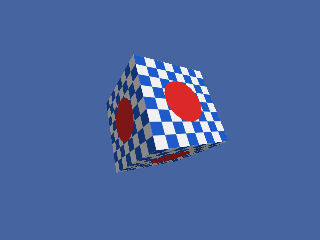
AtlasTexture, FreeTexture, LoadAnimTexture, LoadTexture, PositionTexture, RotateTexture, SaveTexture 〔BlitzLLVM〕, ScaleTexture