Repository navigation
SetPanelImage
Narta Xaymar Dirks edited this page Oct 28, 2026
·
5 revisions

SetPanelImage:Void panel:Int32, file:String| Parameter | Mode | Type | Default | Description |
|---|---|---|---|---|
panel |
In | Int32 | required | Handle of a panel. |
file |
In | String | required | Name of a picture file. |
Shows a picture from a file in a panel. If the panel is bigger than the picture it is repeated like tiles.
Graphics 320, 240, 32, 2
tile = CreateImage(16, 16)
SetBuffer ImageBuffer(tile)
Color 40, 90, 160
Rect 0, 0, 16, 16, 1
Color 255, 255, 255
Oval 4, 4, 8, 8, 1
SaveImage tile, "tile.bmp"
SetBuffer BackBuffer()
win = CreateWindow("Tiles", 10, 10, 300, 140, Desktop(), 3)
p   = CreatePanel(10, 10, 200, 90, win)
SetPanelImage p, "tile.bmp"
Repeat
Until WaitEvent() = $803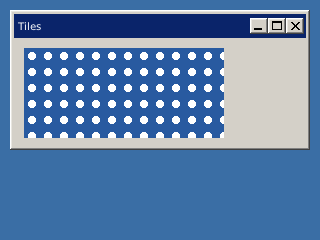
SetButtonState, SetGadgetFont, SetGadgetLayout, SetGadgetShape, SetGadgetText, SetPanelColor, SetSliderRange, SetSliderValue
Differences
- Overview
Features (41)
- 3D Studio models
- Asynchronous loading
- blitz-format
- Blitz-Tidy
- Color depth
- Colors
- Console window on Windows
- CPU features
- Culling
- Debug handle checks
- Depth buffer
- DirectX models
- Displays
- DPI scaling on Windows
- Fullscreen
- glTF models
- Image formats
- IPv6
- Language
- Large Meshes
- Lost graphics device
- Many lights
- Memory
- Mip maps
- Movie controls
- Multiplayer
- Number suffixes
- Numbers of other sizes
- Parameter modes (In, Out, InOut)
- Presentation sync
- Samplers
- Saving pictures
- Scan Codes
- Sound resampling
- Spherical fog
- Sprite depth fade (soft edges)
- Sprite shapes
- The windows of BlitzPlus
- Types everywhere
- Userlib declarations
- Warnings
Commands (333)
- ActivateWindow
- ActiveObjects
- ActiveWindow
- AddVertex
- AnimateMD2
- AntiAlias
- AppTitle
- AsyncLoading 〔BlitzLLVM〕
- AsyncSaving 〔BlitzLLVM〕
- AvailVidMem
- BackBuffer
- BrushTexture
- BSPAmbientLight
- BSPLighting
- BufferDirty
- Byte 〔BlitzLLVM〕
- ByteSwap 〔BlitzLLVM〕
- CameraFogMode
- CanvasBuffer
- ChannelPan
- ChannelPitch
- ChannelPlaying
- ChannelVolume
- ClientHeight
- ClientWidth
- CloseMovie
- Collisions
- CollisionTime
- Confirm
- CopyPixel
- CopyPixelFast
- CopyRect
- CountDisplayModes 〔BlitzLLVM〕
- CountDisplays 〔BlitzLLVM〕
- CountGfxDrivers
- CountGfxModes
- CountHostAddresses
- CountHostIPs
- CountRefreshRates 〔BlitzLLVM〕
- CreateButton
- CreateCanvas
- CreateComboBox
- CreateHtmlView 〔BlitzLLVM〕
- CreateImage
- CreateLabel
- CreateListBox
- CreateListener
- CreateMenu
- CreatePlane
- CreateTabber
- CreateTCPServer
- CreateTerrain
- CreateTextArea
- CreateTexture
- CreateToolBar
- CreateUDPStream
- CreateWindow
- DebugObjects
- Desktop
- DesktopBuffer
- DirectInputEnabled
- DisplayDepth 〔BlitzLLVM〕
- DisplayHeight 〔BlitzLLVM〕
- DisplayModeDepth 〔BlitzLLVM〕
- DisplayModeHeight 〔BlitzLLVM〕
- DisplayModeRefreshRate 〔BlitzLLVM〕
- DisplayModeWidth 〔BlitzLLVM〕
- DisplayName 〔BlitzLLVM〕
- DisplayRefreshRate 〔BlitzLLVM〕
- DisplayScale 〔BlitzLLVM〕
- DisplayWidth 〔BlitzLLVM〕
- DisplayX 〔BlitzLLVM〕
- DisplayY 〔BlitzLLVM〕
- Double 〔BlitzLLVM〕
- DrawBlockRect
- DrawImage
- DrawImageRect
- DrawMovie
- EmitSound
- EnableDirectInput
- EndGraphics
- EntityDepthFade 〔BlitzLLVM〕
- EntityLighting
- EntityStatic 〔BlitzLLVM〕
- EntityTexture
- Flip
- FlipCanvas
- FlushJoy
- FlushKeys
- FlushMouse
- FontHeight
- FontWidth
- FormatTextAreaText
- FreeFont
- FreeImage
- FreeSound
- FreeTexture
- FrontBuffer
- GammaBlue
- GammaGreen
- GammaRed
- GetBrushTexture
- GetHostAddress
- GetJoy
- GetKey
- GetMouse
- GetMovieTexture 〔BlitzLLVM〕
- GetSurfaceBrush
- GetTCPStreamAddress
- GetUDPMsgAddress
- GetUDPStreamAddress
- GfxDriver3D
- GfxDriverCaps3D
- GfxDriverName
- GfxModeDepth
- GfxModeExists
- GfxModeFormat
- GfxModeHeight
- GfxModeWidth
- GrabImage
- Graphics
- Graphics3D
- GraphicsDepth
- GraphicsFormat
- Half 〔BlitzLLVM〕
- HidePointer
- HostIP
- HtmlViewEventURL 〔BlitzLLVM〕
- HtmlViewRun 〔BlitzLLVM〕
- HtmlViewStatus 〔BlitzLLVM〕
- HWMultiTex
- HWRawInput
- ImageBuffer
- ImagesCollide
- Include
- Input
- Int
- JoyChanged
- JoyDeviceConnected
- JoyDeviceCount
- JoyDeviceName
- JoyHat
- JoyType
- JoyWait
- KeyboardChanged
- KeyboardDeviceConnected
- KeyboardDeviceCount
- KeyboardDeviceName
- KeyDown
- KeyHit
- LastJoyDevice
- LastKeyboardDevice
- LastMouseDevice
- LeadingZeros 〔BlitzLLVM〕
- Load3DSound
- LoadAnimMesh
- LoadAnimTexture
- LoadBSP
- LoadBuffer
- LoaderMatrix
- LoadFont
- LoadImage
- LoadMesh
- LoadSound
- LoadTerrain
- LoadTexture
- Locate
- LockBuffer
- LockedFormat
- LockedPitch
- LockedPixels
- LockMouse
- LockTextArea
- Long 〔BlitzLLVM〕
- LoopMovie 〔BlitzLLVM〕
- LoopSound
- MaximizeWindow
- MeshCullBox
- Microseconds 〔BlitzLLVM〕
- MinimizeWindow
- ModifyTerrain
- MouseChanged
- MouseDeviceConnected
- MouseDeviceCount
- MouseDeviceName
- MouseDown
- MouseHit
- MouseX
- MouseXSpeed
- MouseY
- MouseYSpeed
- MouseZ
- MouseZSpeed
- MoveMouse
- MovieHeight
- MovieLength 〔BlitzLLVM〕
- MoviePlaying
- MoviePosition 〔BlitzLLVM〕
- MovieVolume 〔BlitzLLVM〕
- MovieWidth
- Notify
- OpenMovie
- OpenTCPStream
- PauseChannel
- PauseMovie 〔BlitzLLVM〕
- PickedTime
- PlayCDTrack
- PlayMovie 〔BlitzLLVM〕
- PlayMusic
- PlaySound
- PopCount 〔BlitzLLVM〕
- Proceed
- ProfileBegin
- ProfileEnable
- ProfileEnd
- ProfileFlipCount
- ProfileFPS
- ProfileItemCount
- ProfileItemName
- ProfileOutput
- ProfileSample
- ProfileSlow
- ProfileValue
- ProjectedX
- ProjectedZ
- QueryObject
- RawInput
- RawInputEnabled
- ReadPixel
- ReadPixel64 〔BlitzLLVM〕
- ReadPixelFast
- ReadPixelFast64 〔BlitzLLVM〕
- RefreshRateAt 〔BlitzLLVM〕
- RenderWorld
- RequestColor
- RequestDir
- RequestFile
- RequestFont
- ResizeImage
- ResumeChannel
- RotL 〔BlitzLLVM〕
- RotR 〔BlitzLLVM〕
- RuntimeError
- SatByte 〔BlitzLLVM〕
- SatInt 〔BlitzLLVM〕
- SatLong 〔BlitzLLVM〕
- SatShort 〔BlitzLLVM〕
- SatUByte 〔BlitzLLVM〕
- SatUInt 〔BlitzLLVM〕
- SatULong 〔BlitzLLVM〕
- SatUShort 〔BlitzLLVM〕
- SaveBuffer
- SaveImage
- ScaleImage
- ScanLine
- SeekMovie 〔BlitzLLVM〕
- SendUDPMsg
- SendUDPMsgTo
- SetBuffer
- SetCubeFace
- SetCubeMode
- SetFont
- SetGadgetFont
- SetGamma
- SetGfxDriver
- SetMenuText
- SetMinWindowSize
- SetSamplerAddressModeU 〔BlitzLLVM〕
- SetSamplerAddressModeV 〔BlitzLLVM〕
- SetSamplerAddressModeW 〔BlitzLLVM〕
- SetSamplerAnisotropy 〔BlitzLLVM〕
- SetSamplerBorderColor 〔BlitzLLVM〕
- SetSamplerFilterMag 〔BlitzLLVM〕
- SetSamplerFilterMin 〔BlitzLLVM〕
- SetSamplerFilterMip 〔BlitzLLVM〕
- SetSamplerLodBias 〔BlitzLLVM〕
- SetTextAreaFont
- SetToolBarTips
- Short 〔BlitzLLVM〕
- ShowPointer
- Single 〔BlitzLLVM〕
- SoundPan
- SoundPitch
- SoundVolume
- SpriteDepthFade 〔BlitzLLVM〕
- SpriteViewMode
- StartNetGame
- Stats3D
- Step
- Stop
- StopChannel
- StopMovie 〔BlitzLLVM〕
- StringHeight
- StringWidth
- SystemProperty
- TCPStreamIP
- TerrainDetail
- TerrainShading
- Text
- TextureBlend
- TextureBuffer
- TextureCoords
- TextureHeight
- TextureName
- TextureWidth
- TFormImage
- TotalVidMem
- TrailingZeros 〔BlitzLLVM〕
- UByte 〔BlitzLLVM〕
- UDPMsgIP
- UDPStreamIP
- UInt 〔BlitzLLVM〕
- ULong 〔BlitzLLVM〕
- UnlockMouse
- UpdateGamma
- UpdateWindowMenu
- UShort 〔BlitzLLVM〕
- VertexTexCoords
- VertexW
- VKeyDown
- VKeyHit
- VWait
- WaitJoy
- WBuffer
- WindowScale 〔BlitzLLVM〕
- WindowScaling 〔BlitzLLVM〕
- WireFrame
- Write
- WritePixel
- WritePixel64 〔BlitzLLVM〕
- WritePixelFast
- WritePixelFast64 〔BlitzLLVM〕
Language Features
- Overview
Math (31)
- Overview
- Abs
- ACos
- ASin
- ATan
- ATan2
- ByteSwap 〔BlitzLLVM〕
- Ceil
- Cos
- Exp
- Floor
- LeadingZeros 〔BlitzLLVM〕
- Log
- Log10
- Mod
- Pi
- PopCount 〔BlitzLLVM〕
- RotL 〔BlitzLLVM〕
- RotR 〔BlitzLLVM〕
- SatByte 〔BlitzLLVM〕
- SatInt 〔BlitzLLVM〕
- SatLong 〔BlitzLLVM〕
- SatShort 〔BlitzLLVM〕
- SatUByte 〔BlitzLLVM〕
- SatUInt 〔BlitzLLVM〕
- SatULong 〔BlitzLLVM〕
- SatUShort 〔BlitzLLVM〕
- Sgn
- Sin
- Sqr
- Tan
- TrailingZeros 〔BlitzLLVM〕
Time & Date (8)
BlitzBasic
- Overview
Buffers and Pixels (20)
- Overview
- BackBuffer
- BufferDirty
- CopyPixel
- CopyPixelFast
- CopyRect
- FrontBuffer
- GraphicsBuffer
- LoadBuffer
- LockBuffer
- ReadPixel
- ReadPixel64 〔BlitzLLVM〕
- ReadPixelFast
- ReadPixelFast64 〔BlitzLLVM〕
- SaveBuffer
- SetBuffer
- UnlockBuffer
- WritePixel
- WritePixel64 〔BlitzLLVM〕
- WritePixelFast
- WritePixelFast64 〔BlitzLLVM〕
Display (46)
- Overview
- AvailVidMem
- CountDisplayModes 〔BlitzLLVM〕
- CountDisplays 〔BlitzLLVM〕
- CountGfxDrivers
- CountGfxModes
- CountRefreshRates 〔BlitzLLVM〕
- DisplayDepth 〔BlitzLLVM〕
- DisplayHeight 〔BlitzLLVM〕
- DisplayModeDepth 〔BlitzLLVM〕
- DisplayModeHeight 〔BlitzLLVM〕
- DisplayModeRefreshRate 〔BlitzLLVM〕
- DisplayModeWidth 〔BlitzLLVM〕
- DisplayName 〔BlitzLLVM〕
- DisplayRefreshRate 〔BlitzLLVM〕
- DisplayScale 〔BlitzLLVM〕
- DisplayWidth 〔BlitzLLVM〕
- DisplayX 〔BlitzLLVM〕
- DisplayY 〔BlitzLLVM〕
- EndGraphics
- Flip
- GammaBlue
- GammaGreen
- GammaRed
- GfxDriver 〔BlitzLLVM〕
- GfxDriverName
- GfxModeDepth
- GfxModeExists
- GfxModeFormat
- GfxModeHeight
- GfxModeWidth
- Graphics
- GraphicsDepth
- GraphicsFormat
- GraphicsHeight
- GraphicsLost
- GraphicsPalette
- GraphicsWidth
- HidePointer
- PrimaryDisplay 〔BlitzLLVM〕
- RefreshRateAt 〔BlitzLLVM〕
- SetGamma
- SetGfxDriver
- ShowPointer
- TotalVidMem
- UpdateGamma
- VWait
Fonts and Text (12)
Images (39)
- Overview
- AsyncLoading 〔BlitzLLVM〕
- AsyncSaving 〔BlitzLLVM〕
- AutoMidHandle
- CopyImage
- CreateImage
- DrawBlock
- DrawBlockRect
- DrawImage
- DrawImageRect
- FreeImage
- GrabImage
- HandleImage
- ImageBuffer
- ImageFrameDelay
- ImageFrames
- ImageHeight
- ImageReady 〔BlitzLLVM〕
- ImageRectCollide
- ImageRectOverlap
- ImagesCollide
- ImagesOverlap
- ImageWidth
- ImageXHandle
- ImageYHandle
- LoadAnimImage
- LoadImage
- MaskImage
- MidHandle
- RectsOverlap
- ResizeImage
- RotateImage
- SaveImage
- SavesFailed 〔BlitzLLVM〕
- SavesPending 〔BlitzLLVM〕
- ScaleImage
- TFormFilter
- TFormImage
- TileBlock
- TileImage
Mouse (25)
- Overview
- DirectInputEnabled
- EnableDirectInput
- FlushMouse
- GetMouse
- HWRawInput
- LastMouseDevice
- LockMouse
- MouseChanged
- MouseDeviceConnected
- MouseDeviceCount
- MouseDeviceName
- MouseDown
- MouseHit
- MouseWait
- MouseX
- MouseXSpeed
- MouseY
- MouseYSpeed
- MouseZ
- MouseZSpeed
- MoveMouse
- RawInput
- RawInputEnabled
- UnlockMouse
- WaitMouse
Movies (15)
- Overview
- CloseMovie
- DrawMovie
- GetMovieTexture 〔BlitzLLVM〕
- LoopMovie 〔BlitzLLVM〕
- MovieHeight
- MovieLength 〔BlitzLLVM〕
- MoviePlaying
- MoviePosition 〔BlitzLLVM〕
- MovieVolume 〔BlitzLLVM〕
- MovieWidth
- OpenMovie
- PauseMovie 〔BlitzLLVM〕
- PlayMovie 〔BlitzLLVM〕
- SeekMovie 〔BlitzLLVM〕
- StopMovie 〔BlitzLLVM〕
Network (26)
- Overview
- AcceptTCPStream
- CloseTCPServer
- CloseTCPStream
- CloseUDPStream
- CountHostAddresses
- CountHostIPs
- CreateTCPServer
- CreateUDPStream
- DottedIP
- GetHostAddress
- GetTCPStreamAddress
- GetUDPMsgAddress
- GetUDPStreamAddress
- HostIP
- OpenTCPStream
- RecvUDPMsg
- SendUDPMsg
- SendUDPMsgTo
- TCPStreamIP
- TCPStreamPort
- TCPTimeouts
- UDPMsgIP
- UDPMsgPort
- UDPStreamIP
- UDPStreamPort
- UDPTimeouts
Blitz3D
- Overview
3D Sound (2)
Animation (16)
BSP (4)
- Overview
- BSPAmbientLight
- BSPLighting
- BSPLightmapColor 〔BlitzLLVM〕
- LoadBSP
Display (9)
- Overview
- CountGfxModes3D
- GfxDriver3D
- GfxDriverCaps3D
- GfxMode3D
- GfxMode3DExists
- GfxMode3DHeight 〔BlitzLLVM〕
- GfxMode3DWidth 〔BlitzLLVM〕
- Graphics3D
- Windowed3D
Entities (44)
- Overview
- AlignToVector
- CopyEntity
- CountChildren
- CreatePivot
- EntityAlpha
- EntityAutoFade
- EntityBlend
- EntityClass
- EntityColor
- EntityDepthFade 〔BlitzLLVM〕
- EntityDistance
- EntityFX
- EntityInView
- EntityLightChannel 〔BlitzLLVM〕
- EntityLighting
- EntityName
- EntityOrder
- EntityParent
- EntityPitch
- EntityReady 〔BlitzLLVM〕
- EntityRoll
- EntityShininess
- EntityStatic 〔BlitzLLVM〕
- EntityTexture
- EntityX
- EntityY
- EntityYaw
- EntityZ
- FindChild
- FreeEntity
- GetChild
- GetMatElement
- GetParent
- HideEntity
- MoveEntity
- NameEntity
- PaintEntity
- PointEntity
- PositionEntity
- RotateEntity
- ScaleEntity
- ShowEntity
- TranslateEntity
- TurnEntity
Lights (5)
Sprites (7)
Surfaces (29)
- Overview
- AddTriangle
- AddVertex
- ClearSurface
- CountSurfaces
- CountTriangles
- CountVertices
- CreateSurface
- FindSurface
- GetSurface
- PaintSurface
- TriangleVertex
- UpdateNormals
- VertexAlpha
- VertexBlue
- VertexColor
- VertexCoords
- VertexGreen
- VertexNormal
- VertexNX
- VertexNY
- VertexNZ
- VertexRed
- VertexTexCoords
- VertexU
- VertexV
- VertexW
- VertexX
- VertexY
- VertexZ
Textures (51)
- Overview
- AtlasTexture
- ClearTextureFilters
- CreateSampler 〔BlitzLLVM〕
- CreateTexture
- FreeSampler 〔BlitzLLVM〕
- FreeTexture
- GetSamplerAddressModeU 〔BlitzLLVM〕
- GetSamplerAddressModeV 〔BlitzLLVM〕
- GetSamplerAddressModeW 〔BlitzLLVM〕
- GetSamplerAnisotropy 〔BlitzLLVM〕
- GetSamplerBorderColorA 〔BlitzLLVM〕
- GetSamplerBorderColorB 〔BlitzLLVM〕
- GetSamplerBorderColorG 〔BlitzLLVM〕
- GetSamplerBorderColorR 〔BlitzLLVM〕
- GetSamplerFilterMag 〔BlitzLLVM〕
- GetSamplerFilterMin 〔BlitzLLVM〕
- GetSamplerFilterMip 〔BlitzLLVM〕
- GetSamplerLodBias 〔BlitzLLVM〕
- GetSamplerLodMax 〔BlitzLLVM〕
- GetSamplerLodMin 〔BlitzLLVM〕
- LoadAnimTexture
- LoadAtlas
- LoadTexture
- PositionTexture
- RotateTexture
- SaveTexture 〔BlitzLLVM〕
- ScaleTexture
- SetCubeFace
- SetCubeMode
- SetSamplerAddressModeU 〔BlitzLLVM〕
- SetSamplerAddressModeV 〔BlitzLLVM〕
- SetSamplerAddressModeW 〔BlitzLLVM〕
- SetSamplerAnisotropy 〔BlitzLLVM〕
- SetSamplerBorderColor 〔BlitzLLVM〕
- SetSamplerFilterMag 〔BlitzLLVM〕
- SetSamplerFilterMin 〔BlitzLLVM〕
- SetSamplerFilterMip 〔BlitzLLVM〕
- SetSamplerLodBias 〔BlitzLLVM〕
- SetSamplerLodMax 〔BlitzLLVM〕
- SetSamplerLodMin 〔BlitzLLVM〕
- SetTextureSampler 〔BlitzLLVM〕
- TextureBlend
- TextureBuffer
- TextureCoords
- TextureFilter
- TextureFrameDelay
- TextureFrames
- TextureHeight
- TextureName
- TextureReady 〔BlitzLLVM〕
- TextureWidth
World (20)
BlitzPlus
- Overview
Gadgets (50)
- Overview
- ActivateGadget
- AddGadgetItem
- ButtonState
- ClearGadgetItems
- CountGadgetItems
- CreateButton
- CreateComboBox
- CreateHtmlView 〔BlitzLLVM〕
- CreateLabel
- CreateListBox
- CreatePanel
- CreateProgBar
- CreateSlider
- CreateTabber
- DisableGadget
- EnableGadget
- FreeGadget
- GadgetFont
- GadgetGroup
- GadgetHeight
- GadgetItemText
- GadgetText
- GadgetWidth
- GadgetX
- GadgetY
- HideGadget
- HtmlViewBack 〔BlitzLLVM〕
- HtmlViewCurrentURL 〔BlitzLLVM〕
- HtmlViewEventURL 〔BlitzLLVM〕
- HtmlViewForward 〔BlitzLLVM〕
- HtmlViewGo 〔BlitzLLVM〕
- HtmlViewRun 〔BlitzLLVM〕
- HtmlViewStatus 〔BlitzLLVM〕
- InsertGadgetItem
- ModifyGadgetItem
- RemoveGadgetItem
- SelectedGadgetItem
- SelectGadgetItem
- SetButtonState
- SetGadgetFont
- SetGadgetLayout
- SetGadgetShape
- SetGadgetText
- SetPanelColor
- SetPanelImage
- SetSliderRange
- SetSliderValue
- ShowGadget
- SliderValue
- UpdateProgBar