Repository navigation
LoadBSP

Command Index · Blitz3D · BSP
LoadBSP:Int32 file:String, gamma_adj:Float32=0, parent:Int32=0| Parameter | Mode | Type | Default | Description |
|---|---|---|---|---|
file |
In | String | required | The .bsp file. |
gamma_adj |
In | Float32 | 0 |
|
parent |
In | Int32 | 0 |
Optional parent entity. The level is still created at 0, 0, 0. |
Returns: An entity handle, or 0 if the file is not a Quake 3 level.
Loads a Quake 3 level (.bsp, version 46) as one entity. The level is an ordinary entity, so PositionEntity, ScaleEntity and the collision commands work on it; use EntityType and a Collisions rule with method 2 to walk through it. Its surfaces are shared by the triangles that use the same texture. Quake's axes are turned into Blitz3D's: Quake's forward axis is Z here, its left axis is -X, and its up axis is Y.
The textures of the level are found by the names inside the file, with .tga, .jpg, .png or .dds added, next to the level and in the folders above it. Faces that the level marks as sky, hidden or not solid are not drawn, and a level cannot be painted, textured, colored or faded like other entities.
The example below builds a minimal level file itself, so it runs without any level from a game: a floor, a wall and a curved hill. The faces have no textures, which leaves the colors of the vertices.
- Lightmaps are used: a face that has one is drawn with it, and the other faces get the colors of their vertices. Visibility data is not used, so all of the level is always drawn.
- The original lights a BSP with point and spot lights but not with ambient or directional ones. Here the
lightentities of the map's entity lump become point lights (CreateLight 2) that are children of the level, at the position of the map, in its_color, with the map'slightvalue as their range; they light other entities, and the level itself while its lightmaps are not used (BSPLighting). A map light with atargetbecomes a spot light (CreateLight 3) that points at the entity with thattargetname, with a cone wide enough to reach the light'sradiusaround it; a level without light entities has no lights. While lightmaps are used no light affects the level, so the light of the map is not counted twice; it is drawn as its lightmaps or vertex colors say, plus BSPAmbientLight, and multiplied by BSPLightmapColor. - Curved patches are cut into a fixed number of triangles, and billboard faces are skipped.
Graphics3D 320, 240, 0, 2
SetBuffer BackBuffer()
camera = CreateCamera()
CameraClsColor camera, 70, 100, 160
PositionEntity camera, 0, 70, -90
RotateEntity camera, 14, 0, 0

; A vertex of a level: position, texture and lightmap coordinates, normal and color.
Function WriteVertex(file, x#, y#, z#, r, g, b)
	WriteFloat file, x : WriteFloat file, y : WriteFloat file, z
	WriteFloat file, 0 : WriteFloat file, 0 : WriteFloat file, 0 : WriteFloat file, 0
	WriteFloat file, 0 : WriteFloat file, 0 : WriteFloat file, 1
	WriteByte file, r : WriteByte file, g : WriteByte file, b : WriteByte file, 255
End Function
; A face: 3 is a flat piece made of triangles, 2 is a curved patch of control points.
Function WriteFace(file, kind, vertex, vertices, meshvert, meshverts, size_x, size_y)
	WriteInt file, 0 : WriteInt file, -1 : WriteInt file, kind : WriteInt file, vertex : WriteInt file, vertices
	WriteInt file, meshvert : WriteInt file, meshverts : WriteInt file, -1
	For i = 1 To 4
		WriteInt file, 0
	Next
	For i = 1 To 12
		WriteFloat file, 0
	Next
	WriteInt file, size_x : WriteInt file, size_y
End Function

file = WriteFile("wiki_level.bsp")
WriteInt file, $50534249
WriteInt file, 46
; Header: 17 lumps of offset and length. Only textures, vertices, mesh vertices and faces are used.
For lump = 0 To 16
	If lump = 1 Then WriteInt file, 144 : WriteInt file, 72
	If lump = 10 Then WriteInt file, 216 : WriteInt file, 748
	If lump = 11 Then WriteInt file, 964 : WriteInt file, 48
	If lump = 13 Then WriteInt file, 1012 : WriteInt file, 312
	If lump <> 1 And lump <> 10 And lump <> 11 And lump <> 13 Then WriteInt file, 1324 : WriteInt file, 0
Next
; One texture entry: an empty name, no flags, and "solid" contents.
For i = 1 To 64
	WriteByte file, 0
Next
WriteInt file, 0 : WriteInt file, 1
; Floor, wall and the 3 by 3 control points of a hill.
WriteVertex file, 0, -128, 0, 60, 160, 70
WriteVertex file, 256, -128, 0, 30, 90, 40
WriteVertex file, 256, 128, 0, 30, 90, 40
WriteVertex file, 0, 128, 0, 60, 160, 70
WriteVertex file, 256, -128, 0, 200, 190, 160
WriteVertex file, 256, 128, 0, 200, 190, 160
WriteVertex file, 256, 128, 120, 250, 240, 210
WriteVertex file, 256, -128, 120, 250, 240, 210
For y = 0 To 2
	For x = 0 To 2
		h = 0
		If x = 1 And y = 1 Then h = 90
		WriteVertex file, 60 + x * 40, -40 + y * 40, h, 120 + h, 200, 80
	Next
Next
; Two ways to cut a square into triangles, one for each facing.
WriteInt file, 0 : WriteInt file, 1 : WriteInt file, 2
WriteInt file, 0 : WriteInt file, 2 : WriteInt file, 3
WriteInt file, 0 : WriteInt file, 2 : WriteInt file, 1
WriteInt file, 0 : WriteInt file, 3 : WriteInt file, 2
WriteFace file, 3, 0, 4, 6, 6, 0, 0
WriteFace file, 3, 4, 4, 0, 6, 0, 0
WriteFace file, 2, 8, 9, 0, 0, 3, 3
CloseFile file

level = LoadBSP("wiki_level.bsp")
RenderWorld
Flip
WaitKey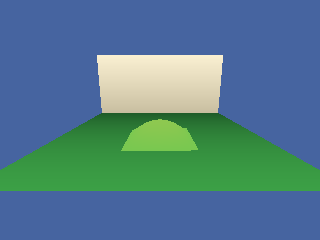
BSPAmbientLight, BSPLighting, BSPLightmapColor 〔BlitzLLVM〕
Command Index · Blitz3D · BSP