Repository navigation
CreateWindow

CreateWindow:Int32 text:String, x:Int32, y:Int32, width:Int32, height:Int32, group:Int32=0, style:Int32=15| Parameter | Mode | Type | Default | Description |
|---|---|---|---|---|
text |
In | String | required | |
x |
In | Int32 | required | Horizontal position inside the group. |
y |
In | Int32 | required | Vertical position inside the group. |
width |
In | Int32 | required | Width of the window. |
height |
In | Int32 | required | Height of the window. |
group |
In | Int32 | 0 |
Desktop or another window. Defaults to 0, which means the desktop. |
style |
In | Int32 | 15 |
Sum of the flags above. Defaults to 15. |
Returns: A handle for the window.
Makes a window and shows it. Windows are the parents of every other gadget: pass the window as the group of a button, label or list to put it inside. The position is relative to the group, which is Desktop for a normal window or another window to make a child that belongs to it.
The style is a sum of these flags, and 15 is the default:
| Flag | Meaning |
|---|---|
| 1 | Title bar |
| 2 | The user can resize the window |
| 4 | Menu bar, shown with a line under it even before menus are added, see WindowMenu |
| 8 | Status bar at the bottom, see SetStatusText |
| 16 | Tool window with a smaller title bar and only a close box |
| 32 | Width and height are the size of the inside, not of the whole window |
Windows send events when they move ($801), change size ($802), are closed ($803) or are activated ($804). Closing does not remove a window by itself, your program decides what to do with the $803 event.
- Every window on the desktop is a window of the operating system, with its frame and title bar, so flag 1 only says whether the window has them, and the user moves, sizes, minimizes and maximizes it the way the system does. Menu bars and status bars are drawn by the runtime. Where no window can be made (no display, or
BLITZLLVM_HEADLESS) the windows are drawn inside the window ofGraphicsinstead, in the order they were activated. A program that never callsGraphicsopens exactly the windows it makes and runs until it ends; one that callsGraphicsas well has that window too, which is where the mouse and key commands of BlitzBasic look, and closing it posts$803with source 0 instead of ending the program.Graphicscalled after windows were made keeps them. On a display with a high density of pixels (Windows at 150 %, a Retina display) a window has that many times more pixels than the width and height say, and its gadgets are drawn that many times bigger, sharp: the program keeps counting in its own units for the sizes and positions of gadgets, the mouse and the buffers of canvases, as it does in the original, whose windows the system scales.BLITZLLVM_GUI_SCALEsets the scale by hand,0turns it off.
Graphics 320, 240, 32, 2
win = CreateWindow("My window", 20, 20, 260, 180, Desktop(), 15)
CreateLabel "Try the X.", 20, 20, 200, 40, win
SetStatusText win, "Waiting"
asked = 0
Repeat
	e = WaitEvent()
	If e = $803 And EventSource() = win Then
		asked = asked + 1
		SetStatusText win, "Close was asked " + asked + "x"
	EndIf
Until asked = 2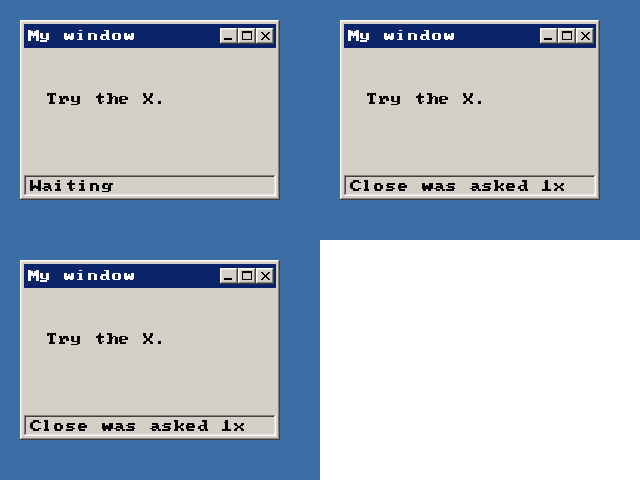
ActivateWindow, ActiveWindow, MaximizeWindow, MinimizeWindow, RestoreWindow, SetMinWindowSize, UpdateWindowMenu, WindowMaximized