Repository navigation
LoadAnimTexture

LoadAnimTexture:Int32 file:String, flags:Int32, width:Int32, height:Int32, first:Int32, count:Int32| Parameter | Mode | Type | Default | Description |
|---|---|---|---|---|
file |
In | String | required | Picture file that contains all frames. |
flags |
In | Int32 | required | Texture flags, see CreateTexture. |
width |
In | Int32 | required | |
height |
In | Int32 | required | |
first |
In | Int32 | required | |
count |
In | Int32 | required |
Returns: A texture handle, or 0 if the file could not be loaded.
Loads one picture that holds several frames laid out left to right, top to bottom, and returns a texture that can show any of them. Choose the frame to show with the frame argument of EntityTexture, BrushTexture or TextureBuffer. The flags are the same as for CreateTexture.
The frames are the layers of one image on the graphics card, so a texture with 100 frames is one texture to the graphics card, and entities that show different frames of it are drawn together. Like in the original, where every frame is a texture of its own, each frame has its own mip maps (flag 8) and is filtered and wrapped by itself: the coordinates that go past a frame come back at its other side, and linear filtering never shows the frame next to it. A picture that is block compressed (DDS) or holds more than 8 bits per channel stays one sheet instead, in which the filtering and the smaller mip maps do also reach into the neighbouring frames.
first_frame is the cell that counts as frame 0, and frame_count is how many cells are used from there. A sheet 256 pixels wide with 64 pixel frames has four cells per row, so cell 5 is the second cell of the second row.
Animated pictures. With a frame_width or frame_height of 0, an animated GIF, animated WebP or animated AVIF file loads as its frames: they are stored as frames, TextureWidth and TextureHeight are the size of one frame, TextureFrames is how many there are, and TextureFrameDelay is how long each lasts. first_frame and frame_count then choose some of the frames (a frame_count of 0 is all the rest). The sheet is at most 8192 pixels wide and high; an animation that needs more is not loaded and a warning says so. Memory is 4 bytes per pixel of every frame, so a 512x512 animation of 100 frames takes 100 MB. A file that is not animated loads as before. Animated PNG (APNG) is intentionally not supported and counts as a plain PNG.
- JPEG 2000 files do not load, and TIFF files with Deflate or JPEG compression do not, which the original read. WebP, AVIF, JPEG XL and DDS load instead, see Image formats.
- TextureWidth and TextureHeight report the size of one frame, not of the whole sheet.
Graphics3D 320, 240, 0, 2
SetBuffer BackBuffer()
camera = CreateCamera()
CameraClsColor camera, 70, 100, 160
light = CreateLight()
RotateEntity light, 40, 30, 0
cube = CreateCube()
PositionEntity cube, 0, 0, 4.2
TurnEntity cube, 20, 30, 0

; Draw a sheet of 4 frames, 64 pixels each, and keep it in a file.
sheet = CreateTexture(256, 64, 1 + 4096)
SetBuffer TextureBuffer(sheet)
ClsColor 0, 0, 0
Cls
For f = 0 To 3
	Color 40 + f * 60, 200 - f * 40, 80
	Rect f * 64 + 4, 4, 56, 56, 1
	Color 255, 255, 255
	Text f * 64 + 32, 32, Str(f), 1, 1
Next
SaveBuffer TextureBuffer(sheet), "wiki_sheet.bmp"
SetBuffer BackBuffer()
FreeTexture sheet

anim = LoadAnimTexture("wiki_sheet.bmp", 1, 64, 64, 0, 4)
For i = 0 To 39
	EntityTexture cube, anim, (i / 10) Mod 4
	TurnEntity cube, 0, 2, 0
	RenderWorld
	Flip
Next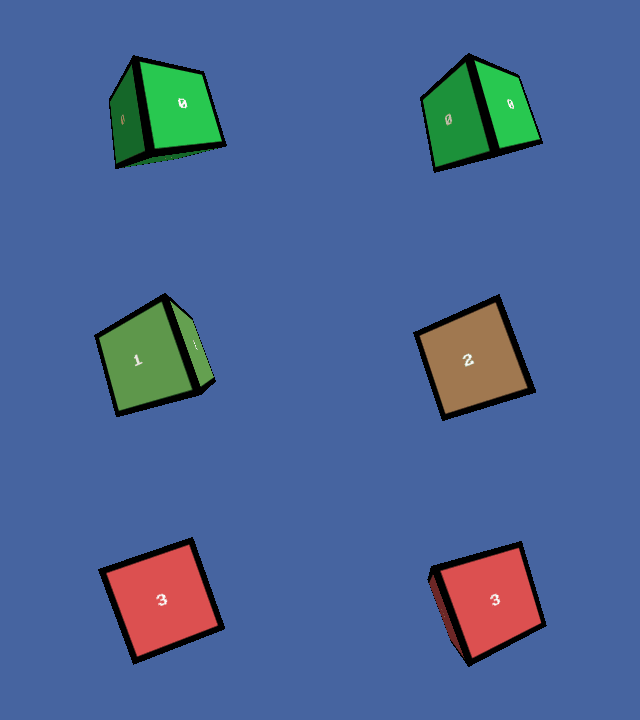
AtlasTexture, CreateTexture, FreeTexture, LoadTexture, PositionTexture, RotateTexture, SaveTexture 〔BlitzLLVM〕, ScaleTexture