Repository navigation
LoadTexture

LoadTexture:Int32 file:String, flags:Int32=1| Parameter | Mode | Type | Default | Description |
|---|---|---|---|---|
file |
In | String | required | Picture file to load. |
flags |
In | Int32 | 1 |
Sum of the texture flags, see CreateTexture. Defaults to 1. |
Returns: A texture handle, or 0 if the file could not be loaded.
Loads a picture file as a texture and returns its handle, or 0 if the file cannot be read. PNG, JPG, BMP, TGA (by the extension .tga), GIF, WebP, AVIF, JPEG XL, DDS and some other formats are supported (see Image formats), but not JPEG 2000, and TIFF only without Deflate or JPEG compression. Loading the same file twice gives two separate textures.
DDS files that are block compressed (DXT1 to DXT5, BC4 and BC7) are sent to the graphics card as they are when it supports the format, which is nearly every desktop card. They then use a quarter to an eighth of the video memory of a PNG of the same size. A texture is turned into an ordinary 32 bit one the first time it is drawn to, for example with SetBuffer and TextureBuffer, which uses the full amount of memory from then on. A compressed file is decoded when it is loaded instead if the card cannot use its format, if flag 4 (masked) is given, if flag 2 is given and the file has no see-through pixels (it then gets its alpha from how bright it is), or if it is BC5, whose third channel is rebuilt. Without flag 2 the texture is opaque, as for every other file.
These formats are read: the block compressed DXT1, DXT3 and DXT5 (BC1, BC2 and BC3), ATI1 and ATI2 (BC4 and BC5) and BC7, including the BC1 to BC7 formats of files with a DX10 header and their sRGB variants, the common uncompressed DX10 formats (RGBA8, BGRA8, BGRX8, 5:6:5, 5:5:5:1, 4:4:4:4, R8, RG8 and A8), and uncompressed RGB, RGBA, luminance and alpha-only pictures with 8, 16, 24 or 32 bits and any bit masks. BC4 pictures are shown as grey, and BC5 pictures as a normal map. DXT1 has see-through pixels if a block uses a see-through color. BC6H (HDR) and files with 16 bit float or 32 bit float channels are not read. Cube maps, volume textures and texture arrays give their first face, slice or layer.
Mip maps (flag 8, which TextureFilter adds to every texture at the start) make distant surfaces use smaller, blurrier copies of the texture. Without the flag only the biggest picture of the file is used. With it, the mip maps that are stored in a block compressed DDS file are used as they are and stay compressed, so a texture with a full chain needs a third more video memory than without. A file that has no stored mip maps, or only some, gets the missing ones made when it is loaded: each is the average of 2 by 2 texels of the one above it, down to a single texel. A compressed file without stored mip maps is decoded for this, and then uses the full amount of memory, as do the ones that are decoded for the reasons above. Stored mip maps of uncompressed DDS files are not read, the whole chain is made from the biggest picture. Drawing on a texture with TextureBuffer makes the mip maps again from the picture as it is then, before the texture is next drawn in a scene.
How transparency is taken from the file depends on the flags. Without flag 2 the picture is opaque even if the file has an alpha channel. With flag 2 an existing alpha channel is used, and a picture without one gets its alpha from how bright each texel is. Flag 4 makes every pure black texel transparent and everything else opaque.
Flag 256 keeps the texture in video memory only: when video memory is full, a texture without the flag is placed in system memory (slower, with a one-time note on the console), and a texture with it stops the program with an "out of video memory" error. See CreateTexture.
Flag 2048 says that the file is sRGB, which almost every picture is, and makes the texture hold linear values: the graphics card converts each texel from sRGB to linear when it samples the texture, and the mip maps are averaged in linear values (with flag 8). The bytes of the texture stay the ones of the file, so ReadPixel, ReadPixelFast and drawing on the TextureBuffer (with flag 4096) read and write sRGB bytes, and the texture is converted only when a scene or an image samples it. Alpha is not converted. Block compressed DDS files (BC1, BC2, BC3 and BC7) are stored in the sRGB variant of their format; BC4, BC5 and cube maps (flag 128) are not converted. Programs draw into a picture that is not converted, so the result of lighting is only correct on screen if the program accounts for it; the flag is meant for programs that use linear values on purpose.
The picture shows a gradient file loaded without the flag (top) and with it (bottom), each drawn without lighting: the converted texture holds the linear values, so the middle grey of 128 is 55.
A texture can be drawn to only if it was loaded with flag 4096 (render target), see CreateTexture. Reading and writing its pixels needs no flag.
Textures that TextureFilter matches by file name get extra flags added.
- Flag 2048 (sRGB conversion) and flag 4096 (render target) are new, see above. A program that is compiled with
-dstops with an error when it sets the buffer of a texture without 4096. - A glTF file (
.glbor.gltf) gives the pictures inside it:"model.glb"is the first and"model.glb#2"the third, see glTF models. - JPEG 2000 files do not load, and TIFF files with Deflate or JPEG compression do not, which the original read. WebP, AVIF, JPEG XL and DDS load instead, see Image formats.
- The video memory and high color flags are always in effect, see CreateTexture. A sphere map (64) uses the whole picture. A cube map (128) needs a picture of six faces next to each other, in the order of SetCubeFace, and gives 0 if its width cannot be divided by 6.
Graphics3D 320, 240, 0, 2
SetBuffer BackBuffer()
camera = CreateCamera()
CameraClsColor camera, 70, 100, 160
light = CreateLight()
RotateEntity light, 40, 30, 0

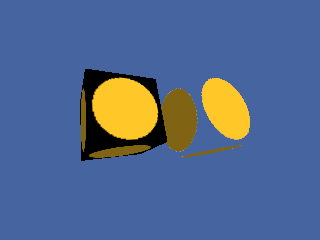
; Make a file with a white disc on black, then load it back as a masked texture.
src = CreateTexture(64, 64, 1 + 4096)
SetBuffer TextureBuffer(src)
ClsColor 0, 0, 0
Cls
Color 255, 200, 40
Oval 4, 4, 56, 56, 1
SaveBuffer TextureBuffer(src), "wiki_disc.bmp"
SetBuffer BackBuffer()

solid = LoadTexture("wiki_disc.bmp", 1)
masked = LoadTexture("wiki_disc.bmp", 1 + 4)
a = CreateCube() : PositionEntity a, -1.3, 0, 5 : EntityTexture a, solid
b = CreateCube() : PositionEntity b, 1.3, 0, 5 : EntityTexture b, masked
TurnEntity a, 20, 30, 0
TurnEntity b, 20, 30, 0
RenderWorld
Flip
WaitKey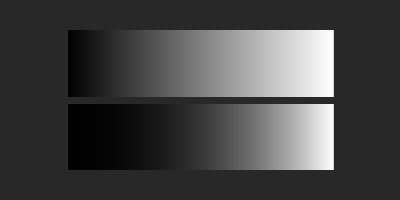
AtlasTexture, CreateTexture, FreeTexture, LoadAnimTexture, PositionTexture, RotateTexture, SaveTexture 〔BlitzLLVM〕, ScaleTexture